Layout of the edition page |
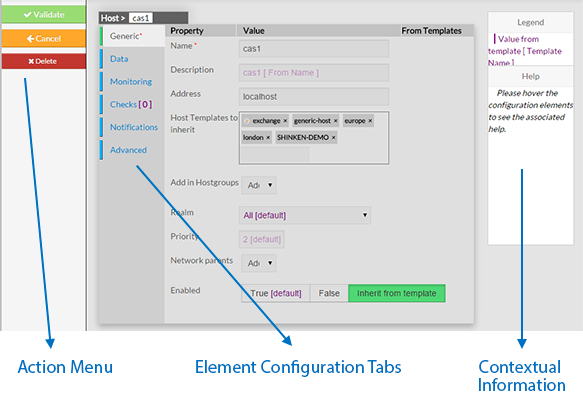
| Every page for elements configuration are organized in the same way. The Layout is devided in 3 sections : - Action Menu
- Element Configuration Tabs
- It contain all information of an element.
- Contextual Information and Help
|
 |
| | |
|
This Menu provides to the Administrator the common actions to Validate, Cancel, or Delete the selected object. - When validating a configuration, the object will be placed in the list of Changes to Apply.
- If the Administrator click on the Cancel button, every changes made after previous saving, will be lost.
- If the Delete button is clicked, a confirmation popup will be disaplayed,
- asking the Administrator to validate or cancel the deletion of object.
|
| | |
Element Configuration Tabs |
| he type of the element and its name are displayed on the top of the Area. 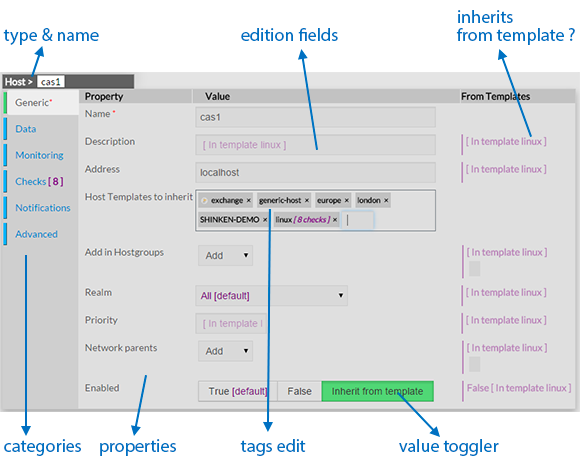
As they are numerous, elements properties are split by category among tabs. - Tabs list will be differtent following the type of the selected element.
- Tab layout is always the same:
- A list of properties linked to the category
- A row of this list contains altways 3 columns:
- Name of Property
- Value of Property
- Value inherited from template
( only for hosts, checks and contact)
Note: Values displayed in purple are by default value or inherited from a template.
- Values Editing Field can be of different kind:
|
|  |
- Type the value
- Typed caracters may match an existing tag:
- If yes, list below will show you possible values.
Clicking or pressing enter will validate the choice. - If not, you can create a new tag by pressing the space bar.
|  |
- Tag Adding Dropdown list
- Select in the dropdown list the tag you want
Note: You can't create tag for this value. | 
|
- Dropdown list
- Select int the dropdown list the value you want
Note: Only one value is possible for this fied. | 
|
- Toggle buttons
- Select one of the 3 possibles values (True, False, Inherit)
Note: the green one is the one selected. | 
|
- Move the cursor up to the expected value.
| 
|
| | |
Contextual Informations |
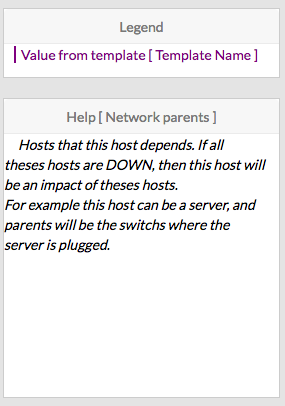
This panel is used to help the Administrator, by showing two kind of informations : - Legend : information to explain the display of the page.
- Contextual Help :
- Move the mouse on property you want some information
- The Help Area will contain the description text and some tips
for the edition of the property
|  |
0 Comments