Role
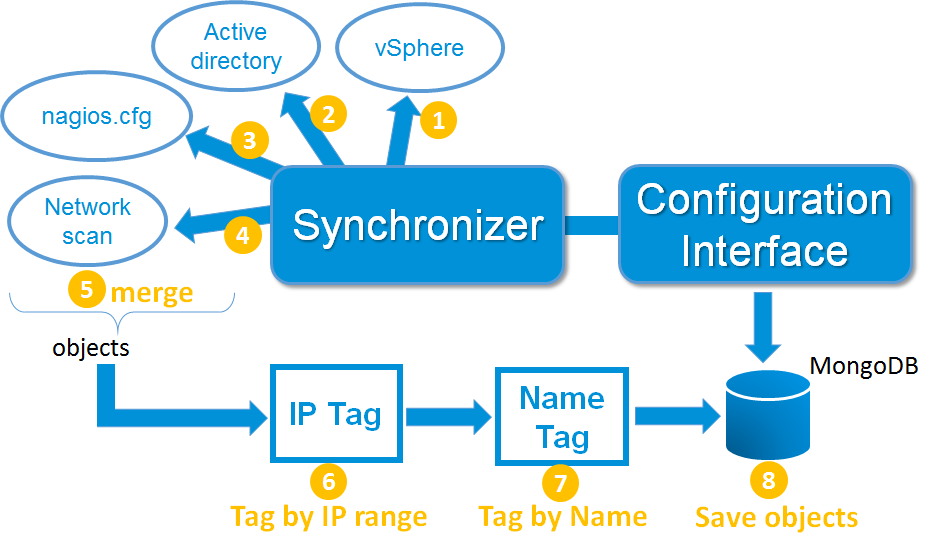
The synchronizer daemon manages the whole configuration. It uses sources to detect new hosts and host modifications.
It presents the configuration web interface to the administrators. Here are the optional sources the daemon can use to get information:
- Active directory
- VSphere (VMWare)
- Nagios or Shinken framework configuration files
- Network scans
Active directory
The Active Directory discovery is done with a domain account, and only need a read access. The connexion can be done in LDAPS to be sure the connexion is secure.
It is possible to define a top level OU in order to list only the elements (servers and users) that are defined below this OU level.
The information that the module is getting are server names, FQDN, the server OS, and if defined in the LDAP entry, its localization. The configuration for this source is located in another page.
VSphere from VMWare
The VSphere discovery is designed to discover physical servers (ESX) and their virtual servers. It will also get OS and their IP address, but only if the VMware tools are enabled and running on the virtual server.
The Synchronizer to VMware connexion is always through the VSphere server, and needs a read access only . The Shinken Enterprise servers do not need any direct access to the ESX servers.
The Shinken Enterprise to VSphere communication is done with the SOAP API from VMWare, onto an HTTPS connexion. The configuration for this source is located in another page.
Nagios or Shinken Framework configuration files
Shinken Enterprise is able to load any Nagios or Shinken Framework configuration files. It will automatically load the defined objects into its configuration. The configuration for this source is located in another page.
Network scans
The network scan discovery is optional. It's done thanks to the nmap command, launched on the Synchronizer server. It allows to scan networks defined by the Shinken Enterprise administrators.
The scans are done on the TCP and UDP ports. It will also try to get additionnal data from the servers and services running on them (it use the -O option of the nmap command). The configuration for this source is located in another page.
Data storage of the configuration
All discovered data from the Synchronizer are saved into a Mongodb database. If possible, it's better for the database to be set aside the Synchronizer daemon. this database do not need to be shared with other daemons, and so its communications should be limited to the local synchronizer server.
Configuration interface and its access
The configuration interface is hosted on the Synchronizer daemon, and use another TCP port than the visualization UI. You can use two different credential systems:
- Manage directly on the configuration interface
- Manage credentials with Active directory accounts. the daemon will use Ldap connexions to check for the credentials.
The non-admon users will be restricted in the visibility onto the hosts they are direct contacts linked to, or are in a contact group linked with the hosts.
This interface is using the save Mongodb databse than the synchronizer daemon. The default port for this configuration interface is 7766.
| Interface | Daemon | Port |
|---|---|---|
| Configuration | Synchronizer | 7766 |
Synchonizer connexion summary
| Source daemon | Connexion to | Port | Protocol | Note |
|---|---|---|---|---|
| Synchronizer | Active Directory | 636 | LDAPS | Read only account |
| Synchronizer | VSphere | 443 | HTTPS | Read only account on VSphere |
Variable Descriptions
| Property | Default | Description |
|---|---|---|
| synchronizer_name | N/A | This variable is used to identify the *short name* of the synchronizer which the data is associated with. |
| address | N/A | This directive is used to define the address from where the main arbier can reach this synchronizer. This can be a DNS name or a IP address. |
| port | 7765 | This directive is used to define the TCP port used by the daemon. |
| spare | 0 | This variable is used to define if the synchronizer must be managed as a spare one (will take the conf only if a master failed). The default value is *0* (master). |
| modules | N/A | This variable is used to define all modules that the synchronizer will load. |
| sources | N/A | List of sources that the synchronizer will load. |
| taggers | N/A | List of taggers that the synchronizer will load. |
Example Definition
define synchronizer {
    synchronizer_name      synchronizer-master
    #host_name             node1       ; CHANGE THIS if you have several Arbiters
    address                localhost   ; DNS name or IP
    port                   7765
    spare                  0           ; 1 = is a spare, 0 = is not a spare
    modules                Cfg_password
    use_ssl                0
    sources                syncui,cfg-file-shinken,active-dir,sync-vmware,cfg-file-nagios,discovery
    taggers                ip-tags,regexp-tags
}
0 Comments