Abstract
This document describes how you can monitor an Oracle database server such as:
- Connection time
- A recent restart
- The number of connections
- Cache hit
- Dead lock
- etc
There are some steps you’ll need to follow in order to monitor a new database machine:
- Understand what is already available (in the Shinken Entreprise installation)
- Setup the oracle user account
- Test the connection to the database
- Setup your server host definition
What is already available in the Shinken Installation
To make your life a bit easier, a few configuration tasks have already been done for you:
- Installation of Oracle instant Client
- Installation of check_oracle_health plugin : /var/lib/shinken/libexec/check_oracle_health
- Several host templates are ready to be used
Note
Setup the oracle user account
Create the database user
Note
You will need to configure the user for all your oracle databases.
Connect to your database as sysadmin on the oracle server :
 | srv-lin-1:oracle# sqlplus "/ as sysdba" |
And then create your shinken account on the database:
| CREATE USER shinken IDENTIFIED BY shinkenpassword; GRANT CREATE SESSION TO shinken; GRANT SELECT any dictionary TO shinken; GRANT SELECT ON V_$SYSSTAT TO shinken; GRANT SELECT ON V_$INSTANCE TO shinken; GRANT SELECT ON V_$LOG TO shinken; GRANT SELECT ON SYS.DBA_DATA_FILES TO shinken; GRANT SELECT ON SYS.DBA_FREE_SPACE TO shinken; |
And for old 8.1.7 database only:
| ---- if somebody still uses Oracle 8.1.7... GRANT SELECT ON sys.dba_tablespaces TO shinken; GRANT SELECT ON dba_temp_files TO shinken; GRANT SELECT ON sys.v_$Temp_extent_pool TO shinken; GRANT SELECT ON sys.v_$TEMP_SPACE_HEADER TO shinken; GRANT SELECT ON sys.v_$session TO shinken; |
Test the connection
To see if the connection to the database named PROD is ok, just launch :
| /var/lib/shinken/libexec/check_oracle_health --connect "(DESCRIPTION =(ADDRESS_LIST =(ADDRESS = (PROTOCOL = TCP)(HOST = srv-lin-1)(PORT = 1521)))(CONNECT_DATA =(SID = PROD)))" --user "shinken" --password "shinkenpassword" --mode connection-time |
Tip
The DATABASES data you will find in the host template matches to the SID of you Oracle database.
Manage more than 1 database on the same host
All checks presents in Oracle templates provided by Shinken Entreprise use the "Duplicate For Each" functionality.
For each database name listed in the DATA "DATABASES", check will be duplicated. An host, having 2 databases, will then have in double each checks with the datatabase name in the check.
Example
Let's look an example: an host has the following:
- The data "DATABASES" set to "DB1,DB2,DB3"
- The oracle template attached on it.
- Let's consider the Oracle-$KEY$-corrupted-blocks checks. He will then have 3 checks:
- Oracle-DB1-corrupted-blocks
- Oracle-DB2-corrupted-blocks
- Oracle-DB3-corrupted-blocks
If you need to set a specific port of connection for 1 of the database, you can provide it as parameters of the Database:
Example
Let's look image the DB2 don't use the 1521 port set by default:
- Change the data "DATABASES" in that way "DB1,DB2$(5000)$,DB3".
- For the duplication on the DB2, then the value1 5000 will be provided to each check and will overload the default port.
What is checked with the templates
Public templates
oracle
This is the very basic Oracle template allowing to know if your Oracle database is running and usable.
Every Oracle templates (except Oracle-connection-method) use it as a parent template.
| Check | Detail | Check range | Default Warning | Default Critical |
|---|---|---|---|---|
| tnsping | listener | |||
| process-usage | Percentage of max possible processes | 0% to 100% | 80 | 90 |
| sga-shared-pool-free | Free Memory in the Shared Pool | 0% to 100% | 10: | 5: |
| tablespace-usage | Used diskspace in the tablespace | 0% to 100% | 90 | 98 |
| corrupted-blocks | Number of corrupted blocks in database | 0 to n | 1 | 10 |
| invalid-objects | Sum of faulty Objects, Indices, Partitions | 0 to n | 0.1 | 0.1 |
oracle-full
Contains all Oracle host templates listed in the Shinken Adminstrators templates.
Warning
Using the oracle-full template will require a lot of resources on your poller daemon. We advise to use only needed templates.
Shinken Administrator templates (can't be seen by other users)
oracle-connection-method
This template describes the method to connect to an Oracle database. Every Oracle templates use it as a parent template.
Note
The parameters common to every Oracle server monitored shoud be setted in the oracle-connection-method host template.
If you have many connection method, do you own template and attach it to host.
oracle-availability
This template gives informations about the database availability.
| Check | Detail | Check range | Default Warning | Default Critical |
|---|---|---|---|---|
| connection-time | Time to contact the database | 0 to n seconds | 0.5 | 1 |
Oracle-datafile
This template gives informations about the datafile availability.
| Check | Detail | Check range | Default Warning | Default Critical |
|---|---|---|---|---|
| datafile-io-traffic | Sum of IO-Operationes from Datafiles per second | n/sec | 1000 | 5000 |
| datafiles-existing | Percentage of max possible datafiles | 0% to 100% | 80 | 90 |
Oracle-flash-recovery-area
This template allow to know about the used diskspace in the flash recovery area.
To be used only if you are using flash recovery area.
| Check | Detail | Check range | Default Warning | Default Critical |
|---|---|---|---|---|
| flash-recovery-area-usage | Used diskspace in the flash recovery area | 0% to 100% | 90 | 98 |
Oracle-pga
This template allows to know the percentage of sorts that are done to disk vs. in-memory.
| Check | Detail | Check range | Default Warning | Default Critical |
|---|---|---|---|---|
| pga-in-memory-sort-ratio | Percentage of sorts in the memory | 0% to 100% | 99: | 90: |
Oracle-redo
This template gives complete informations about the redolog.
| Check | Detail | Check range | Default Warning | Default Critical |
|---|---|---|---|---|
| switch-interval | Interval between RedoLog File Switches | 0 to n | 600: | 60: |
| retry-ratio | Retry-Rate in the RedoLog Buffer | 0% to 100% | 1 | 10 |
| redo-io-traffic | Redolog IO in MB/sec | n/sec | 199 | 200 |
Oracle-rman
This template indicates if there are any RMAN backup problem in the last 3 days.
To be used only if you are using RMAN.
| Check | Detail | Check range | Default Warning | Default Critical |
|---|---|---|---|---|
| rman-backup-problems | Number of RMAN-errors during the last three days | 0 to n | 1 | 2 |
Oracle-rollback-segment
This template gives informations about the Rollback segment. Rollback segment record the actions of transactions in the event that a transaction is rolled back.
| Check | Detail | Check range | Default Warning | Default Critical |
|---|---|---|---|---|
| roll-header-contention | Rollback Segment Header Contention | 0% to 100% | 1 | 2 |
| roll-block-contention | Rollback Segment Block Contention | 0% to 100% | 1 | 2 |
| roll-hit-ratio | Rollback Segment gets/waits Ratio | 0% to 100% | 99: | 98: |
| roll-extends | Rollback Segment Extends n | n/sec | 1 | 100 |
| roll-wraps | Rollback Segment Wraps n | n/sec | 1 | 100 |
Oracle-sga
This template gives complete information about the SGA (System Global Area).
| Check | Detail | Check range | Default Warning | Default Critical |
|---|---|---|---|---|
| sga-data-buffer-hit-ratio | Hitrate in the Data Buffer Cache | 0% to 100% | 98: | 95: |
| sga-library-cache-gethit-ratio | Hitrate in the Library Cache (Gets) | 0% to 100% | 98: | 95: |
| sga-library-cache-pinhit-ratio | Hitrate in the Library Cache (Pins) | 0% to 100% | 98: | 95: |
| sga-library-cache-reloads | Reload-Rate in the Library Cache | n/sec | 10 | 10 |
| sga-dictionary-cache-hit-ratio | Hitrate in the Dictionary Cache | 0% to 100% | 95: | 90: |
| sga-latches-hit-ratio | Hitrate of the Latches | 0% to 100% | 98: | 95: |
| sga-shared-pool-reloads | Reload-Rate in the Shared Pool | 0% to 100% | 1 | 10 |
Oracle-soft-parse
This template gives information about soft parse. It can give you an idea if an application and corresponding SQL statements are being used inefficiently
| Check | Detail | Check range | Default Warning | Default Critical |
|---|---|---|---|---|
| soft-parse-ratio | Percentage of soft-parse-ratio | 0% to 100% | 90: | 98: |
Oracle-stale-statistics
This template allows to know about stale statistics.
| Check | Detail | Check range | Default Warning | Default Critical |
|---|---|---|---|---|
| stale-statistics | Sum of objects with obsolete optimizer statistics | n | 10 | 100 |
Oracle-tablespace
This template gives informations about tablespace such as fragmentation, if it's possible to allocate the next extent and potentially when a tablespace will be full.
| Check | Detail | Check range | Default Warning | Default Critical |
|---|---|---|---|---|
| tablespace-fragmentation | Free Space Fragmentation Index | 100 to 1 | 30: | 20: |
| tablespace-can-allocate-next | Checks if there is enough free tablespace for the next Extent | |||
| tablespace-remaining-time | Sum of remaining days until a tablespace is used by 100%. The rate of increase will be calculated with the values from the last 30 days. (With the parameter –lookback different periods can be specified) | Days | 90: | 30: |
Oracle-usage
This template indicates the percentage of maximum possible sessions and how many users are connected.
| Check | Detail | Check range | Default Warning | Default Critical |
|---|---|---|---|---|
| session-usage | Percentage of max possible sessions | 0% to 100% | 80 | 90 |
| Connected users | Number of currently connected users | 0 to n | 50 | 100 |
How to
Configuration of Oracle-connection-method host template
Click on Hosts then on Hosts Templates in the Elements menu | 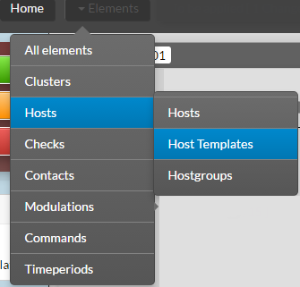 |
In the Name field, type oracle. Then clic on Oracle-connection-method | 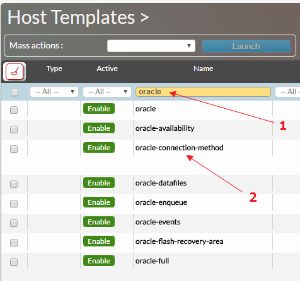 |
| Clic on Data tab | |
You can setup the following DATA :
|
|
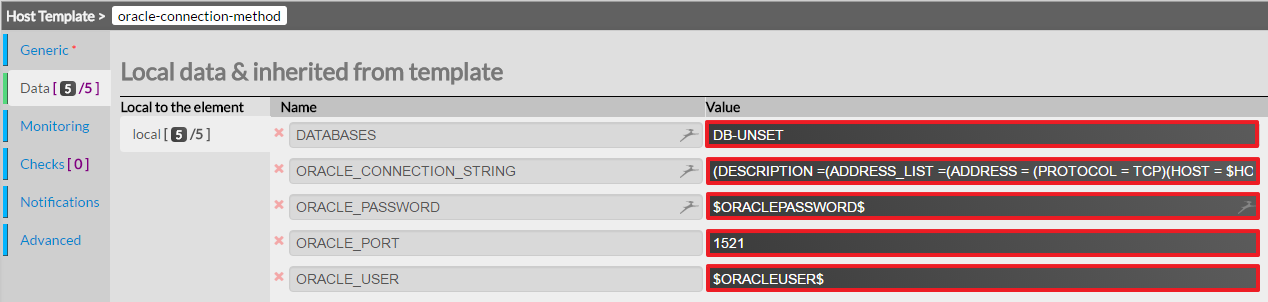
The parameters specifics to each server, such as database name (AKA SID) for example, has to be done in the host's data itself.
Tip
It's a best practice to use the same database monitoring user on every Oracle server monitored. Doing so, you can configure the database user/password only once in the host template oracle-connection-method.
Important (Changing the connection port per database)
Attach an oracle template to you host
| Clic on Hosts in the Elements menu | 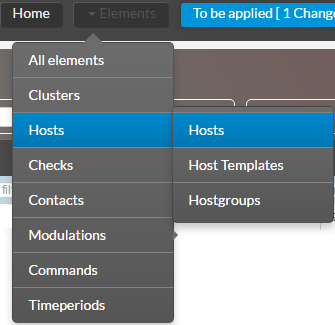 |
Add the chosen Oracle host template to the Host Templates to inherit field. For example the Oracle host template. |  |
Click on the Data tab | 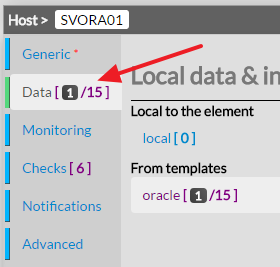 |
Look for the field DATABASES in the From templates data | |
Type the name of the database to be monitoring |  |
| Check if the Following data are ok. | 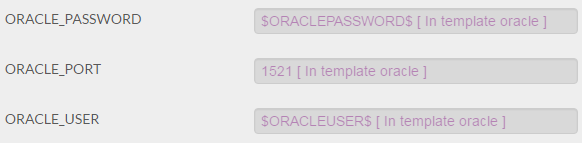 |
Tip
You can monitor multiple database on the same host in typing the name of the database SID separated by a comma.
Exemple : DB1,DB2,DB3