Overview
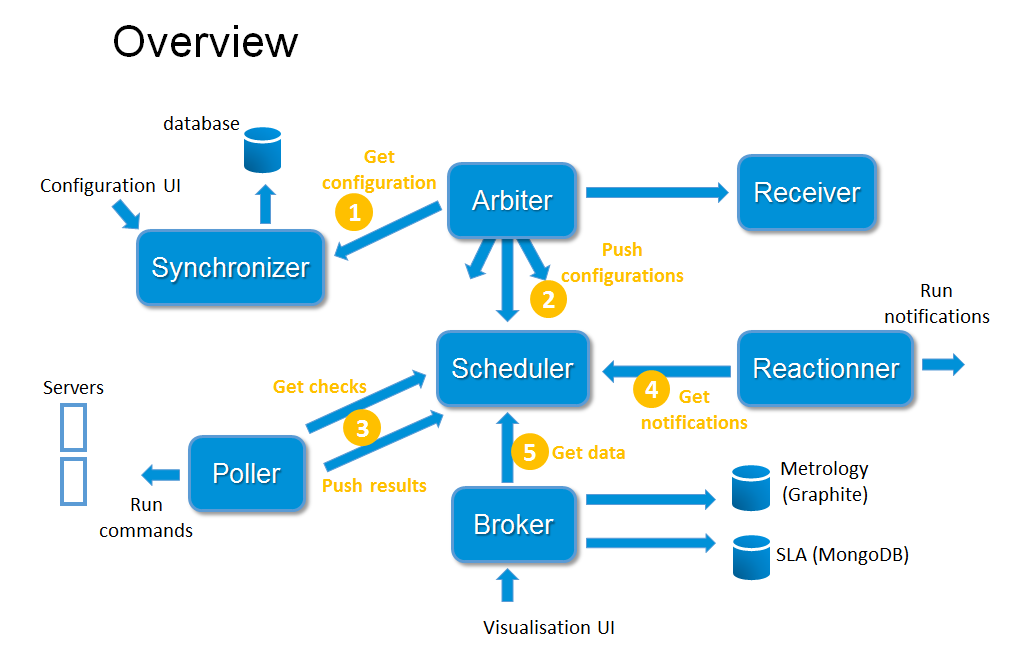
According to the Unix Way: one tool, one task, Shinken Enterprise has an architecture where each part is isolated and connects to the others via standard HTTP interfaces.
Based on a HTTP back-end, this will help you building a highly available and distributed monitoring architecture quite easily.
Here is a table with the different daemons, their ports and their respective role.
| Daemon | Listening Port | Protocol | Role |
|---|---|---|---|
| Synchronizer | 7765 | HTTPS | Manage the configuration edition |
| Arbiter | 7770 | HTTPS | Dispatch the configuration to all daemons |
| Poller | 7771 | HTTPS | Run checks |
| Scheduler | 7768 | HTTPS | Compute Elements' Statut and Context |
| Reactionner | 7769 | HTTPS | Send notifications to user |
| Receiver | 7773 | HTTPS | Receive result of external checks |
| Broker | 7772 | HTTPS | Centralize and export data |
This architecture is fully flexible and scalable. To improve Shinken Enterprise capacity, increasing the number of daemons of the same role is the best way.
Automatic load balancing
Distribute hosts among schedulers
Shinken Enterprise is able to cut the user configuration into parts and dispatch it to the schedulers:
- The load balancing is done automatically: the administrator does not need to remember which host is linked to another one to create packs.
- The dispatch is a host-based one: that means that all checks of a host will be in the same scheduler as this host. That means that the administrator does not need to know all relations among elements like parents, host dependencies or check dependencies: Shinken Enterprise is able to look at these relations and put these related elements into the same shard.
This action is done in two parts:
- create independent shards of elements
- paste shards to create N configurations for the N schedulers
Creating independent shards
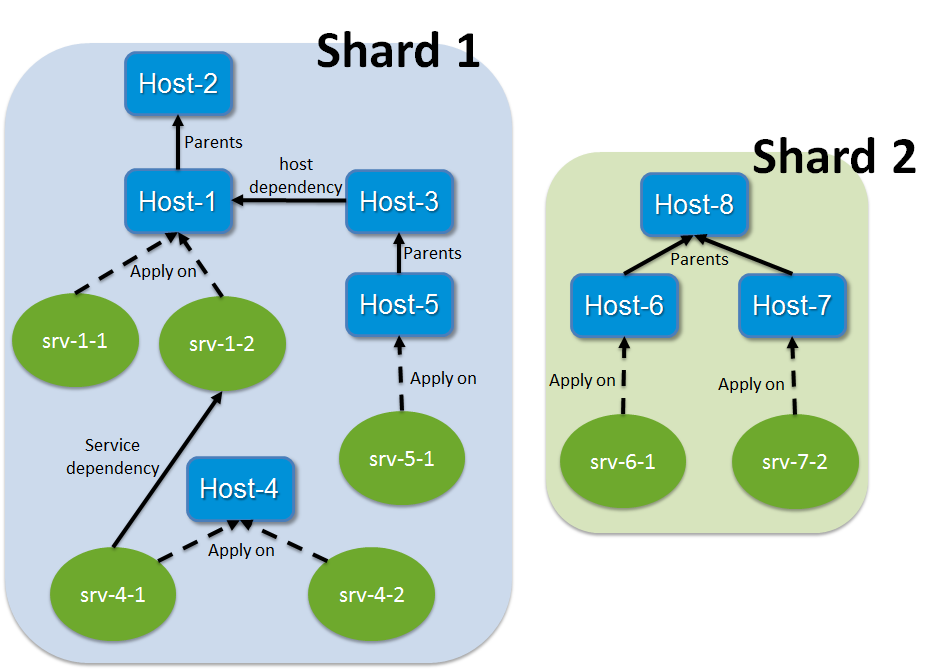
The cutting action is done by looking at two elements: hosts and checks. Checks are linked with their host so they will be in the same shard.
Other relations are taken into consideration :
- Network relationship for hosts (like a distant server and its router).
- Host logical dependencies.
Shinken Enterprise looks at all these relations and creates a graph with it. A graph is a relation shard.
In this example, we will have two shards:
- Shard 1: Host-1 to host-5 and all their checks
- Shard 2: Host-6 to Host-8 and all their checks
The shard aggregation into the schedulers
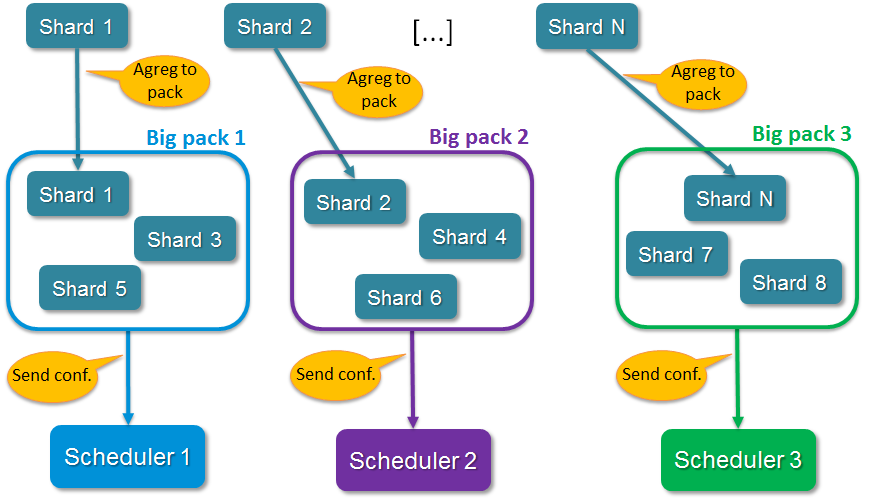
When all shards are created, the Arbiter aggregates them into N configurations if the administrator has defined N active schedulers (no spares).
Shards are aggregated into configurations (it's like "Big packs").
The dispatch looks at the weight property of schedulers: the higher weight a scheduler has, the more packs it will have.
The configurations sending to satellites
When all configurations are created, the Arbiter sends them to the N active Schedulers.
A Scheduler can start processing checks once it has received and loaded it's configuration without having to wait for all schedulers to be ready.
For larger configurations, having more than one Scheduler, even on a single server is highly recommended, as they will load their configurations (new or updated) faster.
The Arbiter also creates configurations for satellites (pollers, reactionners and brokers) with links to Schedulers so they know where to get jobs to do.
After sending the configurations, the Arbiter begins to watch for orders (called external command) from the users and is responsible for monitoring the availability of the satellites.
The high availability
Nobody is perfect. A server can crash, an application too. That is why administrators have spares: they can take configurations of failing elements and reassign them.
The Shinken Enterprise architecture is a high availability one.
- The Arbiter regularly checks if everyone is available. If a scheduler or another satellite is dead, the Arbiter sends its conf to a spare node, defined by the administrator.
- All satellites are informed by this change so they can get their tasks from the new element and do not try to reach the dead one.
- If a node was lost due to a network interruption and it comes back up, the Arbiter will notice and ask the old system to drop its configuration.
- The availability parameters can be modified from the default settings when using larger configurations as the Schedulers or Brokers can become busy and delay their availability responses.
( See Daemons configuration parameters for more information on the three timers involved ).
- The Arbiter regularly checks if everyone is available. If a scheduler or another satellite is dead, the Arbiter sends its conf to a spare node, defined by the administrator.
The only daemon that does not have a spare is the Synchronizer, because its interruption won't have any critical impact on you monitoring.
External commands dispatching
The administrator needs to send orders to the schedulers (like a new status for passive checks).
In Shinken Enterprise, the administrator just sends the order to the Arbiter, that's all. External commands can be divided into two types :
- commands that are global to all schedulers.
- commands that are specific to one element (host/check).
For each command, Shinken Enterprise knows if it is global or not:
- If global, it just sends orders to all schedulers.
- For specific ones it searches which scheduler manages the element referred by the command (host/check) and sends the order to this scheduler.
When the order is received by schedulers they just need to apply them.