Hosts
In Shinken Enterprise, the basic element of supervision is the host.
- A host represents any object with a network address.
- A host is not limited to physical machines, but can also be a virtual machine, a connected object or any object that is accessible and identifiable on a network.
Shinken Enterprise performs checks on each host at regular time intervals, as well as on the checks attached to each host..
- The control performed on each host allows to verify that the host is reachable by their network address, but may be more complex depending on what has been configured by your Shinken administrator.
- This verification is of course configurable by the person(s) in charge of setting up the supervision.
Host Groups
Guests can be organized in groups to facilitate handling and packing.
One can imagine for example a "Web" host group that would contain all the servers dedicated to Web hosting, to facilitate their handling and improve readability..
Checks
In addition to the default verification, a set of additional and more precise checks can be performed on each host. This role is fulfilled by the checks.
A check represents a particular verification that will be performed on the host to which it is attached. Multiple checks can be attached to the same host, and a check can be attached to several different hosts.
When verified, a check provides a result and a long result, a status, a context and performance data ( optional ).
Status and context
Once performed, a check first returns a status and a context.
The status ( Critical, Warning, OK, Unknown ) as well as the context of the check ( DOWNTIME, ACKNOWLEDGED, FLAPPING ) indicate the status of the check verification.
The statuses and contexts are described in more detail in the page dedicated to them: Concept: Status & Context
Result and long result
The verification of a check also provides a result and a long result. It is a textual information that provides the detailed information that the check can provide.
This information is separated in 2 parts:
- The result: This is a brief summary to capture the main information returned by the checklist.
- The long result: More detailed information allowing to have more precise information on the execution of the check. The long result is optional and often absent.
Exemple
The check "Poller - Performance", which allows to supervise the good functioning of Shinken, has a Result and a Long Result.
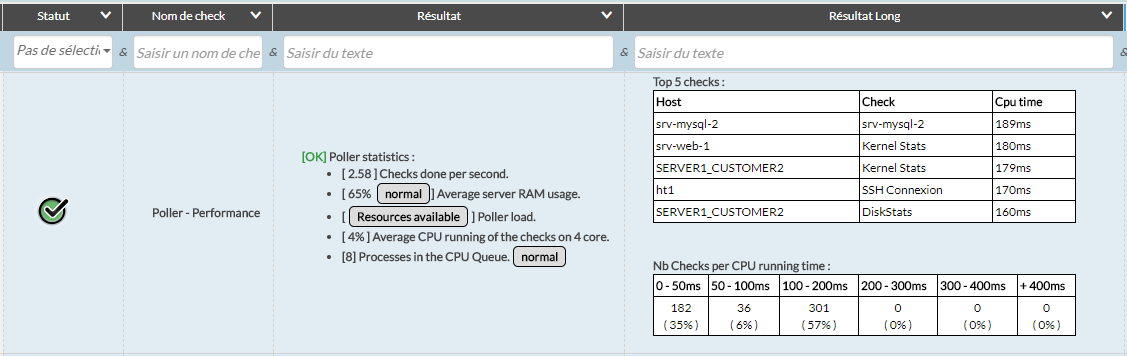
This check has a Result, which shows some information about the statistics of the Poller.
The long Result then provides a summary table with additional data.
Performance data
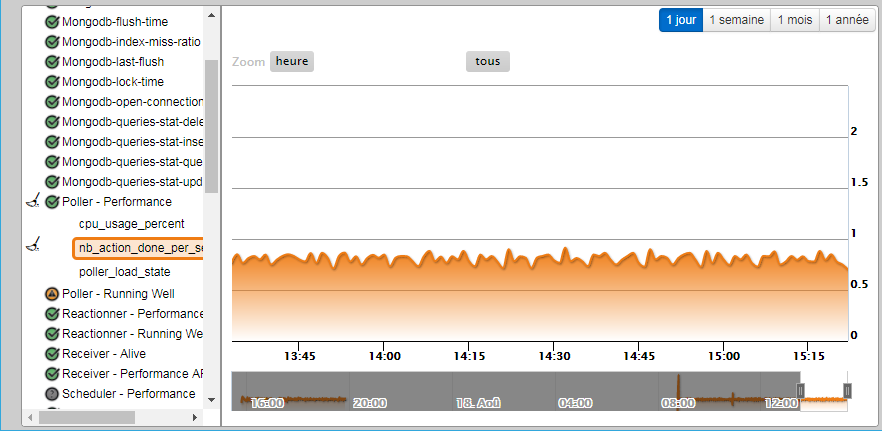
A check can also provide performance data. This is data returned by the check that will be stored and can be reused to draw graphs for example.
The "Poller - Performance" check returns data on CPU usage, CPU load, and the number of checks the CPU is able to perform.
This performance data is stored and can later be used to obtain a curve like the following one:
AIn order to confirm that the status returned when verifying a check is reliable, Shinken Enterprise can perform several checks of the same check..
- If a check returns an OK status, Shinken considers directly that this status is reliable.
- If, on the other hand, the verification of the check returns a status different from OK, Shinken restarts the check to confirm by a new verification that the status is different from OK.
- The reason for this re-check is to prevent the sending of notifications on an uncertain state.
- We then wait until we are assured that there is an incident before notifying users.
( more details on notifications in the associated page: Basic - notifications ).