Description
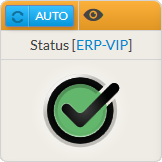
The Status widget provides an overview of a host, a cluster or a check.
It will contain:
|
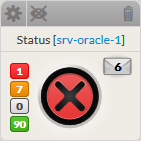
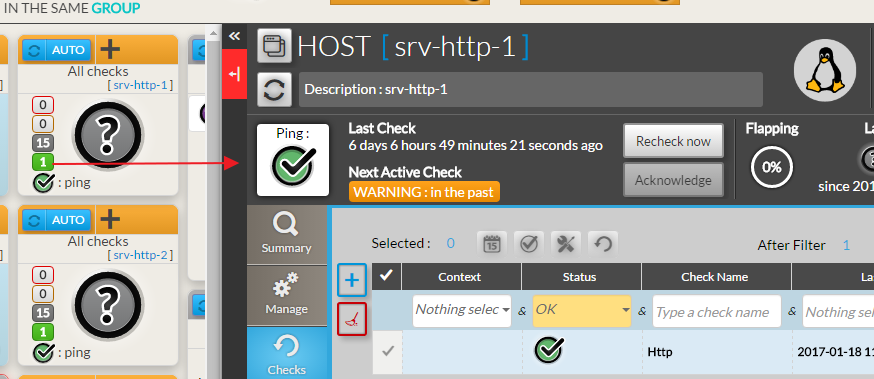
- The widget also shows the number of checks sorted by status:
Red | Critical checks |
Orange | Warning checks |
Grey | Unknown checks |
Green | Ok checks |
Usage
If the status refers to an element, a click on the widget will open the Detailed View Panel providing details on the element (see the Host Detail View chapter).
- For a host, clicking on one of the checks summary box, will directly open the Detail panel on the tab checks panel.
- The list of checks will be filtered to only display checks matching this status.
- To get the full list of checks, simply remove the filter ( See Checks Tab chapter).
Configuration
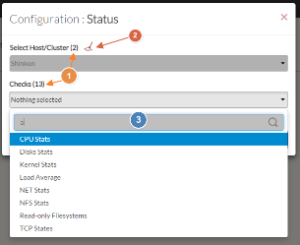
- Select a host or cluster name in the first list.
- The total number of hosts and clusters will be displayed near "Select Host/Cluster" (1).
- If no host selected yet, the list of available hosts will automatically opened.
- You can search (filter) for a host name, typing into the input on top of the list (3).
- You can clean the current selection by clicking on the swipe icon (2).
- Once your element is selected, if you want to monitor a specific check, you just have to select check name inside the second list.
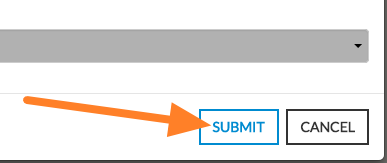
- When configured, press the SUBMIT button.