...
(7 changements observés/20 possibles ) * 100 = 35 %
Since the flap detection logic will give newer state changes a higher rate than older state changes, the actual calculated percentage state change will be slightly less than 35% in this example. Let's say that the weighted percentage of state change turned out to be 31%...
The calculated percentage state change for the service (31%) will then be compared against flapping thresholds to see what should happen:
- If the service was not previously flapping and 31% is equal to or greater than the high flap threshold, Shinken Enterprise considers the service to have just started flapping.
- If the service was previously flapping and 31% is less than the low flap threshold, Shinken Enterprise considers the service to have just stopped flapping.
If neither of those two conditions are met, the flap detection logic won't do anything else with the service, since it is either not currently flapping or it is still flapping.
Flap Detection for Checks
Shinken Enterprise checks to see if a service is flapping whenever the service is checked (either actively or passively).
The flap detection logic for services works as described in the example above.
Flap Detection for Hosts
Host flap detection works in a similar way to service flap detection, with one important difference: Shinken Enterprise will attempt to check to see if a host is flapping whenever:
* The host is checked (actively or passively)
* Sometimes when a service associated with that host is checked. More specifically, when at least x amount of time has passed since the flap detection was last performed, where x is equal to the average check interval of all services associated with the host.
Why is this done? With services we know that the minimum amount of time between consecutive flap detection routines is going to be equal to the service check interval. However, you might not be monitoring hosts on a regular basis, so there might not be a host check interval that can be used in the flap detection logic. Also, it makes sense that checking a service should count towards the detection of host flapping. Services are attributes of or things associated with host after all... In any case, that's the best method I could come up with for determining how often flap detection could be performed on a host, so there you have it.
Flap Detection Thresholds
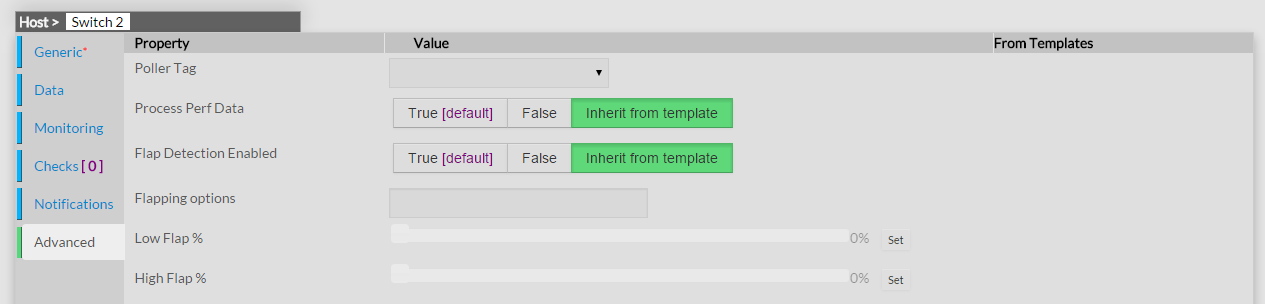
Shinken Enterprise uses several variables to determine the percentage state change thresholds is uses for flap detection. For both hosts and services, there are global high and low thresholds and host- or service-specific thresholds that you can configure. Shinken Enterprise will use the global thresholds for flap detection if you to not specify host- or service- specific thresholds.
This screenshot shows the global and host- or check-specific variables that control the various thresholds used in flap detection.
States Used For Flap Detection
Sachant que la logique de détection va donner une valeur plus élevée au dernier changement, le pourcentage retenu sera légèrement inférieur à 35% dans cet exemple, autour de 31% .
Le pourcentage calculé pour le service (31%) sera comparé aux seuils définis :
- si le service n'était pas en état flapping auparavant et que le pourcentage calculé est supérieur au seuil supérieur, Shinken Enterprise considère que le service vient juste de passer en flapping.
- si le service était précédemment en flapping et que le pourcentage calculé est inférieur au seuil inférieur, Shinken Enterprise considère que le service vient juste de s'arrêter d'être en flapping.
Détection de flapping pour les checks
Shinken Enterprise vérifie si un service est en flapping à chaque vérification (que ce soit un check actif ou passif).
La logique de détection est la même que celle décrite ci-dessus .
Détection de flapping pour les hôtes
La détection de flapping des hôtes fonctionne de façon similaire à celle d'un service, à une différence importante près : Shinken Enterprise va tenter de détecter si un hôte est en flapping à chaque fois que :
* l'hôte est vérifié (activement ou passivement )
* parfois quand le service qui est associé à cet hôte est vérifié, et que x temps est passé depuis la dernière détection de flapping ou x est égal à l'intervalle moyen de vérification de tous les services. .
Seuils de détection du flapping
Shinken Enterprise utilise plusieurs variables afin de déterminer le seuil de pourcentage définissant l'état de flapping. Ces seuils sont définis à la fois au niveau global et au niveau spécifique d'un hôte et d'un service. Les seuils globaux sont utilisés si aucun seuil spécifique n'a été défini.
Etats utilisés pour la détection de flapping.
Normalement, Shinken Enterprise va tracer les résultats des 21 derniers checks de l'hôte ou du service, quelque soit le résultat de ce check .
Vous pouvez cependant exclure certains états de la logique de détection de flapping en utilisant le paramètre "flap_detection_options" dans la definition de l'hôte ou du service. Cela permet de définir quels états sont utilisés pour cette détection Normally Shinken Enterprise will track the results of the last 21 checks of a host or service, regardless of the check result (host/service state), for use in the flap detection logic.You can exclude certain host or service states from use in flap detection logic by using the "flap_detection_options" directive in your host or service definitions. This directive allows you to specify what host or service states (i.e. "UP, "DOWN", "OK, "CRITICAL") you want to use for flap detection. If you don't use this directive, all host or service states are used in flap detection.
Flap Handling
Si cela n'est pas spécifié, tous les états seront utilisés.
Traitement du flapping
Lorsqu'un service ou un hôte est détecté comme étant en When a service or host is first detected as flapping, Shinken Enterprise willva:
- Log a message indicating that the service or host is flapping.
- Add a non-persistent comment to the host or service indicating that it is flapping.
- Send a "flapping start" notification for the host or service to appropriate contacts.
- Suppress other notifications for the service or host.
When a service or host stops flapping, Shinken Enterprise will:
- Log a message indicating that the service or host has stopped flapping.
- Delete the comment that was originally added to the service or host when it started flapping.
- Send a "flapping stop" notification for the host or check to appropriate contacts.
- logguer un message indiquant que le service ou l'hôte est en flapping .
- ajouter un commentaire éphémère à l'hôte indiquant qu'il est en flapping.
- envoyer une notification d'alerte de début de flapping aux contacts appropriés.
- supprimer toutes les autres notifications sur l'hôte ou le service
Lorsqu'un service ou un hôte cesse d'être en flapping, Shinken Enterprise va:
- logguer un message indiquant que le service ou l'hôte n'est plus en flapping.
- supprimer le commentaire éphémère à l'hôte indiquant qu'il est en flapping.
- envoyer une notification de fin de flapping aux contacts approprié
- déplacer le bloc de notifications (les notifications seront toujours liées à Remove the block on notifications for the service or host (notifications will still be bound to the normal : ref:`notification logic <thebasics/notifications>`).
Enabling Flap Detection
...
Activer la détection de flapping
Afin de l'activer dans Shinken Enterprise , vous devrez:
- paramétrer Set enable_flap_detection directive is set to 1 in the main configuration fileSet the Flap Detection Enabled directive in your host and check definitions is set to True.
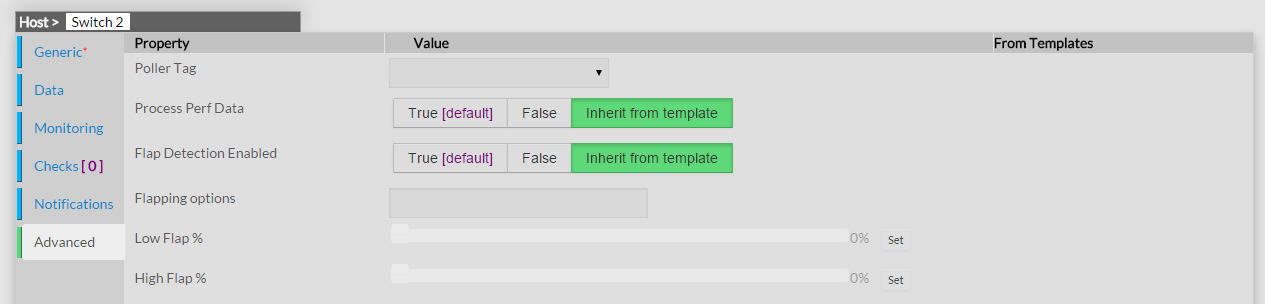
- à 1 dans le fichier de configuration
- paramétrer sur "true" le paramètre "Flap Detection Enabled" dans la définition de l'hôte ou du service.
Si vous souhaitez désactiver la détection à un niveau global, mettant le paramètre "If you want to disable flap detection on a global basis, set the enable_flap_detection directive to 0.If you would like to disable flap detection for just a few hosts or checks, use the Flap Detection Enabled directive in the host and/or checks definitions to do so." à 0. Idem si vous souhaitez le faire à un b=niveau spécifique sur un hôte ou un service.