Contexte
Le Pack Shinken est inclus dans votre installation de Shinken Entreprise afin d'avoir une bonne visibilité de la santé de votre architecture de supervision.
Afin de pouvoir superviser les démons de l'architecture, la source cfg-file-shinken comprend un certain nombre de modèles d'hôte qu'il faudra importer et appliquer sur vos serveurs hébergeant vos démons Shinken.
Les différents modèles mis à votre disposition sont les suivants :
- shinken-arbiter
- shinken-broker
- shinken-broker-module-sla
- shinken-poller
- shinken-reactionner
- shinken-receiver
- shinken-scheduler
- shinken-synchronizer
| Panel | ||||
|---|---|---|---|---|
| ||||
|
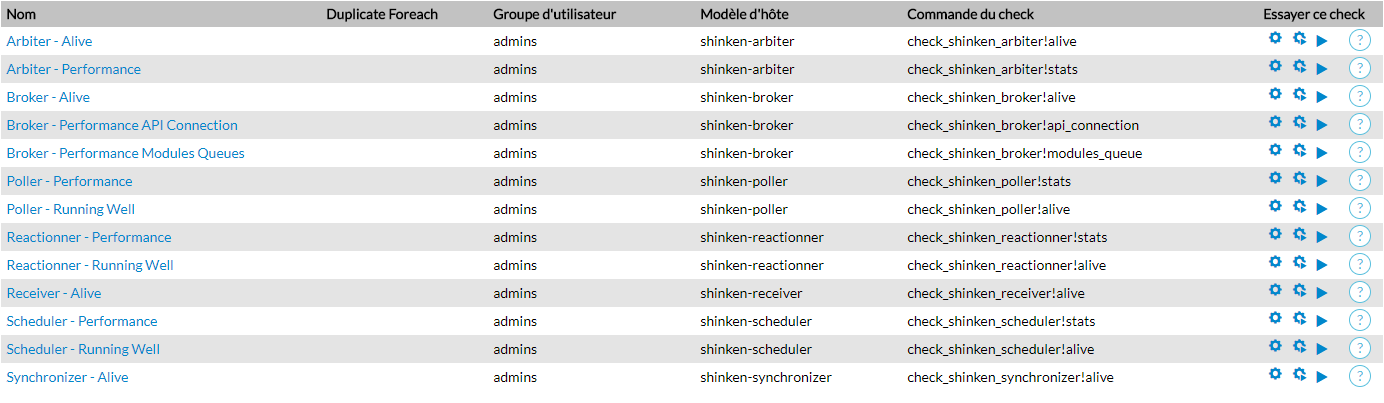
Une fois les modèles appliqués, les checks apparaitront dans l'onglet "Checks" de votre hôte.
Voici un exemple des différents checks du pack Shinken sur un hôte.
| Panel |
|---|
|
Arbiter
Afin de superviser le démon Arbiter, le modèle shinken-arbiter appliqué à votre hôte, attachera deux checks qui vérifieront la santé et la performance de ce démon.
Checks
| Nom du Check | Description | Exemple de résultat |
|---|---|---|
| Arbiter - Alive | Vérifie que le démon Arbiter peut être correctement contacté sur le réseau. |
|
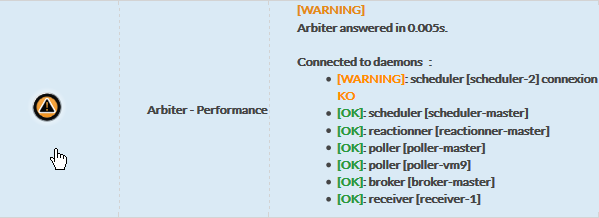
| Arbiter - Performance | Retourne le temps de connexion au démon Arbiter ainsi que la liste des connexions avec les autres démons de l'architecture. |
|

Paramétrage des Checks
Les checks de l'Arbiter peuvent être configurés via des données fournies par le modèle.
Les données suivantes sont disponibles:
| Nom de la donnée | Description | Valeur par défaut |
|---|---|---|
| ARBITER_PORT | Port utilisé pour l'établissement de la connexion avec l'Arbiter | 7770 |
| SHINKEN_PROTOCOL | Protocole utilisé pour établir la connexion avec l'Arbiter | http |
Broker
Afin de superviser le démon Broker, le modèle shinken-broker appliqué à votre hôte, attachera plusieurs checks qui vérifieront la santé et la performance de ce démon.
Checks
| Nom du Check | Description | Exemple de résultat |
|---|---|---|
| Broker - Alive | Vérifie que le démon Broker peut être correctement contacté sur le réseau. |
|
| Broker - Performance API Connection | Vérifie les temps de connexion vers le Broker |
|
| Broker - Performance Modules Queues | Vérifie les performances des modules du Broker |
|
| Broker Daemon Module SLA | Vérifie le bon fonctionnement du module SLA | |




Paramétrage des Checks
Les checks du Broker peuvent être configurés via des données fournies par le modèle.
Les données suivantes sont disponibles:
| Nom de la donnée | Description | Valeur par défaut |
|---|---|---|
| BROKER_PORT | Port utilisé pour l'établissement de la connexion avec Broker | 7772 |
Poller
Afin de superviser le démon Broker, le modèle shinken-poller appliqué à votre hôte, attachera plusieurs checks qui vérifieront la santé et la performance de ce démon.
Checks
| Nom du check | DescriptionExample Output | Exemple de résultat |
|---|---|---|
| Poller - Running Well | Checks that the Poller daemon can be reached over the network, displays its tags an the connection status with the schedulers |
|
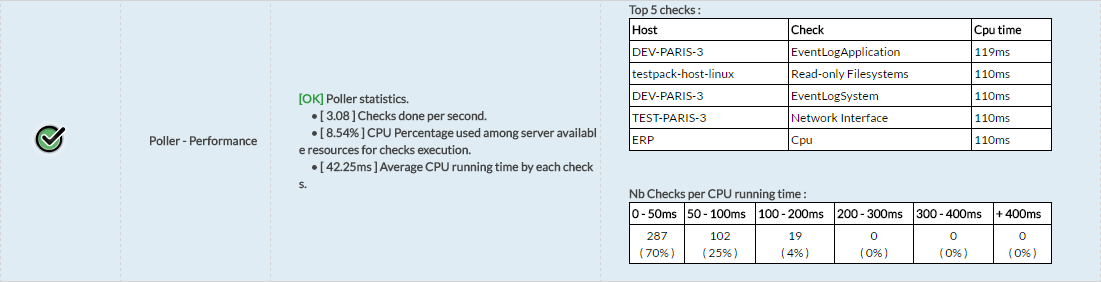
| Poller - Performance | Display performance statistics of checks execution in the Poller. |
|


Check settings
Poller checks can be configured via datas provided by the template.
The following datas are available for the Poller:
| Data name | Description | Default Value |
|---|---|---|
| POLLER_PORT | Port used to establish the connection with the Poller | 7771 |
| NB_CHECK_IN_TIMEOUT_TOLERATE | Number of checks in timeout threshold. Over this limit, the check will exit with an error status | 0 |
| ACTIVE_POLLER_LATENCY | Connection latency above which the check will issue an error. (in seconds) | 0.5 |
Reactionner
Corresponding host template: shinken-reactionner
Checks
| Check name | Description | Example Output |
|---|---|---|
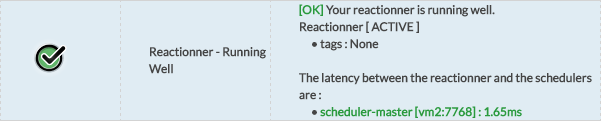
| Reactionner - Running Well | Checks that the Reactionner daemon can be reached over the network, displays its tags and the connection status with the schedulers |
|
| Reactionner - Performance | Display performance statistics of notifications execution in the Reactionner. |
|

Checks settings
Reactionner checks can be configured via datas provided by the template.
The following datas are available for the Reactionner.
| Data name | Description | Default Value |
|---|---|---|
| REACTIONNER_PORT | Port used to establish the connection with the Reactionner | 7769 |
| ACTIVE_REACTIONNER_LATENCY | Connection latency above which the check will issue an error. (in seconds) | 0.5 |
Receiver
Corresponding host template: shinken-receiver
Checks
| Check name | Description | Example Output |
|---|---|---|
| Receiver - Alive | Checks that the Receiver can be reached over the network |
|
| Receiver - Performance API Connection | Checks connection time to the Receiver and its performances |
|


Check settings
Receiver checks can be configured via datas provided by the template.
The following datas are available for the Receiver:
| Data name | Description | Default Value |
|---|---|---|
| RECEIVER_PORT | Port used to establish the connection with the Receiver | 7769 |
Scheduler
Corresponding host template: shinken-scheduler
Checks
| Check name | Description | Example Output |
|---|---|---|
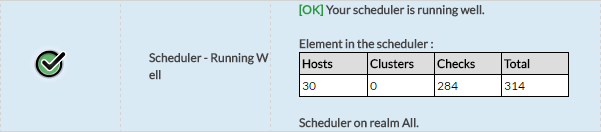
| Scheduler - Running Well | Checks that the Scheduler daemon can be reached over the network, displays how many elements it is managing |
|
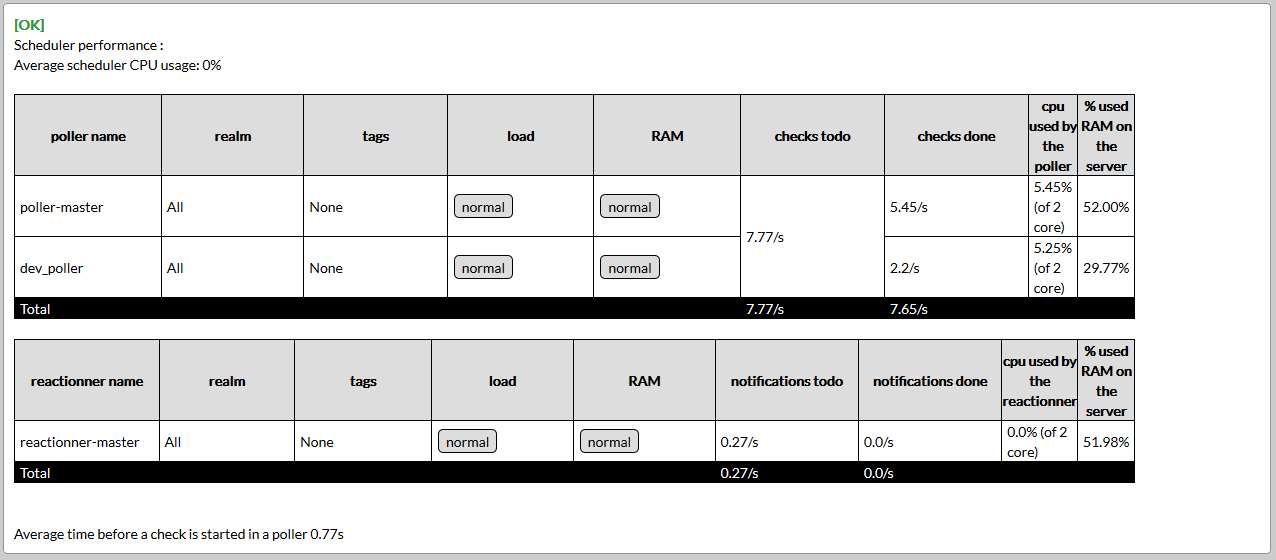
| Scheduler - Performance | Displays CPU usage as well as poller and reactionners statistics. |
|
Check settings
Scheduler checks can be configured via datas provided by the template. SSH parameters are fully described in Rétention Mongodb
The following datas are available for the Scheduler:
| Data name | Description | Default Value |
|---|---|---|
| SCHEDULER_PORT | Port used to establish the connection with the Scheduler | 7768 |
| PASSIVE_POLLER_LATENCY | Connection latency above which the check will issue an error. (in seconds) | 0.5 |
| MONGO_CONNECTION_METHOD | Connection method to the MongoDB server ("direct" or "ssh") | ssh |
| MONGO_SSH_USER | User with whom to connect to the distant server | shinken |
| MONGO_SSH_KEYFILE | SSH private key file to use to connect to the distant server | ~/.ssh/id_rsa |
Synchronizer
Corresponding host template: shinken-synchronizer
Checks
| Check name | Description | Example Output |
|---|---|---|
| Synchronizer - Alive | Checks that the Scheduler daemon can be reached over the network |
|
| Synchronizer - Performance API Connection | Checks connection time to the Synchronizer and its performances |
|


Check settings
Synchronizer checks can be configured via datas provided by the template. SSH parameters are fully described in Rétention Mongodb
The following datas are available for the Synchronizer:
| Data name | Description | Default Value |
|---|---|---|
| SYNCHRONIZER_PORT | Port used to establish the connection with the Synchronizer | 7765 |
| MONGO_CONNECTION_METHOD | Connection method to the MongoDB server ("direct" or "ssh") | ssh |
| MONGO_SSH_USER | User with whom to connect to the distant server | shinken |
| MONGO_SSH_KEYFILE | SSH private key file to use to connect to the distant server | ~/.ssh/id_rsa |