Architecture distribuée de Shinken Enterprise
...
pour le load balancing
...
Le load balancing est très facile à mettre ne place avec Shinken.Enterprise
Si vous utilisez le load balancing, la charge est principalement sur 2 process : :
- pollers: ils lancent les checks, et utilisent beaucoup de ressource CPU
- schedulers: ils planifient, potentiellement beaucoup de checks
Pour les 2, une limite de 15000 checks/5min est une moyenne raisonnable sur un serveur standard (4 cores\@3Ghz). On peut scaler horizontalement en ajoutant simplement plus de serveurs et en les déclarant comme pollers ou scheduleers. .
Attention, le scheduler N'EST PAS un process multi-threaded process, donc si vous rajouter des coeurs, ça ne changera rien à ses performances.
Il y a principalement 2 cas où la charge pose problème :
- utiliser des plugins qui nécessitent beaucoup de
If you use the distributed architecture for load balancing, load is typically present in 2 processes:
- pollers: they launch checks, they use a lot of CPU resources
- schedulers: they schedule, potentially lots of checks
For both, a limit of 15000 checks/5min is a reasonable goal on an average server(4 cores\@3Ghz). Scaling can be achieved horizontally by simply adding more servers and declaring them as pollers or schedulers.
Please note that the scheduler is NOT a multi-threaded process, so even if you add cores to your server, it won't change its performance.
There are mainly two cases where load is a problem:
- using plugins that require lots of processing (check_esx3.pl is a good example)scheduling a very large number of checks
In the first case, you need to add more pollers. In the second, you need to add more schedulers. In this last case, you should also consider adding more pollers (more checks = more pollers) but that can be determined by the load observed on your poller(s).
From now, we will focus on the first case, typically installations have less than 150K checks in 5 minutes, and will only need to scale pollers, not schedulers.
How multiple pollers connect to a common scheduler
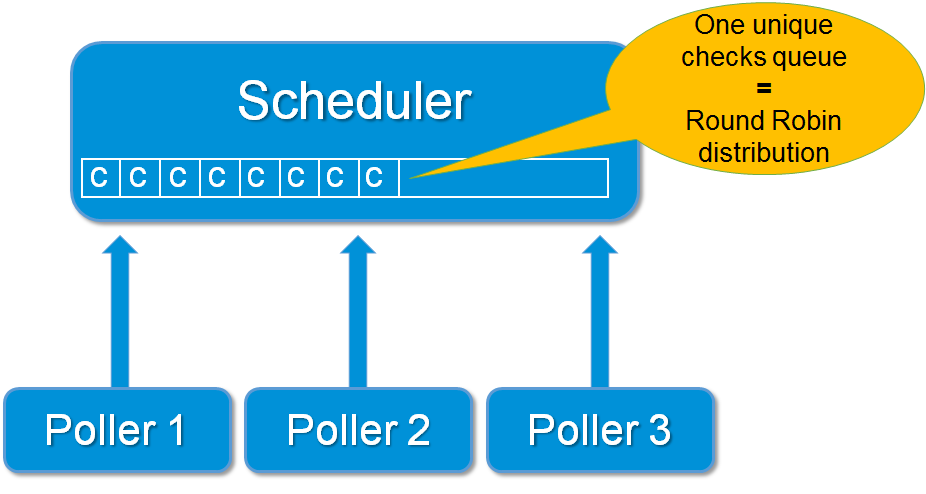
Setup a load balancing architecture with some pollers
- est un bon exemple)
- planifier un très grand nombre de checks
Dans la 1er cas, vous devez ajouter plus de pollers. Dans le second, vous devez ajouter plus de schedulers.
Pour l'instant, restons sur le 1er cas, typiquement une installation avec moins de 150K checks en 5 minutes, et nous devons seulement calibrer les pollers, pas les schedulers.
Comment plusieurs pollers se connectent à un scheduler commun
Mise en oeuvre d'une architecdture en load balancing avec plusieurs pollers
Commencez par installer le package Shinken Enterprise comme d'ordinaire, mais juste en mode pollernode First install the Shinken Enterprise package as usual, but in just a pollernode mode :
$ ./install.sh --pollernode
Declare the new poller on the main configuration file
Declarez le nouveau poller dans le fichier principal de configuration
Maintenant, vous avez un nouveau polller déclaré, server2. Mais l'arbiter server1 a besoin de savoir qu'il a des tâches à lui donner. Cela se fait en déclarant le nouveau poller dans le fichier Ok, now you have a brand new poller declared on your new server, server2. But server1 arbiter needs to know that it must give work to it. This is done by declaring the new poller in the etc/shinken/pollers/poller-master.cfg file.
Edit your Editez le fichier /etc/shinken/pollers/poller-master.cfg file and define your new poller under the existing et définissez votre nouveau poller sous la définirion du poller-1 definition existant (on sur le server1):
#Pollers launch checks
define poller{
poller_name poller-2
address server2
port 7771
}
Be sure to have also those linesVérifiez que vous avez bien ces lignes:
define scheduler{
scheduler_name scheduler-1 ; just the name
address 192.168.0.1 ; ip or dns address of the daemon
port 7768 ; tcp port of the daemon
}
Note: the address has to be l'adresse doit être 192.168.0.1 or ou server1 but not mais pas localhost!
When it's done, restart your Une fois fait, redémarrez Shinken Enterprise.
$ /etc/init.d/shinken restart
Check for connexion
Vérification de la connexion
Vous pouvez regarder dans le fichier You can look at the global shinken.log file (should be under /var/lib/shinken/shinken.log) that the new poller is started and can reach que le nouveau poller est démarré et qu'il peut joindre le scheduler-1.
So look for lines like:Recherchez les lignes :
[All] poller satellite order: poller-2 (spare:False), poller-1 (spare:False),
[All] Trying to send configuration to poller poller-2
[All] Dispatch OK of for configuration 0 to poller poller-2
Vous pouvez également regarder les logs du poller sur le server2.
Vous aurez alors les lignes You can also look at the poller logs on server2.
You may have lines like that :
Waiting for initial configuration
[poller-2] Init de connection with scheduler-1 atHTTP://192.168.0.1:7768
[poller-2] Connexion OK with scheduler scheduler-1
I correctly loaded the modules: []
[poller-2] Allocating new fork Worker: 0