...
Important: there is only ONE arbiter (and a spare of course) for ALL realms. The arbiter manages all realms and all that is inside.
Sub-realms
~~~~~~~~~~~A realm can have sub-realms. It doesn't change anything for schedulers, but it can be useful for other satellites and spares. Reactionners and brokers are linked to a realm, but they can take jobs from all sub-realms too. This way you can have less reactionners and brokers (like we soon will see).
The fact that reactionners/brokers (and in fact pollers too) can take jobs from sub-schedulers is decided by the presence of the manage_sub_realms parameter. For pollers the default value is 0, but it's 1 for reactionners/brokers.
An example
...
To make it simple: you put hosts and/or hostgroups in a realm. This last one is to be considered as a resources pool. You don't need to touch the host/hostgroup definition if you need more/less performances in the realm or if you want to add a new satellites (a new reactionner for example).
Realms are a way to manage resources. They are the smaller clouds in your global cloud infrastructure :).
If you do not need this feature, that's not a problem, it's optional. There will be a default realm created and every one will be put into.
It's the same for hosts that don't have a realm configured: they will be put in the realm that has the "default" parameter.
Picture example
~~~~~~~~~~~~~~~~Let's take two examples of distributed architectures around the world. In the first case, the administrator don't want to share resources between realms. They are distinct. In the second, the reactionners and brokers are shared with all realms (so all notifications are send from a unique place, and so is all data).
...
Like you can see, all elements are in a unique realm. That's the sub-realm functionality used for reactionner/broker.
Configuration of the realms
~~~~~~~~~~~~~~~~~~~~~~~~~~~~
Realm configuration
Here is the configuration for the shared architecture:::
| Code Block | ||||
|---|---|---|---|---|
| ||||
define realm {
  realm_name All
  realm_members Europe,US,Asia
  default 1 ;Is the default realm. Should be unique!
}

define realm{
  realm_name Europe
  realm_members Paris ;This realm is IN Europe
}
|
...
#An now the satellites: define scheduler{ scheduler_name scheduler_Paris |
...
realm Paris ;It will only manage Paris hosts |
...
} |
...
define reactionner{ |
...
reactionner_name reactionner-master |
...
realm All ;Will reach ALL schedulers |
...
} |
And in host/hostgroup definition:::
define host{
host_name server-paris
realm Paris ;Will be put in the Paris realm
[...]
}
define hostgroups{
hostgroup_name linux-servers
alias Linux Servers
members srv1,srv2
realm Europe ;Will be put in the Europe realm
}
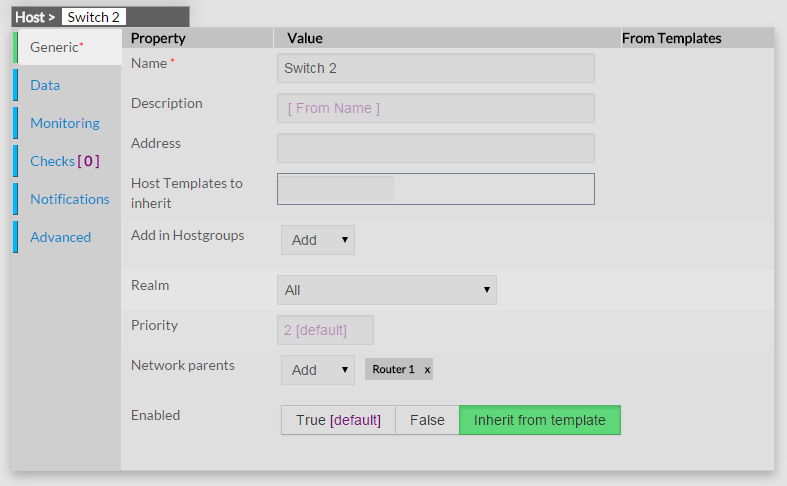
the host link into a realm will be on the host configuration page:
Multi levels brokers
Multi levels brokers
~~~~~~~~~~~~~~~~~~~~~In the previous samples, if you put numerous brokers into the realm, each scheduler will have only one broker at the same time. It was also impossible to have a common Broker in All, and one brokers in each sub-realms.
You can activate multi-brokers features with a realm parameter, the broker_complete_links option (0 by default).
You will have to enable this option in ALL your realms! For example:::
| Code Block | ||||
|---|---|---|---|---|
| ||||
define realm{ |
...
realm_name Europe |
...
broker_complete_links 1 } |
}
This will enable the fact that each scehduler will schedulerwill be linked with each brokers. This will make possible to have dedicated brokers in a same realm (one for WebUIthe web interface, another for Graphite for example). It will also make possible to have a common Broker in "All", and one broker in each of its sub-realms (Europe, US and Asia). Of course the sub-brokers will only see the data from their realms, and the sub-realms (like Paris for Europe for example).