Introduction
Before starting the migration
Prerequisites
This guide will suppose you already have the following:
- A Shinken architecture (the one you want to migrate)
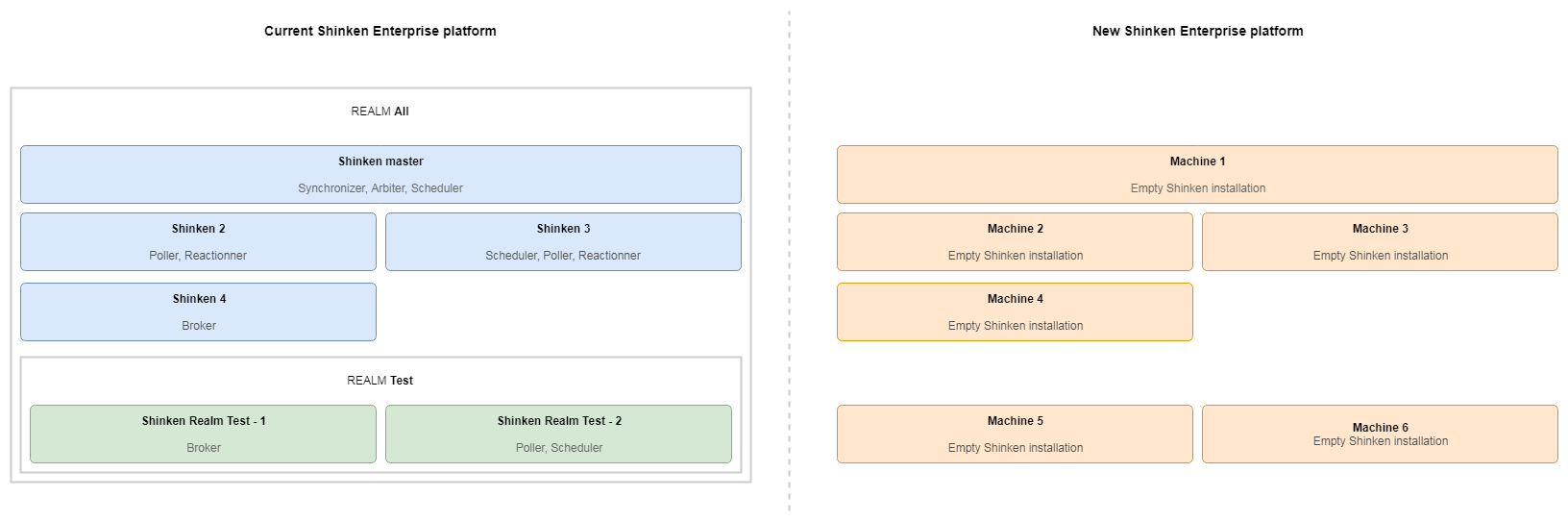
- A new "empty architecture": the machines for the new architecture are available and have Shinken installed with the default configuration.
- The Shinken version of the new Shinken platform must be equal or more recent that the current platform (cannot migrate from V02.05.00 to V02.04.00 for instance).
The starting point of the migration guide is an architecture such as the following:
| Panel |
|---|
|
What this guide covers
This guide covers the migration of Shinken configuration and data collected by Shinken. This includes:
- Shinken configuration (hosts, checks, templates)
- Shinken architecture and daemons configuration
- SLA data
- Metrology
- Shinken logs
What this guide does not cover
Because each environment has its own characteristics, this guide does not cover the migration of elements other than the Shinken architecture and configuration, meaning:
- Specific system configuration (machine setups, disks mounts, SELinux, ...)
- Network configuration (firewall, routing)
Migration steps
Daemons configuration
Copy configuration
The first step of the migration is to copy the Shinken data of each machine to its counterpart in the new platform.
For each machine in the current plateform with Synchronizer, Arbiter or Broker daemons:
Create a backup of all the data in the machine:
Code Block shinken-backup
Create an archive of the created backup folder and copy it to the new machine
Extract the archive and restore the backup on the new machine:
Code Block shinken-restore /path/to/backup/folder
| Tip |
|---|
If you do not want to migrate the all available Shinken Enterprise data, you can select what you want with the parameters of shinken-backup and shinken-restore commands. These options are described on the Backup and restore commands documentation page. This can be useful for example if you have network disks for metrics and you can simply mount them on the new machines instead of copying all the metrology data. |
Adapt configuration to the new platform if needed
Restoring the configuration copies the configuration from the old machine as is on the new machine. This means the addresses of the different daemons still point to the old daemons.
If the new platform is on another network with different addresses, you will have to change these addresses in the configuration to point to the new daemons addresses.
Copy retention data
To keep hosts and checks status, Shinken uses retention on the Scheduler. When restarting a Scheduler, status are loaded from the retention instead of being "Unknown". This is important if you have notifications setup, because by default an "Unknown" status on an host or check sends a notification. With retention, restarting your Scheduler might send a notification for each host of your monitoring configuration.
When migrating, you might want to also copy your retention data. If the retention module on the Schedulers is PickeRetentionFile, you can migrate your retention data by copying the /var/lib/shinken/retention.dat on the associated Scheduler in the new infrastructure.
Checks scripts
The shinken-backup utility does not backup the content of /var/lib/shinken/libexec and /var/lib/shinken-user/libexec/ yet. These folders contain scripts executed by Shinken to perform the checks. If you put custom scripts in any of these folders, you will have to manually copy their contents to the same folder on the new machines.
This operation only needs to be done on machines hosting Poller and Reactionners daemons.
Addons data
The nagvis and nagvis-shinken-architecture addons added in the version V02.05.00 each have their own configuration files and content. The shinken-backup utility does not backup these configuration files and content yet.
To save and migrate those, you will have to copy the following files and folders on the new machines:
- nagvis addon: /opt/nagvis
- nagvis-shinken-architecture addon: /var/lib/shinken-nagvis