Introduction
Configuration
Voici le fichier CFG de configuration présent dans : /etc/shinken/modules/broker-module-livedata.cfg
| Code Block | ||
|---|---|---|
| ||
#===============================================================================
# broker module livedata
#===============================================================================
# Daemons that can load this module:
# - broker
# This module is an api getting information from the broker
#===============================================================================

define module {

    #======== Module identity =========
    # Module name. Must be unique
    module_name               broker-module-livedata

    # Module type (to load module code). Do not edit.
    module_type               broker_module_livedata

    #======== Listening address =========
    # host: IP address to listen to.
    #       note: 0.0.0.0 = all interfaces.
    host                      0.0.0.0
    # port to listen
    port                      8000

    # HTTPs part, enable if you want to set the visualisation interface listen in HTTPs mode
    # disabled by default. Set your own certificates. Set your own token, it is usefull to get access to the API
    use_ssl                   0
    ssl_cert                  /etc/shinken/certs/server.cert
    ssl_key                   /etc/shinken/certs/server.key
    token                     ak5zv6t5s25r6g4
}
|
Mise en marche du module
Pour mettre en marche votre module il vous faut l'ajouter à la listes des modules actifs sur le broker souhaité.
Pour se faire, rendez vous dans le fichier de configuration de votre broker à l'emplacement /etc/shinken/brokers/nom_de_votre_broker.cfg :
| Code Block | ||
|---|---|---|
| ||
#===============================================================================
# BROKER
#===============================================================================
# Description: The broker is responsible for:
# - Exporting centralized logs of all Shinken daemon processes
# - Exporting status data
# - Exporting performance data
# - Exposing Shinken APIs:
#   - Status data
#   - Performance data
#   - Command interface
#===============================================================================

define broker {

# Shinken Enterprise. Lines added by import core. Do not remove it, it's used by Shinken Enterprise to update your objects if you re-import them.
    _SE_UUID            core-broker-060340145ade11e5b703080027f08538
    _SE_UUID_HASH       8e00136f9e61061e07ca0f4a63509b68
# End of Shinken Enterprise part

    #======== Daemon name and address =========
    # Daemon name. Must be unique
    broker_name               broker-master

    # IP/fqdn of this daemon (note: you MUST change it by the real ip/fqdn of this server)
    address                   localhost

    # Port (HTTP/HTTPS) exposed by this daemon
    port                      7772

    # 0 = use HTTP, 1 = use HTTPS
    use_ssl                       0


    #======== Master or spare selection =========
    # 1 = is a spare, 0 = is not a spare
    spare                     0


    #======== Daemon connection timeout and down state limit =========
    # timeout: how many seconds to consider a node don't answer
    timeout                   3

    # data_timeout: how many second to consider a configuration transfert to be failed
    # because the network brandwith is too small.
    data_timeout              120

    # max_check_attempts: how many fail check to consider this daemon as DEAD
    max_check_attempts        3

    # Check this daemon every X seconds
    check_interval            10


    #======== Modules to enable for this daemon =========
    # Available:
    # - Simple-log            : save all logs into a common file
    # - WebUI                 : visualisation interface
    # - Graphite-Perfdata     : save all metrics into a graphite database
    # - sla                   : save sla into a database
    # - Livestatus            : TCP API to query element state, used by nagios external tools like NagVis or Thruk
    # - Broker-module-liveData: JSON API to query element data.
    modules                   Simple-log, WebUI, Graphite-Perfdata, sla, Livestatus, broker-module-livedata


    #======== Realm and architecture settings =========
    # Realm to set this daemon into
    realm                    All

    # 1 = take data from the daemon realm and its sub realms
    # 0 = take data only from the daemon realm
    manage_sub_realms        1


    # In NATted environments, you declare each satellite ip[:port] as seen by
    # *this* broker (if port not set, the port declared by satellite itself
    # is used)
    #satellitemap    scheduler-1=1.2.3.4:7768, poller-1=1.2.3.5:7771


    #======== Enable or not this daemon =========
    # 1 = is enabled, 0 = is disabled
    enabled                  1

} |
Rendez vous alors à la ligne des modules et ajoutez-y broker-module-livedata :
| Code Block | ||
|---|---|---|
| ||
modules Simple-log, WebUI, Graphite-Perfdata, sla, Livestatus, broker-module-livedata |
Redémarrez ensuite votre Arbiter pour que la configuration du Broker soit active, puis redémarrez votre Broker qui s'occupera de mettre en marche le module livedata.
Fonctionnement
L'accès à cette API est restreinte aux détenteurs d'un token généré dans la configuration (modifiable par l'utilisateur) du module.
Appeler l'API
URL = http://{ip_broker}:{port_module}/api/V1/host/408cd29ad37611e8810e0800277b7e16?token={token}
ou https://IP_DU_BROKER:PORT_DU_MODULE/api/V1/TYPE/UUID?token=TOKEN_DU_MODULE
Exemple pour un hôte avec le module sur le port 8000 du broker en localhost et "adt" comme token :
http://localhost:8000/api/V1/host/408cd29ad37611e8810e0800277b7e16?token=adt
DIRE QUE CA RENVOIE DU JSON
Routes de l'API (titre a changer)
GET /api/V1/host/{uuid}
Description incroyable de mon appel
Paramètres
uuid ca fait des trucs (dans un tableau c'est plus joli)
Réponse
Codes de retour
Explication codes de retour
200 OK
4XX Token de merde
404 Host not found
Tete de la réponse (titre a changer)
- host_uuid : text
- host_name : text
- host_display_name : text
- status : text
- OK
- WARNING
- CRITICAL
- UNKNOWN
- MISSING-DATA
- SHINKEN-INACTIVE
- status_since : epoch (en secondes)
- context : text
- NOTHING
- ACKNOWLEDGED
- PARTIAL-ACKNOWLEDGED
- INHERITED-ACKNOWLEDGED
- DOWNTIME
- PARTIAL-DOWNTIME
- INHERITED-DOWNTIME
- FLAPPING
- PARTIAL-FLAPPING
- DISABLED
- business_impact : 0, 1, 2, 3, 4, 5
output : text
long_output : text
Exemple
| Code Block | ||
|---|---|---|
| ||
{
 "status": "OK",
 "host_display_name": "localhost",
 "long_output": "",
 "host_name": "localhost",
 "context": "NOTHING",
 "status_since": 1540457802,
 "business_impact": 2,
 "output": "PING OK - Packet loss = 0%, RTA = 0.02 ms",
 "host_uuid": "408cd29ad37611e8810e0800277b7e16"
}
|
Check attaché à un hôte
GET /api/V1/check-on-host/UUID
- check_uuid : text
- check_name : text
- check_display_name : text
- status : text
- OK
- WARNING
- CRITICAL
- UNKNOWN
- MISSING-DATA
- SHINKEN-INACTIVE
- status_since : epoch (en secondes)
- context : text
- NOTHING
- ACKNOWLEDGED
- PARTIAL-ACKNOWLEDGED
- INHERITED-ACKNOWLEDGED
- DOWNTIME
- PARTIAL-DOWNTIME
- INHERITED-DOWNTIME
- FLAPPING
- PARTIAL-FLAPPING
- DISABLED
- output : text
- business_impact : 0, 1, 2, 3, 4, 5
- long_output : text
- host_uuid : text
- host_name : text
- host_display_name : text
Exemple
| Code Block | ||
|---|---|---|
| ||
{
 "status": "OK",
 "host_display_name": "localhost",
 "check_name": "Broker Daemon Livedata - broker-master",
 "host_uuid": "408cd29ad37611e8810e0800277b7e16",
 "long_output": "",
 "host_name": "localhost",
 "context": "NOTHING",
 "output": "<span style=\"color:#2A9A3D;font-weight:bold;\">[OK]</span> The example works fine.<br/>",
 "business_impact": 2,
 "status_since": 1540457781.797493,
 "check_uuid": "022a505c849f840e110f2aba5e27597f",
 "check_display_name": "Broker Daemon Livedata - broker-master"
}
|
Cluster
GET /api/V1/cluster/UUID
- cluster_uuid : text
- cluster_name : text
- cluster_display_name : text
- status : text
- OK
- WARNING
- CRITICAL
- UNKNOWN
- MISSING-DATA
- SHINKEN-INACTIVE
- status_since : epoch (en secondes)
- context : text
- NOTHING
- ACKNOWLEDGED
- PARTIAL-ACKNOWLEDGED
- INHERITED-ACKNOWLEDGED
- DOWNTIME
- PARTIAL-DOWNTIME
- INHERITED-DOWNTIME
- FLAPPING
- PARTIAL-FLAPPING
- DISABLED
- business_impact : 0, 1, 2, 3, 4, 5
- output : text
- long_output : text
Exemple
| Code Block | ||
|---|---|---|
| ||
{
 "status": "OK",
 "cluster_display_name": "localhost",
 "long_output": "",
 "cluster_name": "localhost",
 "context": "NOTHING",
 "status_since": 1540457802,
 "business_impact": 2,
 "output": "PING OK - Packet loss = 0%, RTA = 0.02 ms",
 "cluster_uuid": "408gfhfr7611e8810e0800277b7e16"
}
|
Check attaché à un cluster
GET /api/V1/check-on-cluster/UUID
- check_uuid : text
- check_name : text
- check_display_name : text
- status : text
- OK
- WARNING
- CRITICAL
- UNKNOWN
- MISSING-DATA
- SHINKEN-INACTIVE
- status_since : epoch (en secondes)
- context : text
- NOTHING
- ACKNOWLEDGED
- PARTIAL-ACKNOWLEDGED
- INHERITED-ACKNOWLEDGED
- DOWNTIME
- PARTIAL-DOWNTIME
- INHERITED-DOWNTIME
- FLAPPING
- PARTIAL-FLAPPING
- DISABLED
- output : text
- business_impact : 0, 1, 2, 3, 4, 5
- long_output : text
- cluster_uuid : text
- cluster_name : text
- cluster_display_name : text
Exemple
| Code Block | ||
|---|---|---|
| ||
{
 "status": "OK",
 "cluster_display_name": "localhost",
 "check_name": "Broker Daemon Livedata - broker-master",
 "cluster_uuid": "408gfhfr7611e8810e0800277b7e16",
 "long_output": "",
 "cluster_name": "localhost",
 "context": "NOTHING",
 "output": "<span style=\"color:#2A9A3D;font-weight:bold;\">[OK]</span> The example works fine.<br/>",
 "business_impact": 2,
 "status_since": 1540457781.797493,
 "check_uuid": "044a505c849f840e110f2aba5e27597f",
 "check_display_name": "Example cluster check"
}
|
Obtenir un uuid
Hôtes et Clusters
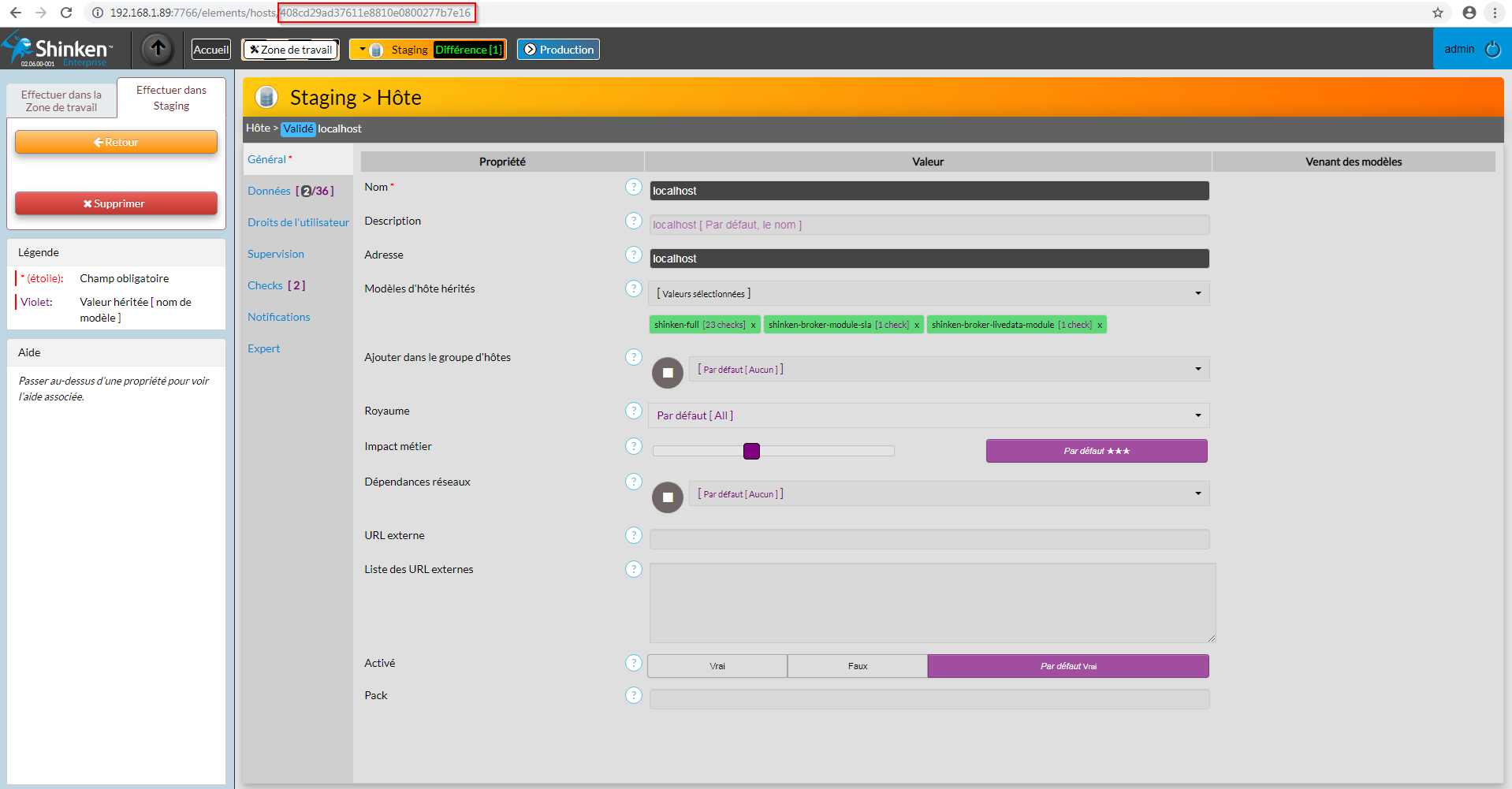
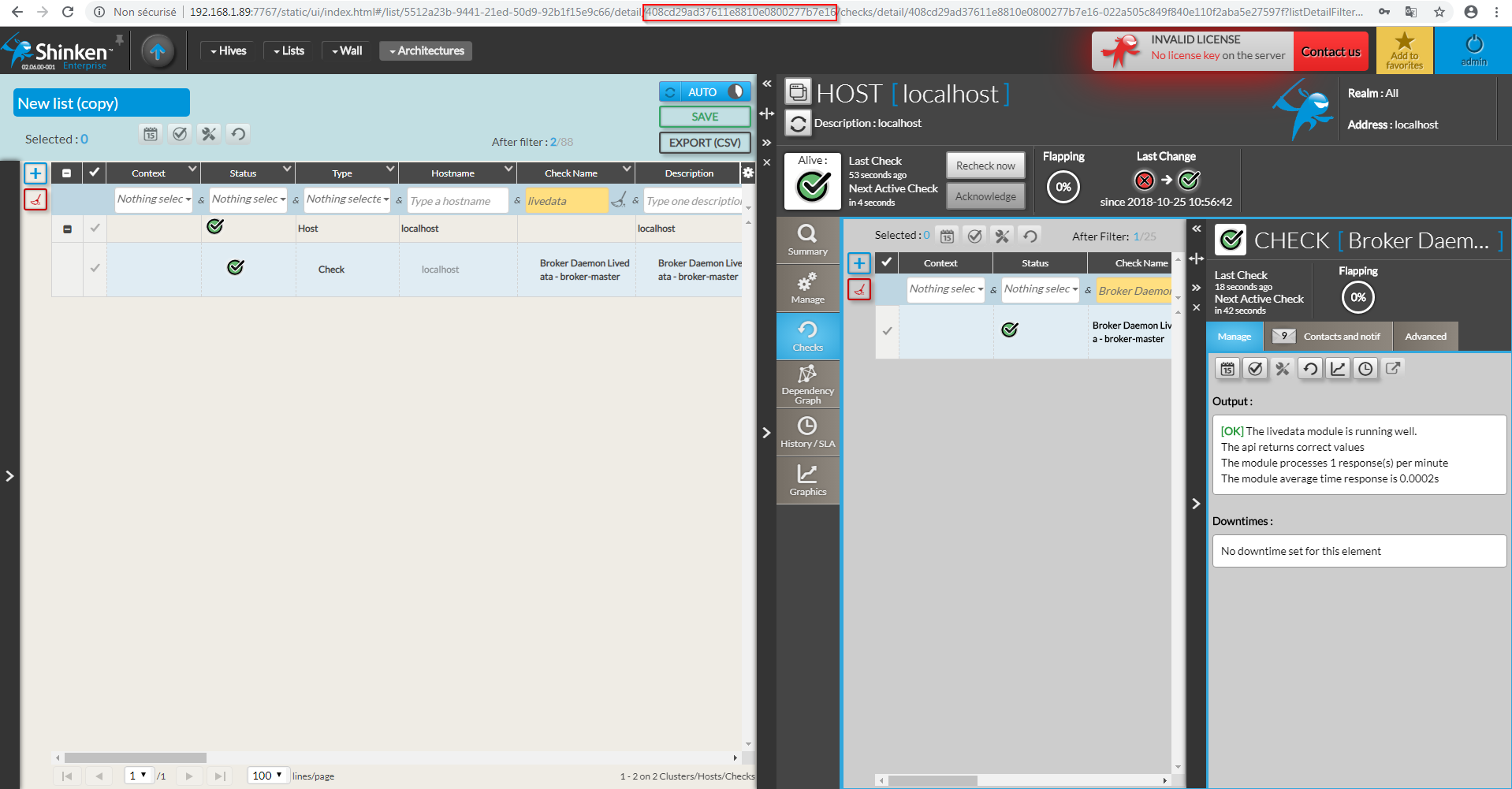
Pour récupérer l'uuid d'un hôte ou d'un cluster il suffit de se rendre dans sa page de configuration sur l'UI de Configuration, ou de le sélectionner dans l'UI de Visualisation. Il se trouve alors dans l'url tel que :
Checks attachés
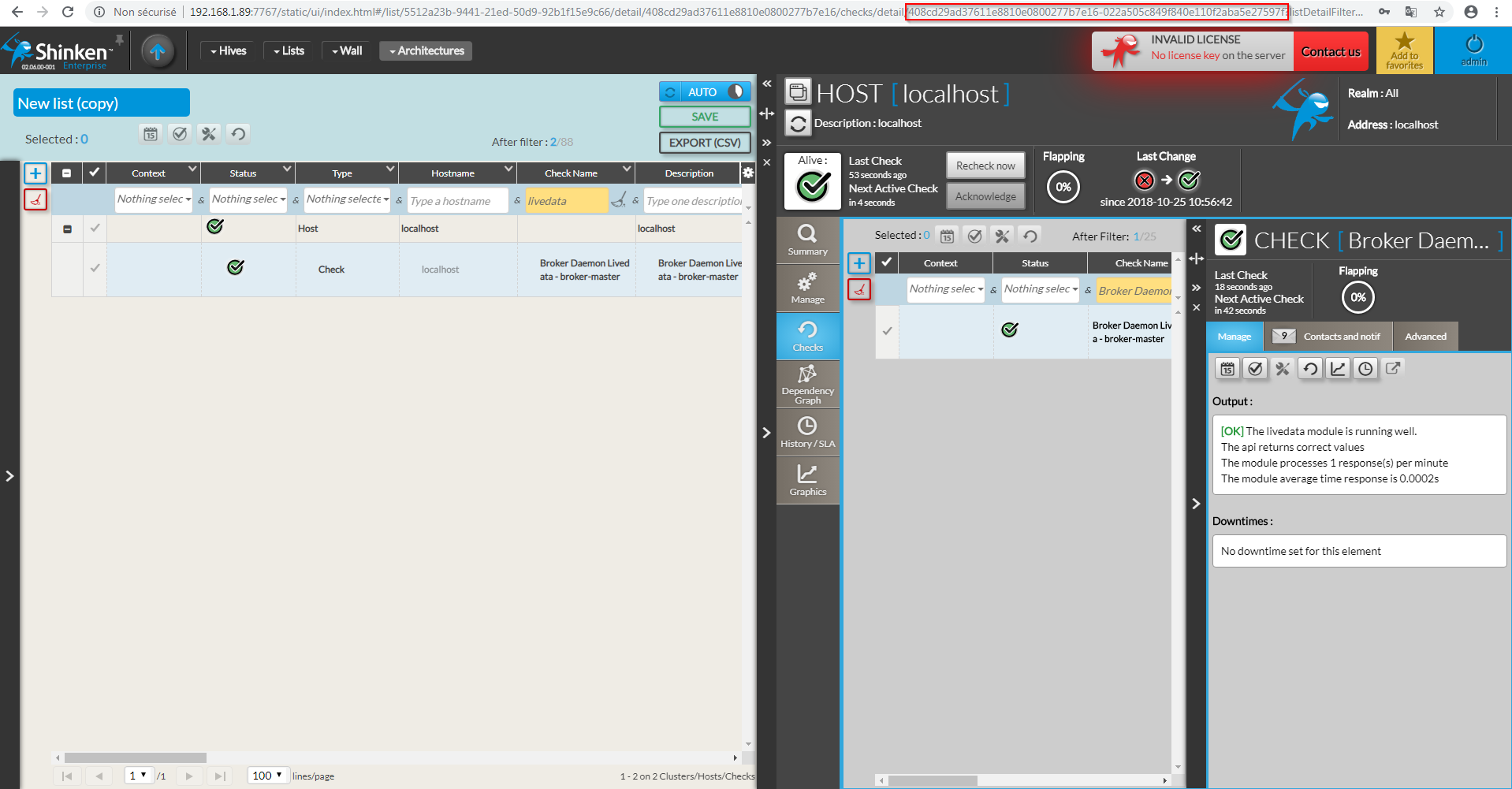
Pour récupérer l'uuid d'un check attaché à un hôte ou à un cluster, il suffit de se rendre dans sa page de configuration sur l'UI de Configuration en y rajoutant l'uuid de l'hôte ou du cluster sur lequel il est attaché, suivit d'un tiret. Ou plus simplement dans l'UI de Visualisation.
...