...
The hive will help you to organize visually your overview of elements that need to be monitored.
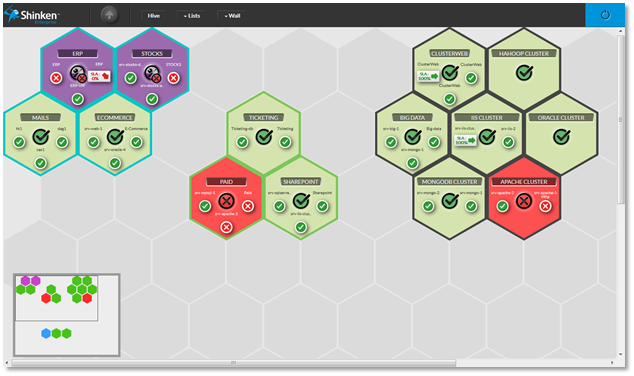
It consists in empty alveolus or tile hiding empty alveolus in which you can have tiles.
The hive has no size limit. Each time you will add tile new to its edge, the hive will extend it self itself by adding 2 columns or rows of empty alveolus.
...
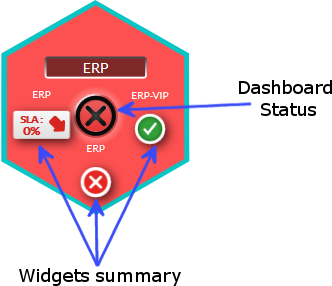
Each tile of the hive is a summary of a Dashboard.
A dashboard is a visual container of information which will help you to investigate issue sources (see Dashboard chapter for more details).
It contains:
|  |
...
- no summary,
- the default title "NEW DASHBOARD(X)", where X is the number of tile in the hive.,
- the default status OK.
Editing the display of the tile is done into the dashboard it is linked to.
...
You will notice that some tiles have the same border color. You can set this color to tiles group. It is up to you to choose your organization. As an example, you can choose a color to differentiate data centers. This color can be set when editing a tile the Dashboard linked to the tile (see Dashboard chapter).
The image show you the example of the green group. | 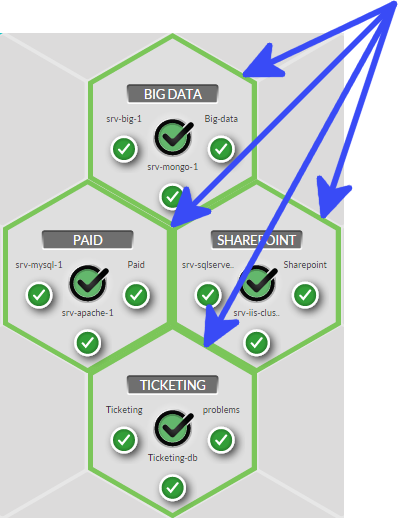 |
Mini map
...
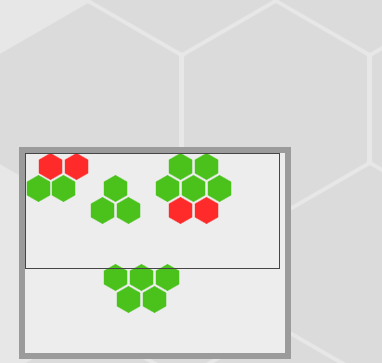
The mini map is located at the bottom left conner of the hive It wil help you to navigate faster if your hive a size bigger than your computer screen.
You just have to
|  |
...