...
In order for Shinken Enterprise to be able to distinguish between DOWN and UNREACHABLE states for the hosts that are being monitored, you'll first need to tell Shinken Enterprise how those hosts are connected to each other - from the standpoint of the Shinken Enterprise daemon. To do this, trace the path that a data packet would take from the Shinken Enterprise daemon to each individual host. Each switch, router, and server the packet encounters or passes through is considered a "hop" and will require that you define a parent/child host relationship in Shinken Enterprise. Here's what the host parent/child relationships looks like from the viewpoint of Shinken Enterprise:
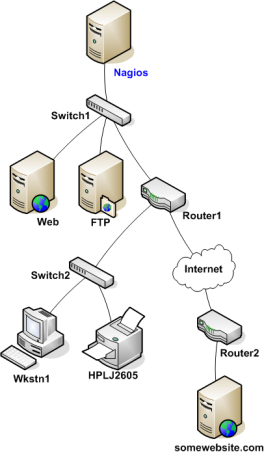
Now that you know what the parent/child relationships look like for hosts that are being monitored, how do you configure Shinken Enterprise to reflect them? The parents directive in your :ref:`host definitions <configobjects/host>` allows you to do this. Here's what the (abbreviated) host definitions with parent/child relationships would look like for this example:
...
Now that you're configured Shinken Enterprise with the proper parent/child relationships for your hosts, let's see what happen when problems arise. Assume that two hosts - Web and Router1 - go offline...
...
When hosts change state (i.e. from UP to DOWN), the host reachability logic in Shinken Enterprise kicks in. The reachability logic will initiate parallel checks of the parents and children of whatever hosts change state. This allows Shinken to quickly determine the current status of your network infrastructure when changes occur. During this additional check time, the notification for the web and router1 hosts are blocked because we don't know yet **WHO** is the root problem.
...