Versions Compared

Key

  • This line was added.
  • This line was removed.
  • Formatting was changed.

...

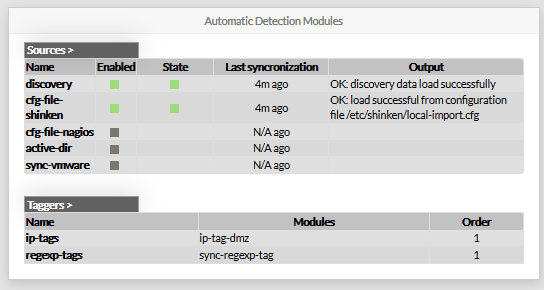
This panel shows 2 tables :

  • List of modules Sources (which retreive data from an external source).
    There are 5 available modules :
    • The Nagios config file import module.
    • The discovery module ( scan use defined range ip to detect new host and collect data)
    • The Active Directory module (collect data from the microsoft directory service)
    • The VMWare Module (collect data from the microsoft directory service)
    • The Shinken Framework config file import module.
  • List of define Taggers.
    • By default, 2 taggers are provided as example
      • ip-tags
      • regexpt-tags


For both table, each row gives a link pointing to the correspondant configuration.


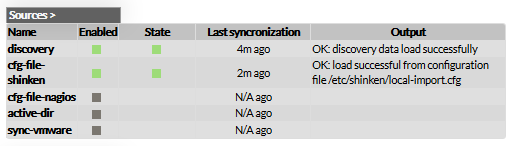
Sources

Sources table shows, for each known source module: 

  • If the module is enable or not.

  • The state of the module (if enable).Since when the last synchronization occured.

      • green if it's running well
      • red if something went wrong
  • The output generated by the last synchronization.


The list of Sources presented in this table depends on modules installed
in the directory named "sources".

If necessary, names can be changed by editing configuration files of modules
located in this directory.


Taggers

This table shows all known Taggers. For each Taggers, associated modules and order are printed.

Like other tables of this page, Taggers' name are pointing at the corresponding configuration.