...
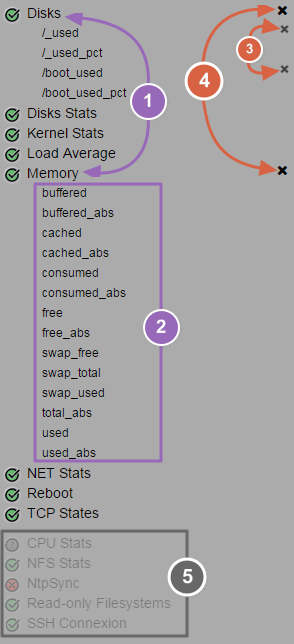
(1) Click on check name to develop his its list of metrics (2) Click on desired metrics name to select these (3) To deselect a metric, click on the cross on the right of the metric name (4) To deselect all metrics from a check, click on the cross on the right of the check name (5) Checks without metrics are dimmed at the end of list |
|
...
You can choose different periods for the displayed graph among , by default, the default on open value is "1 day".
On the right of the period buttons, a refresh button is available, click on it to refresh the graph with last values.
...
You can display multiple metrics on the same graph, so, each metric is traced drawned in a different color.
Move the mouse on the graph to display the info tooltip. In this one, you can retrieve the affected colors of each metric.
...