Versions Compared

Key

  • This line was added.
  • This line was removed.
  • Formatting was changed.

...

This Menu provides to the Administrator the common actions to Validate, Cancel, or Delete the selected object.

    • When validating a configuration, the object will be placed in the list of Changes to Apply.

    • If the Administrator click on the Cancel button, every changes made after precedent saving, will be lost.

    • If the Delete button is clicked, a confirmation popup will be disaplayed, asking the Administrator to validate or cancel the deletion of object.

Element Configuration Tabs

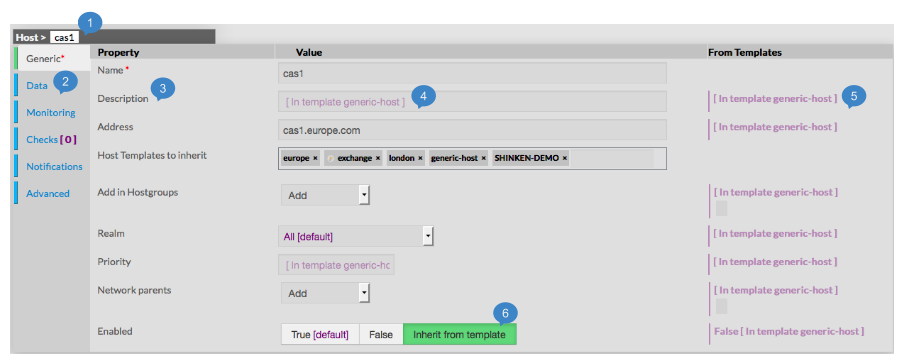
The type of the element and is name are displayed on the top of the Aera (1).


As they are numerous, elements properties are splited by category among tabs.

    • Tabs list will be different following the type of the selected element.
The
    • Tab layout
of a tab
    • is always the same
.
    • :
  1. Shows Type > Name of element
  2. Categories of properties
    Categories

  3. Name of Property

  4. Value of Property

  5. Value inherited from, if available

  6. Button used to activate or not Inherit from Template for Enabled property


...