Versions Compared

Key

  • This line was added.
  • This line was removed.
  • Formatting was changed.

...

Generic

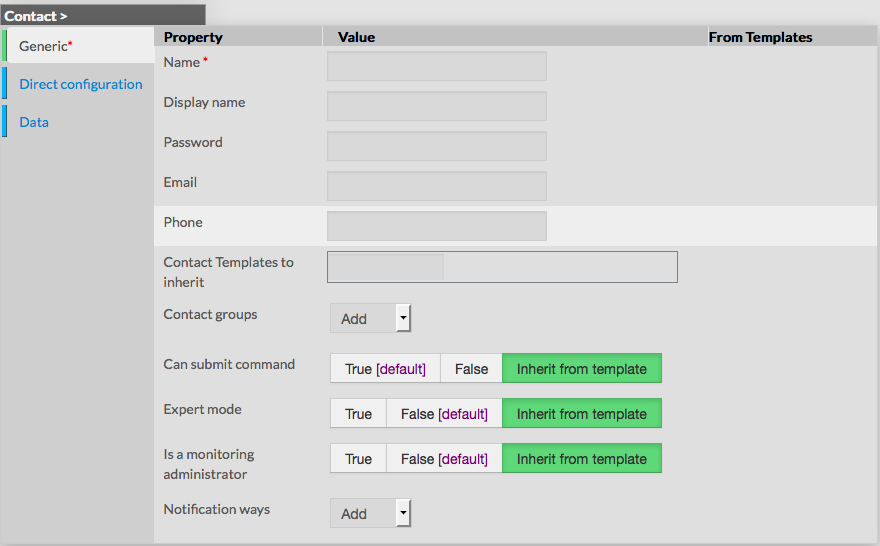
Generic properties contains the minimum properties requiered to create an Contact :

  • Name
    • the name of the Contact

    • this field is requiered

  • Display name
    • the name that will be displayed in the visualization interface and in notifications
  • Password
    • the Password that the user will use to connect to the visualization interface
    • the password is hidden when editing the contact
  • Email
    • email address of the contact, used to notify him
  • Phone
    • phone of the contact, used to notify by pager for example
  • Contact Templates to inherit
    • list of templates the contact should inherit from
    • templates name are suggested when starting to fill the field
  • Contact groups
    • List of contact groups the contact should be in
    • more than one contact groups can be selected
  • Can submit command
    • option used to determine if user will be able to schedule a new check through the visualization interface
  • Expert mode
    • option used to determine if the user will be able to see the expert mode in the visualization interface
  • Is a monitoring Administrator
    • option used to give the user Administrators rights, ie UI Configuration Access
  • Notification ways
    • list of notification ways used to notify the contact (by email, by pager etc.)

Direct Configuration


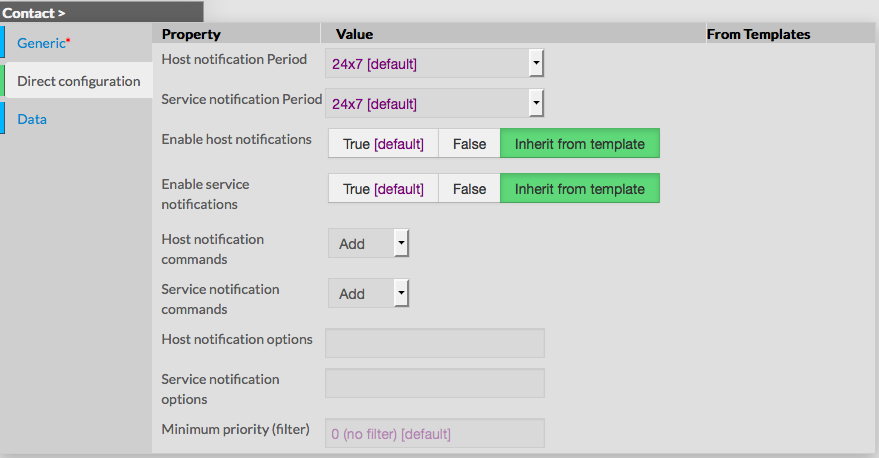
This category is used to define properties linked to the notifications, like Periods, Type of notification and Options.

  • Host notification period 
    • define the period within contact will be notified about host alerts
    • the value must be selected from the available time period list
  • Service notification period 
    • define the period within contact will be notified about service alerts
    • the value must be selected from the available time period list
  • Enable host notifications
    • determines if notifications should be sent about host alerts
    • default value is taken from Contact template
  • Enable service notifications
    • determines if notifications should be sent about service alerts
    • default value is taken from Contact template
  • Host notification commands
    • this option let the ability to select the command that will be used to notify the contact about host alerts
    • multiple notification command can be selected
    • default value is taken from contact template
  • Services notification commands
    • this option let the ability to select the command that will be used to notify the contact about service alerts
    • default value is taken from contact template
  • Host notification options
    • this option is used to define host states for which notifications should be sent
    • value is a comma separated list of flags
    • valid options are :
      • d : down
      • u : unreachable
      • r : recovery
      • f : flapping
      • s : scheduled downtime
      • n : none
    • default value is taken from contact template
    • if no flag is present, contact will be notified according to host properties
  • Service notification options
    • this option is used to define check states for which notifications should be sent
    • value is a comma seperated list of flags
    • valid options are :
      • w : warning
      • u : unknown
      • c : critical
      • r : recovery
      • f : flapping
      • n : none
    • default value is taken from contact template
    • if no flag is present, contact will be notified according to service properties
  • Minimum priority
    • = min business impact ?


...

From the Form page

First go to the Contacts page, from in the Main menu, then click on the contact name you want to delete.

Once in the page displaying the form, click on the Delete button available on the left menu.

A confirmation popup will be displayed.


From the Main page

First go to the Contacts page, from the Main menu, then click on the check box placed on the first column of the table.

Use the Action menu on the top to select Delete, and click to the Launch Button.

A confirmation popup will be displayed.

Using the Main page gives Administrators ability to Delete many Hosts at once.

image

...