Versions Compared

Key

  • This line was added.
  • This line was removed.
  • Formatting was changed.

...

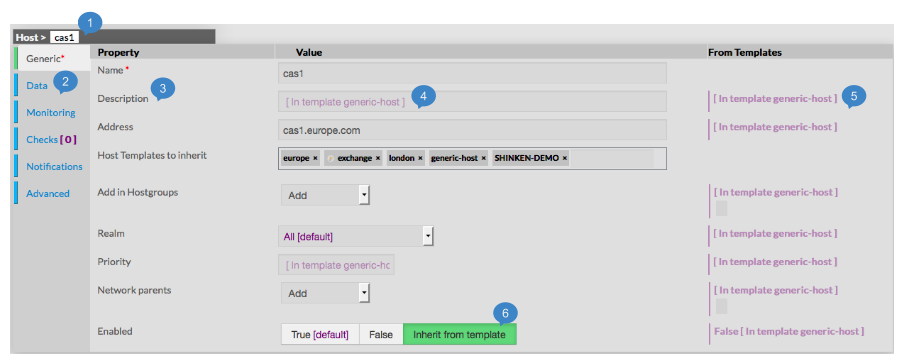
The type of the element and its name are displayed on the top of the Aera (1).


As they are numerous, elements properties are split by category among tabs.

    • Tabs list will be different following the type of the selected element.

    • Tab layout is always the same:

      • A list of properties linked to the category
      • A row of this list contains always 3 columns:
          • Name of Property
          • Value of Property
          • Value inherited from template
            ( only for hosts, checks and contact)

            Note:

            Values displayed in purple are by default value or inherited from a template.
      •  Values Editing Field can be of different kind:
 
        • Textfield:
            • type the value
        • Tag Editing field
            • Type the value
            • Typed caracters may match an existing tag:
                • If yes, list below will show you possible values.
                  Clicking or pressing enter will validate the choice.
                • If not, you can create a new tag by pressing the space bar.
        • Tag Adding Dropdown list
            • Select in the dropdown list the tag you want

Note: You can't create tag for this value.


        • Dropdown list
            • Select in the dropdown list the value you want

Note: Only one value is possible for this fied.


        • Toggle buttons
            • Select one of the 3 possibles values (True, False, Inherit)

Note: the green one is the one selected.


        • horizontal gauge
            • Move the cursor up to the expected value.


Contextual Informations


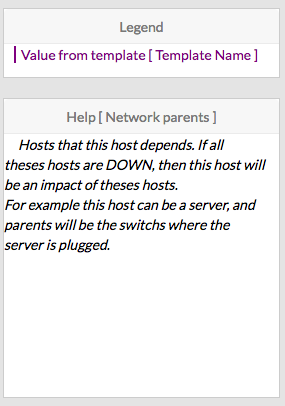
This Panel panel is used to help the Administrator, by showing two kind of informations  :

    • Legend : information to explain the display of the page.
    • Contextual Help :
  • move
        • Move the mouse on property you want some information

To see Help about an element, simply place your cursor over this element on the page,

description and configuration help will be immediatly shown in the right box.
        • The Help Area will contain the description text and some tips
          for the edition of the property