...
A click on the gearing button  will open the following pop-up.
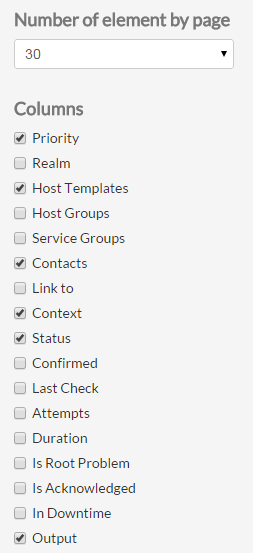 | You can choose which column to display:Status:Duration : Since when the element is in this state- UP : no problem on an host
- OK : no problem on an service
- Warning : The service is running but in degraded mode
- DOWN : the host is not running
- Critical : the element is not running
- UNKNOWN : no information is available on the element.
- FLAPPING : the element state is changing (by default, checks are made every five minutes, so its means that the X last checks results were different).
- DOWNTIME : The element has been flagged by a Shinken user as “under maintenance”.
- ACKNOWLEDGED : The problem has been taken into account by a Shinken user.
Duration : Since when the element is in this stateOutput : The output string provided by the last plugin checking the element.State typetypeLast Check : When did the previous check occur.- HARD : the status is validated
- SOFT : the status is not sure. In this type, a check has been done but the result is not 100% sure so the engine will send a new check attempt to be sure of the status.
Last Check : When did the previous check occurAttempts : Attemps column will be useful only if the state type of the element is SOFT. It indicates how many checks can be possibly done before the State type becomes HARD.Realm : The realm to which the element belongs. Realms can be geographical or logical organization.Priority (Bussines impact) : The importance of the element defined in the Shinken Enterprise configuration is reprensented by star (from 0 to 5). This view is sorted by business priority importance.
|
Refresh the list
If you don't make any action, the page will be refreshed every minutes
...