Versions Compared

Key

  • This line was added.
  • This line was removed.
  • Formatting was changed.

...

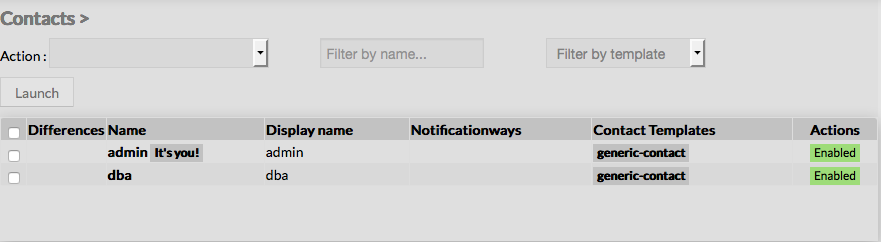
When accessing the Contacts Configuration Page, a Contact Table is displayed, listing all existing contact objects.

This table contains the following informations :

  • a check box to select one or more contacts
  • Differences
  • Name of the contact
  • Display Name of the contact
  • Notification ways
  • Contact Templates 
  • Actions
    States

This page also provides, on the left, an action Menu, used to :

  • Add a new Contact
  • Show Contacts detected by Automatic Modules
  • Accept differencies on selected elements


On the top of the table, A tool bar let Administrators the ability to :

  • Delete or Duplicate selected Contacts
  • Filter List by Name
  • Filter List by Template applied on Contacts

...

Generic

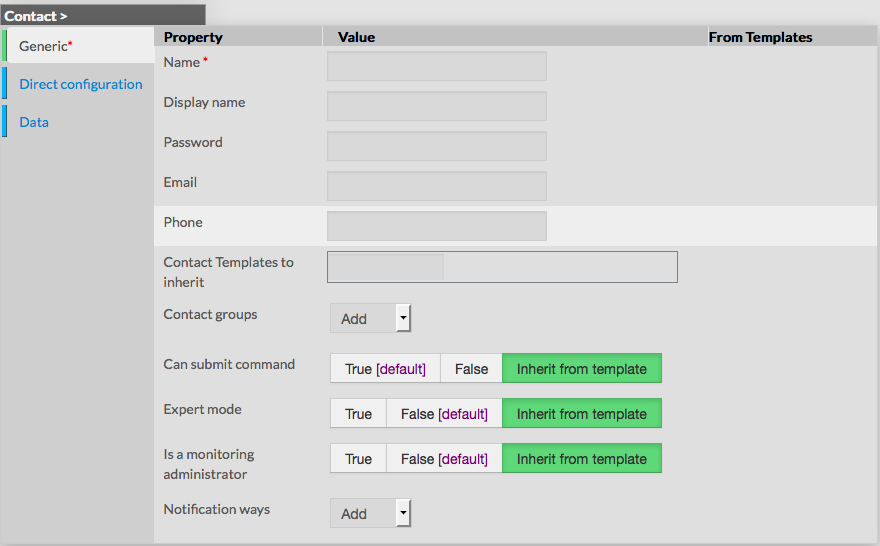
Generic properties contains the minimum properties requiered to create an Contact :

  • Name
    • the name of the Contact

    • this field is requiered

  • Display name
    • the name that will be displayed in the visualization interface and in notifications
  • Password
    • the Password that the user will use to connect to the visualization interface
    • the password is hidden when editing the contact
  • Email
    • email address of the contact, used to notify him
  • Phone
    • phone of the contact, used to notify by pager for example
  • Contact Templates to inherit
    • list of templates the contact should inherit from
    • templates name are suggested when starting to fill the field
  • Contact groups
    • List of contact groups the contact should be in
    • more than one contact groups can be selected
  • Can submit command
    • option used to determine if user will be able to schedule a new check through the visualization interface
  • Expert mode
    • option used to determine if the user will be able to see the expert mode in the visualization interface
  • Is a monitoring Administrator
    • option used to give the user Administrators rights, ie UI Configuration Access
  • Notification ways
    • list of notification ways used to notify the contact (by email, by pager etc.)

Direct Configuration


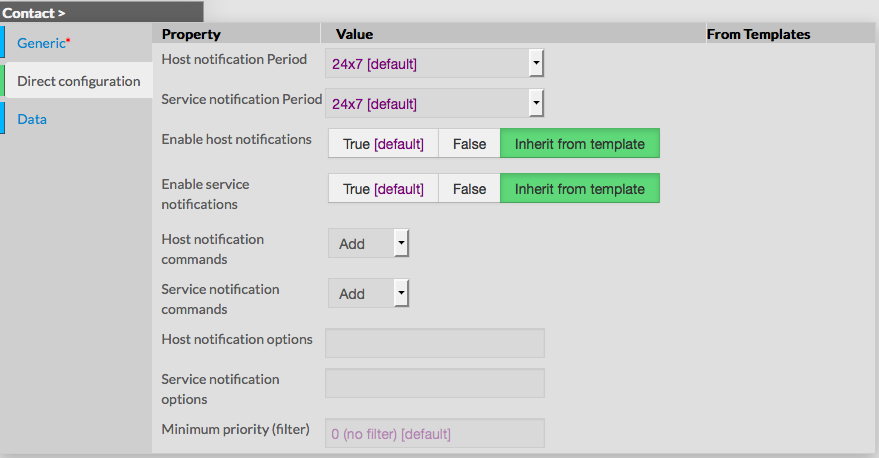
This category is used to define properties linked to the notifications, like Periods, Type of notification and Options.

  • Host notification period 
    • define the period within contact will be notified about host alerts
    • the value must be selected from the available time period list
    Service notification period 
  • CHeck notification period (attention service dans l'appli)
    • define the period within contact will be notified about service alerts
    • the value must be selected from the available time period list
  • Enable host notifications
    • determines if notifications should be sent about host alerts
    • default value is taken from Contact template
  • Enable
    service notifications
    check notifications (attention service dans l'appli)
    • determines if notifications should be sent about service alerts
    • default value is taken from Contact template
  • Host notification commands
    • this option let the ability to select the command that will be used to notify the contact about host alerts
    • multiple notification command can be selected
    • default value is taken from contact template
    Services
  • Checks notification commands (attention Service dans l'appli)
    • this option let the ability to select the command that will be used to notify the contact about service alerts
    • default value is taken from contact template
  • Host notification options
    • this option is used to define host states for which notifications should be sent
    • value is a comma separated list of flags
    • valid options are :
      • d : down
      • u : unreachable
      • r : recovery
      • f : flapping
      • s : scheduled downtime
      • n : none
    • default value is taken from contact template
    • if no flag is present, contact will be notified according to host properties
    Service
  • Check notification options (attention service dans l'appli)
    • this option is used to define check states for which notifications should be sent
    • value is a comma seperated list of flags
    • valid options are :
      • w : warning
      • u : unknown
      • c : critical
      • r : recovery
      • f : flapping
      • n : none
    • default value is taken from contact template
    • if no flag is present, contact will be notified according to service properties
  • Minimum priority
      = min business impact ?
    • this value is used to notify the contact only if priority is equal or higher the filter value

note : Minimum priority is very useful when a contact wants to be notified only for critical systems like Gateway, Electrical room etc.


Data

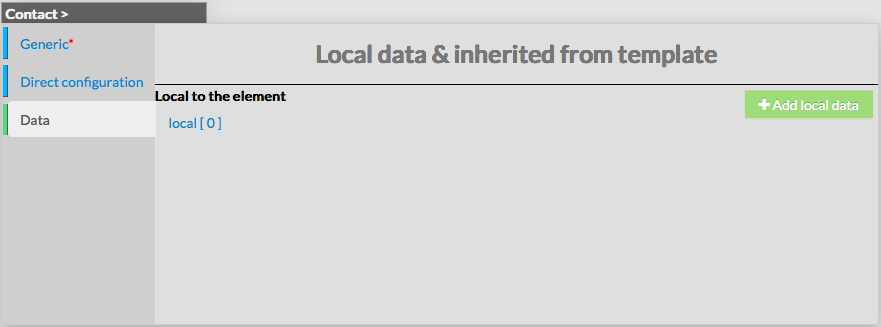
Data is used to show and create variables used by Shinken Enterprise to execute commands.

Those values are also called Macros.

For a contact, data is useful to set values that will be used when notifying.

As shown on the picture, when creating a new contact, no data are available, even if the new contact inherit from template.

You can add local data by using the button.

Data consists of key / value pairs.


...