Résumé
Cette page décrit le contenu du pack MySQL livré permettant de superviser une base MySQL. Les checks du packs supervisent différents indicateurs, comme par exemple:
- Le temps de réponse
- Le nombre de connexions
- Le ratio de cache
- etc...
Plusieurs étapes de configuration sont nécessaires afin de superviser une base de données MySQL:
- Analyser ce qui est disponible dans le pack MySQL livré avec Shinken Entreprise
- Mettre en place un compte MySQL utilisé par les scripts de supervision
- Tester la connexion à la base de données
- Configurer l'hôte Shinken pour démarrer la supervision de la base
Abstract
This document describes how you can monitor an MySQL database server such as:
- Connection time
- The number of connections
- Cache hit
- etc
There are some steps you’ll need to follow in order to monitor a new database machine:
- Understand what is already available (in the Shinken Entreprise installation)
- Setup the MySQL user account
- Test the connection to the database
- Setup your server host definition
| Panel | ||||
|---|---|---|---|---|
| ||||
|
What is already available in the Shinken Installation
Contenu du pack MySQL
Pour faciliter la supervision de bases de données MySQL, certaines étapes de configuration sont déjà effectuées par l'installation de Shinken:
To make your life a bit easier, a few configuration tasks have already been done for you:
Installation of- Le script
- check_mysql_health
- utilisé par la supervision est installé dans /var/lib/shinken/libexec/check_mysql_health
- Des modèles préconfigurés utilisables sont installés dans Shinken Entreprise (ils seront décrits en détail dans la suite de cette documentation)
| Tip | ||
|---|---|---|
| ||
| We suppose here that the MySQL server you want to monitor is named On suppose dans la suite de cette documentation que le serveur MySQL à superviser est un serveur Linux appelé "srv-lin-1 and is a Linux. Please change the configuration and commands according with the real name of your server. |
Setup the MySQL user account
". Il faudra donc adapter les commandes qui utilisent ce nom d'hôte à votre infrastructure. |
Mise en place d'un compte de supervision MySQL
Pour pouvoir superviser la base de données, il faut d'abord créer un compte sur la base MySQL qui va être utilisé par Shinken pour récuperer les informations nécessaires à la supervision.
Pour commencer, on se connecte avec l'utilisateur root sur la base de données (changer "password" par le mot de passe root de la base de données)Connect with a root account on your MySQL database. change ‘password’ with your mysql root password:
| Code Block | ||
|---|---|---|
| ||
lin-srv-1:# mysql -u root -ppassword |
And create a shinken userOn créée ensuite un utilisateur "shinken" (remplacer "shinkenpassword" par un mot de passe au choix à utiliser pour l'utilisateur shinken):
| Code Block | ||
|---|---|---|
| ||
GRANT usage ON *.* TO 'shinken'@'%' IDENTIFIED BY 'shinkenpassword'; |
It’s a good thing to change the shinkenpassword to another password. Then you need to update the /etc/shinken/resource.d/mysql.cfg
On change ensuite dans Shinken les données globales utilisées par le pack MySQL qui définissent l'utilisateur et le mot de passe à utiliser pour la connexion à la base de données. Dans /etc/shinken/resource.d/mysql.cfg:
| Code Block |
|---|
$MYSQLUSER$=shinken $MYSQLPASSWORD$=shinkenpassword |
Test the connection
Vérification de la connexion à la base de données
Une fois l'utilisateur défini dans la base de données MySQL, on peut vérifier que la connexion est opérationnelle avec la commande suivanteTo see if the connection to the MySQL server is ok, just launch :
|
What is checked with the templates
Modèles d'hôtes disponibles dans le pack MySQL
Le pack MySQL livre des modèles d'hôtes préconfigurés qui peuvent être utilisés avec très peu de configuration manuelle. Parmi ces modèles d'hôtes, certains sont visibles par les administrateurs de SI (modèles publics) tandis que d'autres plus précis ne sont visibles que pour les administrateurs Shinken.
Modèles d'hôtes publics
Public templatesmysql
This is the very basic MySQL template allowing to know if your MySQL database server is running and usable.
Every MySQL templates (except Mysql-connection-method) use it as a parent template.
| Check | Detail | Check range | Default Warning | Default Critical |
|---|---|---|---|---|
| connection | Time to connect to the server | 0 to n | 1 | 5 |
| restart | Time the server is running | 0 to n | 10: | 5: |
| slow_queries | slow_queries | 0 to n | 0.1 | 1 |
| tmp_disk_tables | Percent of temp tables created on disk | 0 to n | 25 | 50 |
mysql-full
Contains all MySQL host templates listed in the Shinken Adminstrators templates.
| Warning | ||
|---|---|---|
| ||
Using the mysql-full template will require a lot of resources on your poller daemon. We advise to use only the needed templates. |
Shinken Administrator templates (can't be seen by other users)
mysql-connection-method
This template describes the method to connect to MySQL server. Every MySQL templates use it as a parent template.
mysql-cluster
This template gives informations about the MySQL cluster.
mysql-innoDB
This template gives informations about innoDB buffers and logwaits.
| Check | Detail | Check range | Default Warning | Default Critical |
|---|---|---|---|---|
| bufferpool_hitrate | InnoDB buffer pool hitrate | 0 to n | 99: | 95: |
| bufferpool_wait_free | InnoDB buffer pool waits for clean page available | 0 to n | 1 | 10 |
| log_waits | InnoDB log waits because of a too small log buffer | 0 to n | 1 | 10 |
mysql-MyISAM
This template gives informations about MyISAM key cache hitrate.
| Check | Detail | Check range | Default Warning | Default Critical |
|---|---|---|---|---|
| keycache-hitrate | MyISAM key cache hitrate | 0 to n | 99: | 95: |
mysql-performance
This template gives informations about the global server performance.
| Check | Detail | Check range | Default Warning | Default Critical |
|---|---|---|---|---|
| index_usage | Usage of indexes | 0 to n | 90: | 80: |
| long_running_procs | long running processes | 0 to n | 10 | 20 |
| table_lock_contention | Table lock contention | 0 to n | 1 | 2 |
| tablecache_hitrate | Table cache hitrate | 0 to n | 99: | 95: |
| threadcache_hitrate | Hit rate of the thread-cache | 0 to n | 10 | 20 |
mysql-query-cache
This template gives informations about query cache.
| Check | Detail | Check range | Default Warning | Default Critical |
|---|---|---|---|---|
| qcache_hitrate | Query cache hitrate | 0 to n | 90: | 80: |
| qcache_lowmem_prunes | Query cache entries pruned because of low memory | 0 to n | 1 | 10 |
mysql-usage
This template gives informations about MySQL server usage.
| Check | Detail | Check range | Default Warning | Default Critical |
|---|---|---|---|---|
| open_files | Percent of opened files | 0 to n | 80 | 95 |
| threads_connected | Number of currently open connections | 0 to n | 10 | 20 |
How to
Configuration of Mysql-connection-method host template
Click on Hosts then on Hosts Templates in the Elements menu
| Panel |
|---|
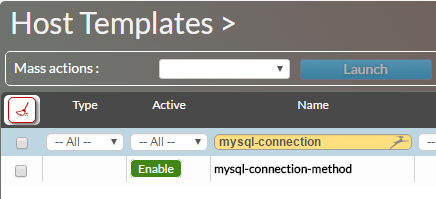
In the Name field, type mysql-connection.
Then clic on mysql-connection-method
| Panel |
|---|
|
Clic on Data tab
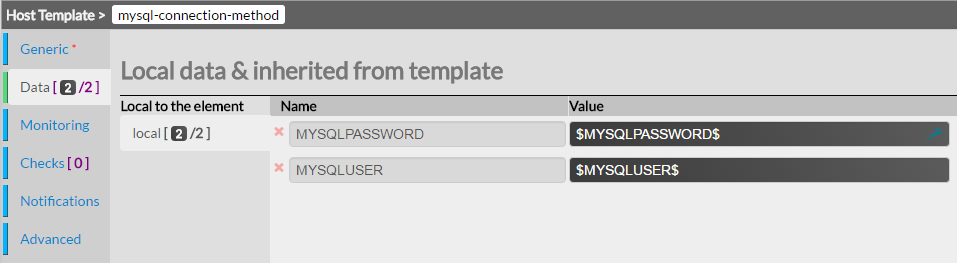
You can setup the following DATA :
- MYSSQLPASSWORD : the MySQL password of the user used to connect to database
- MYSQLUSER : the MySQL user name used to connect to database
| Panel |
|---|
|
| Tip | ||
|---|---|---|
You can also set the user and password directly in /etc/shinken/resource.d/myslq.cfg
|
Attach a MySQL template to you host
Clic on Hosts in the Elements menu
| Panel |
|---|
Add the chosen MySQL host template to the Host Templates to inherit field.
For example the MySQL host template.
| Panel |
|---|
|

Click on the Data tab
| Panel |
|---|
|
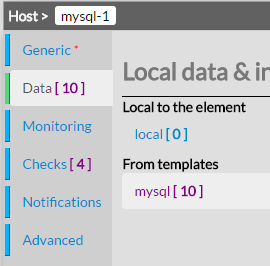
Check if the Following data are ok.
| Panel |
|---|
|