Abstract
This document describes how you can monitor an Oracle database server such as:
- Connection time
- A recent restart
- The number of connections
- Cache hit
- Dead lock
- etc
There are some steps you’ll need to follow in order to monitor a new database machine:
- Understand what is already available (in the Shinken Entreprise installation)
- Setup the oracle user account
- Test the connection to the database
- Setup your server host definition
| Panel | ||||
|---|---|---|---|---|
| ||||
|
What is already available in the Shinken Installation
To make your life a bit easier, a few configuration tasks have already been done for you:
- Installation of Oracle instant Client
- Installation of check_oracle_health plugin : /var/lib/shinken/libexec/check_oracle_health
- Several host templates are ready to be used
| Tip | ||
|---|---|---|
| ||
| We suppose here that the Oracle machine you want to monitor is named srv-lin-1 and is a linux. Please change the configuration and commands according with the real name of your server. |
Setup the oracle user account
Create the database user
| Tip | ||
|---|---|---|
| ||
You will need to configure the user for all your oracle databases. |
Connect to your database as sysadmin on the oracle server :
 |
|
And then create your shinken account on the database:
|
|
And for old 8.1.7 database only:
|
|
Test the connection
To see if the connection to the database named PROD is ok, just launch :
|
| |||||
|
|
| Tip | ||
|---|---|---|
| ||
The DATABASES data you will find in the host template matches to the SID of you Oracle database. |
|
| language | bash |
|---|
What is checked with the templates
Public templates
Oracle
This is the very basic Oracle template allowing to know if your Oracle database is running and usable.
| Check | Detail | Check range | Default Warning | Default Critical |
|---|---|---|---|---|
| tnsping | listener | |||
| process-usage | Percentage of max possible processes | 0% to 100% | 80 | 90 |
| sga-shared-pool-free | Free Memory in the Shared Pool | 0% to 100% | 10: | 5: |
| tablespace-usage | Used diskspace in the tablespace | 0% to 100% | 90 | 98 |
| corrupted-blocks | Number of corrupted blocks in database | 0 to n | 1 | 10 |
| invalid-objects | Sum of faulty Objects, Indices, Partitions | 0 to n | 0.1 | 0.1 |
Oracle-full
Contains all Oracle host templates listed in the Shinken Adminstrators templates.
| Warning | ||
|---|---|---|
| ||
Using the Oracle-full template could lead to slow issues. You should use the really needed templates instead. |
Shinken Administrator templates
Oracle-connection-method
This template describes the method to connect to an Oracle database. Every Oracle templates use it as a parent template.
| Info | ||
|---|---|---|
| ||
The parameters common to every Oracle server monitored shoud be setted in the oracle-connection-method host template. |
Oracle-datafile
This template gives informations about the datafile availability.
| Check | Detail | Check range | Default Warning | Default Critical |
|---|---|---|---|---|
| datafile-io-traffic | Sum of IO-Operationes from Datafiles per second | n/sec | 1000 | 5000 |
| datafiles-existing | Percentage of max possible datafiles | 0% to 100% | 80 | 90 |
Oracle-enqueue
This template gives informations about enqueue and possible problem related to un-indexed forein keys.
| Check | Detail | Check range | Default Warning | Default Critical |
|---|---|---|---|---|
| enqueue-contention | Enqueue wait/request-Ratio | 0% to 100% | 1 | 10 |
| enqueue-waiting | How many percent of the elapsed time since the last run has an Enqueue spend with waiting | 0% to 100% | 0.00033 | 0.00033 |
Oracle-events
This template give informations about event waiting (typically session in waiting status).
| Check | Detail | Check range | Default Warning | Default Critical |
|---|---|---|---|---|
| event-waits | Waits/sec from system events | n/sec | 10 | 100 |
| event-waiting | How many percent of the elapsed time has an event spend with waiting | 0% to 100% | 0.1 | 0.5 |
Oracle-flash-recovery-area
This template allow to know about the used diskspace in the flash recovery area.
| Note |
|---|
To be used only if you are using flash recovery area. |
| Check | Detail | Check range | Default Warning | Default Critical |
|---|---|---|---|---|
| flash-recovery-area-usage | Used diskspace in the flash recovery area | 0% to 100% | 90 | 98 |
Oracle-latch
This template gives informations about latches. Latches are low level serialization mechanisms used to protect shared data structures in the SGA.
| Check | Detail | Check range | Default Warning | Default Critical |
|---|---|---|---|---|
| latch-contention | Latch misses/gets-ratio. With –name a Latchname or Latchnumber can be passed over. (See list-latches) | 0% to 100% | 1 | 2 |
| latch-waiting | How many percent of the elapsed time since the last run has a Latch spend with waiting | 0% to 100% | 0.1 | 1 |
Oracle-pga
This template allows to know the percentage of sorts that are done to disk vs. in-memory.
| Check | Detail | Check range | Default Warning | Default Critical |
|---|---|---|---|---|
| pga-in-memory-sort-ratio | Percentage of sorts in the memory | 0% to 100% | 99: | 90: |
Oracle-redo
This template gives complete informations about the redolog.
| Check | Detail | Check range | Default Warning | Default Critical |
|---|---|---|---|---|
| switch-interval | Interval between RedoLog File Switches | 0 to n | 600: | 60: |
| retry-ratio | Retry-Rate in the RedoLog Buffer | 0% to 100% | 1 | 10 |
| redo-io-traffic | Redolog IO in MB/sec | n/sec | 199 | 200 |
Oracle-rman
This template indicates if there are any RMAN backup problem in the last 3 days.
| Note |
|---|
To be used only if you are using RMAN. |
| Check | Detail | Check range | Default Warning | Default Critical |
|---|---|---|---|---|
| rman-backup-problems | Number of RMAN-errors during the last three days | 0 to n | 1 | 2 |
Oracle-rollback-segment
This template gives informations about the Rollback segment. Rollback segment record the actions of transactions in the event that a transaction is rolled back.
| Check | Detail | Check range | Default Warning | Default Critical |
|---|---|---|---|---|
| roll-header-contention | Rollback Segment Header Contention | 0% to 100% | 1 | 2 |
| roll-block-contention | Rollback Segment Block Contention | 0% to 100% | 1 | 2 |
| roll-hit-ratio | Rollback Segment gets/waits Ratio | 0% to 100% | 99: | 98: |
| roll-extends | Rollback Segment Extends n | n/sec | 1 | 100 |
| roll-wraps | Rollback Segment Wraps n | n/sec | 1 | 100 |
Oracle-sga
This template gives complete information about the SGA (System Global Area).
| Check | Detail | Check range | Default Warning | Default Critical |
|---|---|---|---|---|
| sga-data-buffer-hit-ratio | Hitrate in the Data Buffer Cache | 0% to 100% | 98: | 95: |
| sga-library-cache-gethit-ratio | Hitrate in the Library Cache (Gets) | 0% to 100% | 98: | 95: |
| sga-library-cache-pinhit-ratio | Hitrate in the Library Cache (Pins) | 0% to 100% | 98: | 95: |
| sga-library-cache-reloads | Reload-Rate in the Library Cache | n/sec | 10 | 10 |
| sga-dictionary-cache-hit-ratio | Hitrate in the Dictionary Cache | 0% to 100% | 95: | 90: |
| sga-latches-hit-ratio | Hitrate of the Latches | 0% to 100% | 98: | 95: |
| sga-shared-pool-reloads | Reload-Rate in the Shared Pool | 0% to 100% | 1 | 10 |
Oracle-soft-parse
This template gives information about soft parse. It can give you an idea if an application and corresponding SQL statements are being used inefficiently
| Check | Detail | Check range | Default Warning | Default Critical |
|---|---|---|---|---|
| soft-parse-ratio | Percentage of soft-parse-ratio | 0% to 100% | 90: | 98: |
Oracle-stale-statistics
This template allows to know about stale statistics.
| Check | Detail | Check range | Default Warning | Default Critical |
|---|---|---|---|---|
| stale-statistics | Sum of objects with obsolete optimizer statistics | n | 10 | 100 |
Oracle-sysstat
This template allows you know the change of sysstat values over time.
| Check | Detail | Check range | Default Warning | Default Critical |
|---|---|---|---|---|
| sysstat | Changes/sec for any value from v$sysstat | n/sec | 10 | 100 |
Oracle-tablespace
This template gives informations about tablespace such as fragmentation, if it's possible to allocate the next extent and potentially when a tablespace will be full.
| Check | Detail | Check range | Default Warning | Default Critical |
|---|---|---|---|---|
| tablespace-fragmentation | Free Space Fragmentation Index | 100 to 1 | 30: | 20: |
| tablespace-can-allocate-next | Checks if there is enough free tablespace for the next Extent | |||
| tablespace-remaining-time | Sum of remaining days until a tablespace is used by 100%. The rate of increase will be calculated with the values from the last 30 days. (With the parameter –lookback different periods can be specified) | Days | 90: | 30: |
Oracle-top10-stats
This template give global statistics.
| Check | Detail | Check range | Default Warning | Default Critical |
|---|---|---|---|---|
| seg-top10-logical-reads | Sum of the userprocesses under the top 10 logical reads | n | 1 | 9 |
| seg-top10-physical-reads | Sum of the userprocesses under the top 10 physical reads | n | 1 | 9 |
| seg-top10-buffer-busy-waits | Sum of the userprocesses under the top 10 buffer busy waits | n | 1 | 9 |
| seg-top10-row-lock-waits | Sum of the userprocesses under the top 10 row lock waits | n | 1 | 9 |
Oracle-usage
This template indicates the percentage of maximum possible sessions and how many users are connected.
| Check | Detail | Check range | Default Warning | Default Critical |
|---|---|---|---|---|
| session-usage | Percentage of max possible sessions | 0% to 100% | 80 | 90 |
| Connected users | Number of currently connected users | 0 to n | 50 | 100 |
How to
Configuration of Oracle-connection-method host template
Clic on Hosts in the Elements menu | 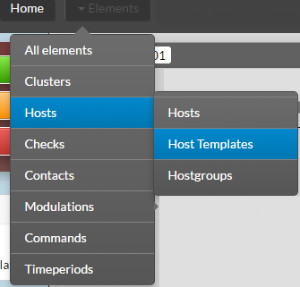 |
In the Name field, type oracle. Then clic on Oracle-connection-method | 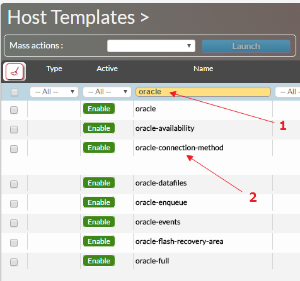 |
| Clic on Data tab | |
You can setup the following DATA :
|
|
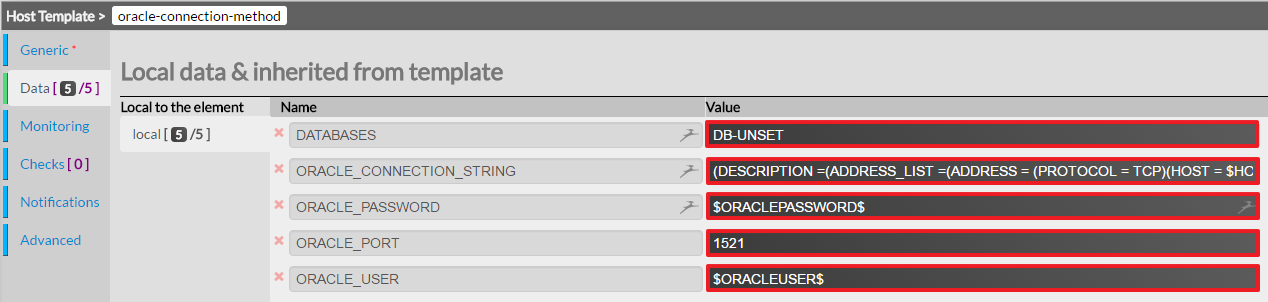
The parameters specifics to each server, such as database name (AKA SID) for example, has to be done in the host's data itself.
| Tip | ||
|---|---|---|
| ||
It's a best practice to use the same database monitoring user on every Oracle server monitored. Doing so, you can configure the database user/password only once in the host template oracle-connection-method. |
Attach an oracle template to you host
| Clic on Hosts in the Elements menu | 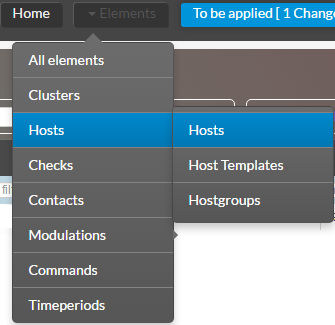 |
Add the Oracle choosen host template to the Host Templates to inherit field. For example the Oracle host template. |  |
Clic on the Data tab | 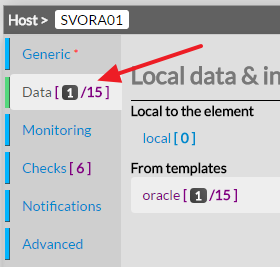 |
Look for the field DATABASES in the From templates datas | |
Type the name of the database to be monitoring |  |
| Check if the Following data are ok. |  |
| Tip | ||
|---|---|---|
| ||
You can monitor multiple database on the same host in typing the name of the database SID separated by a comma. Exemple : DB1,DB2,DB3 |
How to create you own template
| Info |
|---|
TODO |
create you own pack!
| Info |
|---|
TODO |
Use your own plugin
| Info |
|---|
TODO |