...
In most cases you'll use Shinken Enterprise to monitor your hosts and checks using regularly scheduled :ref:`active checks <thebasics/activechecks>`active checks. Active checks can be used to "poll" a device or check for status information as often as needed. Shinken Enterprise also supports a way to monitor hosts and checks passively instead of actively. They key features of passive checks are the following:
...
- Asynchronous by nature, they cannot or would not be monitored effectively by polling their status on a regularly scheduled basis, like backup or batchs
- Located behind a firewall and cannot be checked actively from the monitoring host
...
- Submitting check results that happen directly within an application without using an intermediate log file(syslog, event log, etc.).
Passive checks are also used when configuring :ref:`distributed <advanced/distributed>` or :ref:`redundant <advanced/redundancy>` monitoring installations.
How Passive Checks Work
Here's how passive checks work in more detail.
The processing of active and passive check results is essentially the same. This allows for seamless integration of status information from external applications with Shinken Enterprise. | 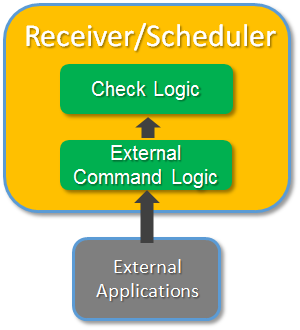 |
...
In order to enable passive checks in Shinken Enterprise, you'll need to do the following:
- Set accept_passive_service_checks directive is set to 1 (in shinken.cfg).
- Set the passive_checks_enable" directive in your host and check definitions is set to 1True.
If you want to disable processing of passive checks on a global basis, set the accept_passive_check_checks directive to 0.
If you want to disable passive checks for just a few hosts or checks, use the "passive_checks_enabled" directive in the host and/or check definitions to do so.
Submitting Passive check
...
Results
External applications can submit passive check check results to Shinken Enterprise by writing a PROCESS_check_CHECK_RESULT external command to the external command pipe, which is essentially a file handle that you write to as you would do with a file.
The format of the command is the following : "[<timestamp>] PROCESS_check_CHECK_RESULT;<host_name>;<svc_description>;<return_code>;<plugin_output>" where...
- timestamp is the time in time_t format (seconds since the UNIX epoch) that the check check was perfomed (or submitted). Please note the single space after the right bracket.
- host_name is the short name of the host associated with the check in the check definition
- svc_description is the description of the check as specified in the check definition
- return_code is the return code of the check (0=OK, 1=WARNING, 2=CRITICAL, 3=UNKNOWN)
- plugin_output is the text output of the check check (i.e. the plugin output)
A check must be defined in Shinken Enterprise before it will accept passive check results for it! Shinken Enterprise will ignore all check results for checks that have not been configured before it was last (re)started.
...
External applications can submit passive host check results to Shinken Enterprise by writing a PROCESS_HOST_CHECK_RESULT external command to the external command file.
The format of the command is as follows: "[<timestamp>]PROCESS_HOST_CHECK_RESULT;<host_name>;<configobjects/host_status>;<plugin_output>" where...
- timestamp is the time in time_t format (seconds since the UNIX epoch) that the host check was perfomed (or submitted). Please note the single space after the right bracket.
- host_name is the short name of the host (as defined in the host definition)
- host_status is the status of the host (0=UP, 1=DOWN, 2=UNREACHABLE)
- plugin_output is the text output of the host check
A host must be defined in Shinken Enterprise before you can submit passive check results for it! Shinken Enterprise will ignore all check results for hosts that had not been configured before it was last (re)started.
Once data has been received by the Arbiter process, either directly or through a Receiver daemon, it will forward the check results to the appropriate Scheduler to apply check logicYou can look at the Enable webservice for passive checks about how to send external checks to the receivers.
Passive Checks and Host States
...