Organisation des pages |
| Chaque page de la configuration d'éléments est organisée de la même manière . Elle est divisée en |
Layout of the edition page |
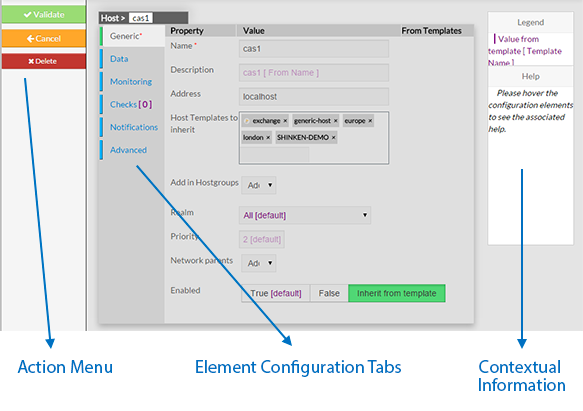
| Every page for elements configuration are organized in the same way. The Layout is devided in 3 sections : - Menu Action Menu
- Element Configuration Tabs
- It contain all information of an element.
- Labels de configuration d'éléments
- il contient toutes les informations d'un élément.
- Aide et information contextuelleContextual Information and Help
|
 |
| | |
| Menu |
This Menu provides to the Administrator the common actions to Validate, Cancel, or Delete the selected object. - When validating a configuration, the object will be placed in the list of Changes to Apply.
- If the Administrator click on the Cancel button, every changes made after previous saving, will be lost.
- If the Delete button is clicked, a confirmation popup will be disaplayed,
- asking the Administrator to validate or cancel the deletion of object.
|
| | |
Element Configuration Tabs |
| he type of the element and its name are displayed on the top of the Area. 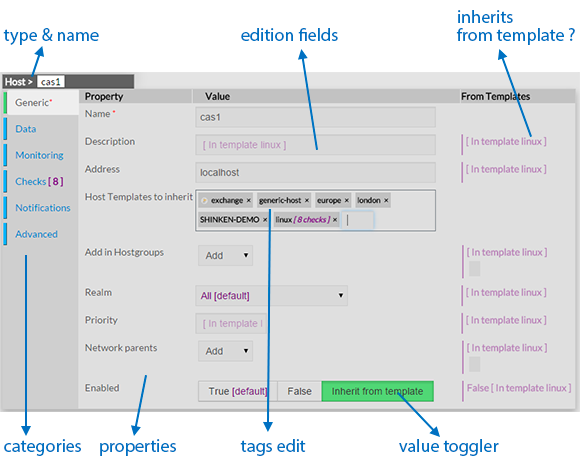 Image Removed Image Removed
As they are numerous, elements properties are split by category among tabs. - Tabs list will be differtent following the type of the selected element.
- Tab layout is always the same:
- A list of properties linked to the category
- A row of this list contains altways 3 columns:
- Name of Property
- Value of Property
- Value inherited from template
( only for hosts, checks and contact)
Note: Values displayed in purple are by default value or inherited from a template.
- Values Editing Field can be of different kind:
|
|  Image Removed Image Removed |
- Type the value
- Typed caracters may match an existing tag:
- If yes, list below will show you possible values.
Clicking or pressing enter will validate the choice. - If not, you can create a new tag by pressing the space bar.
|  Image Removed Image Removed |
|
Ce menu propose l'accès aux actions principales pour valider,annuler ou supprimer l'objet sélectionné. - En validant une configuration, les objets seront placés dans la liste des changements à valider .
- Si on clicke sur le bouton annuler,chaque changement fait après la dernière sauvegarde sera perdu .
- Si on clicke sur le bouton supprimer, une fenêtre de confirmation sera affichée demandant la confirmation de l'action,
|
| | |
Labels de configuration d'éléments |
| Le type et le nom de l'élément est présenté dans cet écran en haut . Image Added Etant nombreuses, les propriétés des éléments sont répartis par catégorie dans les labels . - la liste des labels sera différente en fonction du type d'élément sélectionné .
- la présentation est toujours la même :
- une liste des propriétés reliées à la catégorie
- une ligne contient toujours les 3 même colonnes
- Nom de la propriété
- Valeur de la propriété
- Valeur héritée du template
( seulement pour les hôtes, checks et contacts )
Note: Les valeurs en mauve sont celles par défaut ou héritées d'un template .
- Les champs éditables peuvent être de différent type
|
| Image Added |
- saisir la valeur
- les caractères saisis peuvent correspondre à un tag existant:
- si oui, une liste propose les valeurs possibles.
. - si non, vous pouvez créer le nouveau tag en appuyant sur la barre d'espace .
| Image Added |
- Ajout par liste déroulante
- choisir dans la liste le tag à sélectionner
Note: vous pouvez créer un tag pour cette valeur - Tag Adding Dropdown list
- Select in the dropdown list the tag you want
Note: You can't create tag for this value. | 
|
- Dropdown list
- Select int the dropdown list the value you want
Note: Only one value is possible for this fied. | 
|
- Toggle buttons
- Select one of the 3 possibles values (True, False, Inherit)
Note: the green one is the one selected. | 
|
- Move the cursor up to the expected value.
| 
|
| | |
Contextual Informations |
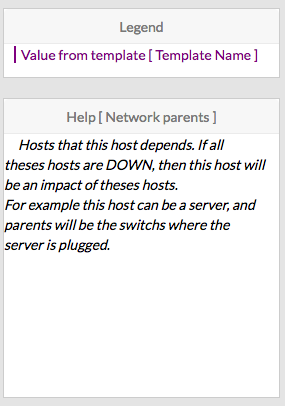
This panel is used to help the Administrator, by showing two kind of informations : - Legend : information to explain the display of the page.
- Contextual Help :
- Move the mouse on property you want some information
- The Help Area will contain the description text and some tips
for the edition of the property
|  |