- Sélectionner un hôte ou un nom de cluster dans la liste.
- Le nombre total d'hôtes et de clusters apparaîtra près de "Sélectionner Hôte
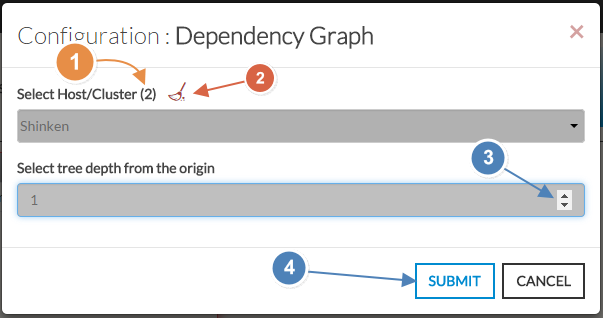
Select a host or cluster name in the first list.
The total number of hosts and clusters will be displayed near "Select Host- If no host selected yet, the list of available hosts will automatically opened.
- You can search (filter) for a host name, typing into the input on top of the list.
Youcan clean the current selection by clicking on the swipe icon (2).- si aucun n'est déjà sélectionné, la liste de tous les hôtes disponibles apparaîtra automatiquement
- Vous pouvez faire un filtre sur un nom ou un type en saisisant directement dans la liste (3).
- Vous pouvez nettoyer la sélection en clickant sur le balai (2)
- Depth of the tree.
- By default, the depth is set to 5, but you can change it as you want (3) between 1 to 10.
- When configured, press the SUBMIT button (4).
| 
|