Principe
Visualiser tous les métrics sur les checks disponibles pour un hôte
Overview
Visualize all metrics availables of checks for the opened host .
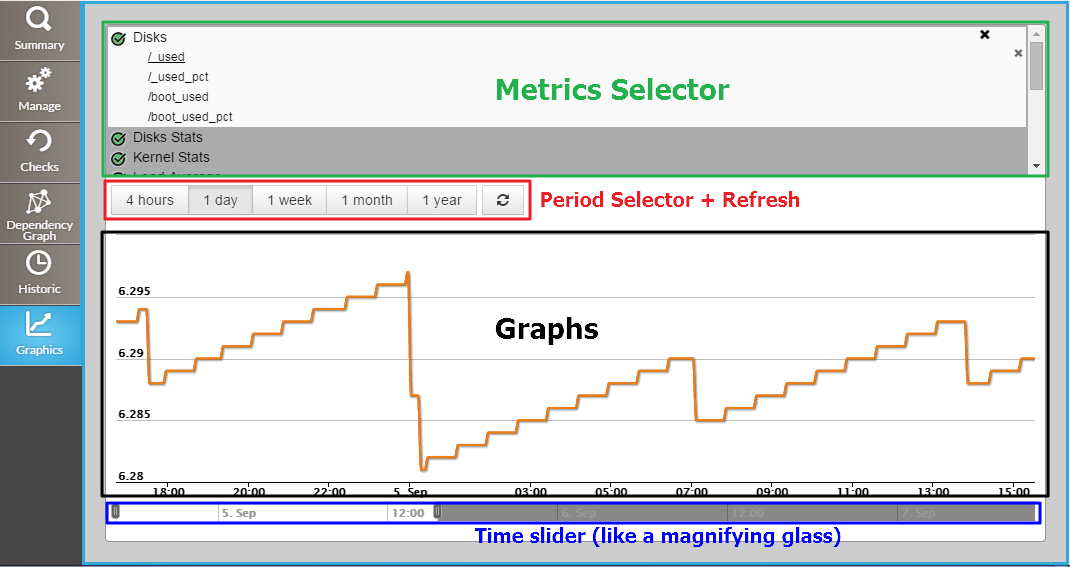
Metrics Selector
...
Sélection des métriques
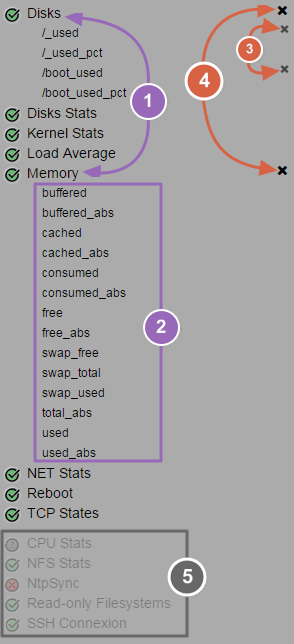
(1) Click on check name to develop its list of metrics (2) Click on desired metrics name to select them (3) To deselect a metric, click on the cross on the right of the metric name (4) To deselect all metrics from a check, click on the cross on the right of the check name (5) Checks without metrics are dimmed at the end of list |
|
...
 Note that if you came from the Checks Tab, the check will be already developed in the metrics selector.
Period selector + Refresh
You can choose different periods for the displayed graph among , by default, the value is "1 day".
On the right of the period buttons, a refresh button is available, click on it to refresh the graph with last values.
Graphs
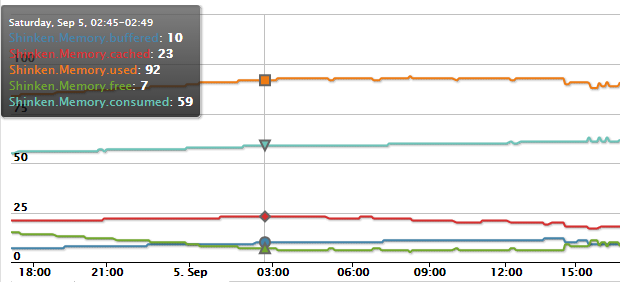
You can display multiple metrics on the same graph. Each metric is drawn in a different color.
...
The tooltip displays values for each metric for a precise date and time (corresponding to the mouse position),
Time slider
Below the graph, two sliders allow to adapt the current view on the desired time period.
...