| Scroll Ignore | ||||||||||||||
|---|---|---|---|---|---|---|---|---|---|---|---|---|---|---|
| ||||||||||||||
|
Concept
Le module Graphite-Perfdata permet d'envoyer et de stocker les métriques dans un serveur Graphite ( via Carbon ). Il est possible de modifier des paramètres via le fichier de configuration ci-dessous.
Les métriques sont associées aux UUID des éléments de Shinken. Cela permet d'éviter d'avoir à réécrire toutes les métriques suite à la modification du nom d'un hôte ou d'un check.
Pour faciliter la consultation des métriques avec des outils externes à Shinken, le module fournit une API qui permet de récupérer les relations UUID ↔ nom :
- Il peut envoyer les informations sur les éléments modifiés lors d'un chargement de configuration au serveur de métrologie.Doit être unique
- Il permet la récupération des relations UUID ↔ nom via un serveur qui fournit les données d'inventaire.
Pour assurer la transition vers ces mécanismes sans interruption de service, le module stocke également l'inventaire en base de données.
Cela permet d'assurer une compatibilité avec le fonctionnement historique de Shinken avec Graphite.
Cet enregistrement en base de données est voué à disparaître.
Activation du module
Le module Graphite-Perfdata est un module qui peut être activé seulement sur le démon Broker.
- L'activation du module s'effectue en ajoutant le nom de ce module dans le fichier de configuration du démon Broker.
- Pour ce faire, ouvrer le fichier de configuration du Broker à l'emplacement /etc/shinken/brokers/nom_du_broker.cfg, et ajouter le nom de votre du module "
Graphite-Perfdata".
Exemple : par défaut, nous livrons Shinken livre un module dont le nom est "Graphite-Perfdata":
| Code Block | ||||
|---|---|---|---|---|
| ||||
define broker {
    ...
    modules                   Module 1, Module 2, Module 3, Graphite-Perfdata
    ...
} |
Pour prendre en compte le changement de configuration, redémarrer l'Arbiter:
| Code Block | ||||
|---|---|---|---|---|
| ||||
service shinken-arbiter restart |
Configuration
La configuration du module se trouve par défaut dans le fichier /etc/shinken/modules/graphite.cfg
- Vous trouverez aussi systématiquement un Un exemple dans /etc/shinken-user-example/configuration/daemons/brokers/modules/graphite_perfdata/graphite_perfdata-example.cfg
Exemple de fichier de configuration
| Code Block | ||||
|---|---|---|---|---|
| ||||
#================================================================================ |
# Graphite-Perfdata |
#================================================================================ |
# Daemons that can load this module: |
# - broker (to save sla information into a mongodb database) |
# This module send metrics into a graphite (carbon) server |
# CFG_FORMAT_VERSION 1
#================================================================================ |
define module { |
# ┌─────────────────────────────────────────────────────────────────────────────────────────────────────┐ # |
# │ ────────────────────────────────────── MODULE IDENTITY ────────────────────────────────────── │ # |
# └─────────────────────────────────────────────────────────────────────────────────────────────────────┘ # |
# ─── Module name [ Must be unique ] [ MANDATORY ] ─── |
# ─── ─── |
module_name Graphite-Perfdata |
# ─── Module type [ Do not edit ] [ MANDATORY ] ─── |
# ─── ─── |
module_type graphite_perfdata |
# ┌─────────────────────────────────────────────────────────────────────────────────────────────────────┐ # |
# │ ────────────────────────────────────── STORED METRICS ─────────────────────────────────────── │ # |
# └─────────────────────────────────────────────────────────────────────────────────────────────────────┘ # |
# ─── Restrict stored metrics ─── |
# ─── You can specify a list of realms whose metrics will be managed ─── |
# ─── |
# Default : empty => ( Store metrics from all realms and all sub realms ) ─── |
# ... : list of realms => ( format is realm names, coma separated ) ─── |
# ─── Example : East, West ─── |
# ─── |
# broker__module_graphite_perfdata__realm_store_only |
# ─── Store Warning Threshold ─── |
# ─── |
# Default : Enable => 1 ( warning threshold will be stored as well as its metric value ) ─── |
# ... : Disable => 0 ( warning threshold will not be be stored ) ─── |
# |
─── |
─── |
# broker__module_graphite_perfdata__store_warning_threshold 1 |
# ─── Store Error Threshold ─── |
# ─── |
# Default : Enable => 1 ( error threshold will be stored as well as its metric value ) ─── |
# ... : Disable => 0 ( error threshold will not be be stored ) ─── |
# |
─── ─── |
# broker__module_graphite_perfdata__store_error_threshold 1 |
# ┌─────────────────────────────────────────────────────────────────────────────────────────────────────┐ # |
# │ ────────────────────────────────────── NETWORK TIMEOUT ────────────────────────────────────── │ # |
# └─────────────────────────────────────────────────────────────────────────────────────────────────────┘ # |
# ─── Connect Timeout ─── |
# ─── |
# Default : 4 ( seconds ) ─── |
# ─── |
─── |
# broker__module_graphite_perfdata__connect_timeout 4 |
# ─── Send Timeout ─── |
# ─── |
# Default : 4 ( seconds ) ─── |
# |
─── |
─── |
# broker__module_graphite_perfdata__send_timeout 4 |
# ┌─────────────────────────────────────────────────────────────────────────────────────────────────────┐ # |
# │ ──────────────────────────────────────── METRIC SEND ──────────────────────────────────────── │ # |
# └─────────────────────────────────────────────────────────────────────────────────────────────────────┘ # |
# ──────────── Metrology server parameters ──────────────────────────────────────────────────────────── # |
# ─── Graphite writer ( carbon ) address ─── |
# ─── IP address or FQDN of carbon-cache or carbon-relay instance to send metrics to ─── |
# ─── |
# Default : localhost ─── |
# |
─── |
─── |
# broker__module_graphite_perfdata__writer__host localhost |
# ─── Graphite writer ( carbon ) port ─── |
# ─── tcp port of carbon-cache or carbon-relay instance to send metrics to ─── |
# ─── |
# Default : 2003 ─── |
# |
─── ─── |
# broker__module_graphite_perfdata__writer__port 2003 |
# ────────────────── Resources Usage ────────────────────────────────────────────────────────────────── # |
# ─── Number of workers ─── |
# ─── This module will use workers in the Broker, each worker will manage a shard of all hosts/checks. ─── |
# ─── This parameter is used by the Broker to set the number of workers. ─── |
# ─── Each worker will use one CPU, which will balance the metrology processing load among CPUs. ─── |
# ─── |
# Default : 1 ─── |
# ─── |
─── |
# broker__module_graphite_perfdata__writer__nb_workers 1 |
# ─── Pending metrics count limit ─── |
# ─── Maximal number of pending metrics to be sent the module keeps, before discarding new ones ─── |
# ─── This parameter makes it possible to limit memory size needed by each worker of this module ─── |
# ─── |
# Default : 0 => Limit is disabled ( all data is kept ) ─── |
# ─── |
─── |
# broker__module_graphite_perfdata__writer__pending_nb_limit 0 |
# ───────────────── Batch mode tuning ───────────────────────────────────────────────────────────────── # |
# ─── Batch send interval ─── |
# ─── Delay, in seconds, between batch send. ─── |
# ─── In the meantime, metrics accumulate for the next batch. ─── |
# ─── This parameter makes it possible to avoid excessive solicitations of metrology server, ─── |
# ─── and to group metrology server writes. ─── |
# ─── |
# Default : 10 ─── |
# ... : 0 => Disable batch mode ( metrics are sent when module receives them ) ─── |
# ─── ─── |
# broker__module_graphite_perfdata__writer__send_interval 10 |
# ─── Batch send trigger ─── |
# ─── Number of pending metrics that triggers an immediate batch send (without waiting next interval) ─── |
# ─── This parameter makes it possible to avoid sending too large blocks to metrology server, ─── |
# ─── as well as consuming too much memory on the worker's module by keeping a lot of data pending. ─── |
# ─── |
# Default : 20 ─── |
# ... : 0 => Disable trigger ─── |
# |
─── ─── |
# broker__module_graphite_perfdata__writer__pending_nb_trigger 20 |
# ┌─────────────────────────────────────────────────────────────────────────────────────────────────────┐ # |
# │ ───────────────────────────────────────── INVENTORY ───────────────────────────────────────── │ # |
# └─────────────────────────────────────────────────────────────────────────────────────────────────────┘ # |
# ─────────────────── Inventory push ────────────────────────────────────────────────────────────────── # |
# ─── Activate inventory push on configuration reload ─── |
# ─── |
# Default : Enable => 1 ─── |
# ... : Disable => 0 ─── |
# |
─── ─── |
# broker__module_graphite_perfdata__inventory_push__enable 1 |
# ─── URL where inventory push is sent ─── |
# ─── |
# Default : http://localhost/migrate ─── |
# ... : port can be defined in URL if needed ( http://localhost:80/migrate ) ─── |
# ─── |
─── |
# broker__module_graphite_perfdata__inventory_push__url http://localhost/migrate |
# ─── Batch size ─── |
# ─── When pushing inventory to metrology server, split data to be sent in requests sending ─── |
# ─── only this number of elements each time ─── |
# ─── |
# Default : 5000 ─── |
# ... : 0 ( Push whole inventory in one request ) ─── |
# |
─── |
─── |
# broker__module_graphite_perfdata__inventory_push__batch_size 5000 |
# ────────────────── Inventory Server ───────────────────────────────────────────────────────────────── # |
# ─── Activate inventory server ─── |
# ─── |
# Default : Enable => 1 ─── |
# ... : Disable => 0 ─── |
# ─── |
─── |
# broker__module_graphite_perfdata__inventory_server__enable 1 |
# ─── Listen address of inventory server ─── |
# ─── |
# Default : 127.0.0.1 => listen on loopback interface ─── |
# ... : 0.0.0.0 => listen on all interfaces ─── |
# ... : IP or FQDN => listen on this address only ─── |
# ─── |
─── |
# broker__module_graphite_perfdata__inventory_server__address 127.0.0.1 |
# ─── Listen port of inventory server ─── |
# ─── |
# Default : 52000 ─── |
# ─── ─── |
|
# broker__module_graphite_perfdata__inventory_server__port 52000 |
# ─── Activate SSL ─── |
# ─── |
# ... : Enable => 1 ─── |
# Default : Disable => 0 ─── |
# |
─── |
─── |
# broker__module_graphite_perfdata__inventory_server__use_ssl 0 |
# ─── Certificate file ─── |
# ─── |
# Default : /etc/shinken/certs/server.cert ─── |
# |
─── ─── |
# broker__module_graphite_perfdata__inventory_server__ssl_cert /etc/shinken/certs/server.cert |
# ─── Certificate key file ─── |
# ─── |
# Default : /etc/shinken/certs/server.key ─── |
# ─── |
─── |
# broker__module_graphite_perfdata__inventory_server__ssl_key /etc/shinken/certs/server.key |
# ──────────────── Inventory in MongoDB ─────────────────────────────────────────────────────────────── # |
# ─── Store inventory data in MongoDB ─── |
# ─── Deprecated way for metrology server to get inventory data ─── |
# ─── |
# Default : Enable => 1 ─── |
# ... : Disable => 0 ─── |
# |
─── ─── |
# broker__module_graphite_perfdata__inventory_mongo__enable 1 |
# ─── MongoDB server URL ─── |
# ─── |
# Default : mongodb://localhost/?w=1&fsync=false ─── |
# ─── |
─── |
# broker__module_graphite_perfdata__inventory_mongo__database__uri mongodb://localhost/?w=1&fsync=false |
# ─── MongoDB database ─── |
# ─── |
# Default : shinken ─── |
# ─── |
─── |
# broker__module_graphite_perfdata__inventory_mongo__database__name shinken |
# ─── |
username/password to authenticate to MongoDB. ─── # ─── Both parameters must be provided for authentication to function correctly. |
|
─── # ─── |
|
─── |
# broker__module_graphite_perfdata__inventory_mongo__database__username # ─── |
|
─── # broker__module_graphite_perfdata__inventory_mongo__database__password # ─── MongoDB replica set |
|
─── |
# |
|
|
|
|
─── # Default : |
|
─── |
|
# |
─── |
|
─── # broker__module_graphite_perfdata__inventory_mongo__database__replica_set # ─── MongoDB collection |
|
|
|
|
|
─── |
|
# |
|
|
|
|
|
|
|
|
|
─── # Default : metrology_inventory ─── |
# ─── |
|
|
|
|
─── |
# broker__module_graphite_perfdata__inventory_mongo__collection metrology_inventory # ─────────────────── SSH tunneling |
|
─────────────────────────────────────────────────────────────────── |
# |
|
# ─── Secure MongoDB access with SSH tunnel ─── |
# ─── |
# |
|
|
... |
|
|
|
: Enable => 1 |
─── |
# Default : Disable => 0 ─── # ─── |
|
|
|
|
─── # |
broker__module_graphite_perfdata__inventory_mongo__database__use_ssh_tunnel 0 # ─── SSH user to connect to ─── # |
|
|
|
|
|
|
|
|
|
|
|
|
|
─── # Default : shinken ─── # ─── |
|
|
|
|
|
|
─── # broker__module_graphite_perfdata__inventory_mongo__database__ssh_user shinken # ─── SSH key file used |
for authentication ─── |
# broker__module_graphite_perfdata__inventory_mongo__database__ssh_keyfile ~shinken/.ssh/id_rsa
# |
|
|
|
─── # Default : ~shinken/.ssh/id_rsa ─── # ─── |
|
|
|
|
─── |
# |
broker__module_graphite_perfdata__inventory_mongo__database__ssh_keyfile ~shinken/.ssh/id_rsa # ─── SSH tunnel timeout ─── |
# |
|
|
|
|
|
|
|
|
|
|
|
|
|
|
|
|
|
|
|
|
|
|
|
|
─── # Default : 10 |
|
|
|
|
─── # ─── |
|
─── # broker__module_graphite_perfdata__inventory_mongo__database__ssh_tunnel_timeout 10 # ─────────────── MongoDB auto reconnect ────────────────────────────────────────────────────────────── # # ─── Retry number, after connection loss, before failing with an error ─── # |
|
|
|
|
|
|
|
|
|
|
|
|
|
─── # Default : 5 |
|
─── |
|
|
# ─── |
|
─── # broker__module_graphite_perfdata__inventory_mongo__database__retry_connection_X_times_before_considering_an_error 5 # ─── Delay between retries, after connection loss ─── # |
|
|
|
|
|
|
|
|
|
|
|
|
|
|
|
|
|
|
|
|
|
|
|
|
|
|
─── # Default : 5 |
|
|
|
|
|
|
|
|
|
|
|
|
|
|
|
|
|
|
|
|
|
|
|
|
|
|
|
─── |
# ─── ─── # broker__module_graphite_perfdata__inventory_mongo__database__wait_X_seconds_before_reconnect 5 # ─── NOTE: Change these values only if you have a MongoDB cluster and you change the ─── # ─── heartbeatTimeoutSecs of your MongoDB replica set ─── # ─── The value of mongodb_retention__database__wait_X_seconds_before_reconnect * ─── # ─── mongodb_retention__database__retry_connection_X_times_before_considering_an_error must be ─── # ─── higher than heartbeatTimeoutSecs in the rs.conf(); of your MongoDB replica set. ─── } |
Détails des sections composant le fichier de configuration
Identification du module
Il est possible de définir plusieurs instances de module de type Graphite-Perfdata dans votre l'architecture Shinken.
- Chaque instance devra avoir un nom unique.
| Scroll Title | |||||||||||
|---|---|---|---|---|---|---|---|---|---|---|---|
| |||||||||||
|
|
|
|
Métriques gérées
| Scroll Title | ||||||||||||
|---|---|---|---|---|---|---|---|---|---|---|---|---|
| ||||||||||||
|
|
|
|
|
|
|
|
Timeouts réseau
| Scroll Title | ||
|---|---|---|
|
|
|
Envoi des métriques
Serveur de métrologie
| Scroll Title | |||||||||||||||||||
|---|---|---|---|---|---|---|---|---|---|---|---|---|---|---|---|---|---|---|---|
| |||||||||||||||||||
|
Ressources système
| Scroll Title | |||||||||||||||||||
|---|---|---|---|---|---|---|---|---|---|---|---|---|---|---|---|---|---|---|---|
| |||||||||||||||||||
|
|
Envoi par lot
| Scroll Title | |||||||||||||||||||
|---|---|---|---|---|---|---|---|---|---|---|---|---|---|---|---|---|---|---|---|
| |||||||||||||||||||
|
Inventaire ( relation [ UUID ↔ nom ] )
| Info |
|---|
Si aucun outil externe n'est utilisé pour consulter les métriques ( comme Grafana par exemple ), Graphite n'aura pas besoin de l'inventaire de Shinken. Le serveur fournissant les données d'inventaire peut alors être désactivé. |
| Panel |
|---|
|
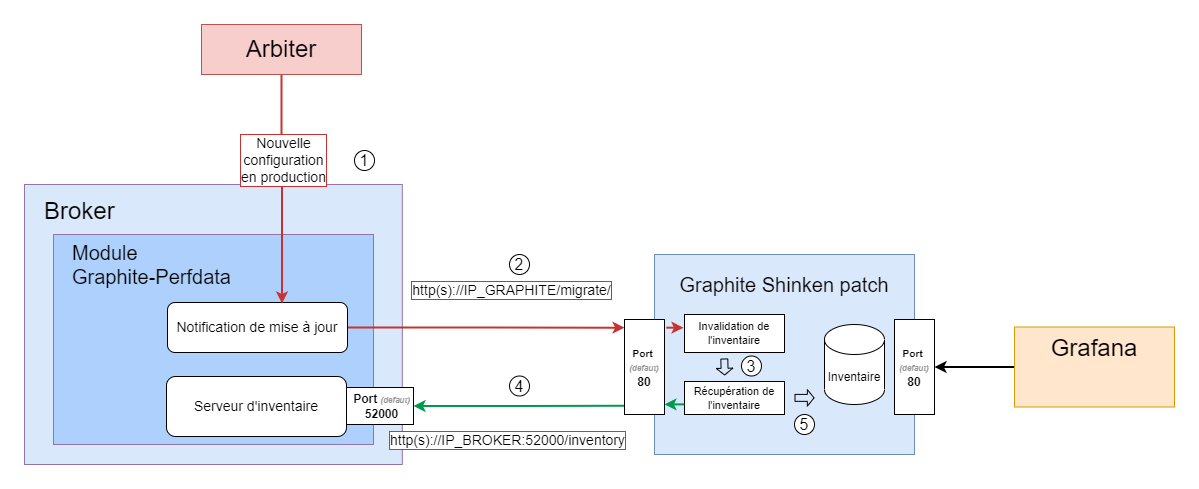
Ce schéma détaille les flux réseaux associés aux deux sections de configuration qui suivent.
- En noir, le flux induit par une requête par nom aux éléments de Graphite, suivi,
- En vert, par le flux vers le serveur d'inventaire, lors de la première requête, pour obtenir la table de traduction nom ↔ UUID
- En rouge, le flux suite à un déploiement de configuration, permettant de réinitialiser l'inventaire de Graphite
Serveur fournissant les données d'inventaire
| Scroll Title | ||||||||||||||||||||||||||
|---|---|---|---|---|---|---|---|---|---|---|---|---|---|---|---|---|---|---|---|---|---|---|---|---|---|---|
| ||||||||||||||||||||||||||
|
Chiffrement
| Scroll Title | ||||||||||||
|---|---|---|---|---|---|---|---|---|---|---|---|---|
| ||||||||||||
|
|
|
Envoi de l'inventaire lors d'un chargement de configuration
| Scroll Title | ||||||||||||
|---|---|---|---|---|---|---|---|---|---|---|---|---|
| ||||||||||||
|
|
|
|
|
|
|
|
Stockage dans Mongodb
En plus d'envoyer les données d'inventaire au serveur Graphite, ce module peut également stocker ces données en base de données.
Cela permet au serveur Graphite d'accéder à ces informations si l'accès au serveur fournissant les données d'inventaire n'est pas encore autorisé ou configuré ( voir la page Grafana - v8.3.2 section "Paramètres de connexion aux serveurs d'inventaire" ) .
Ce mode de fonctionnement est voué à disparaître, au profit d'un accès au serveur fournissant directement les données d'inventaire.
| Info |
|---|
Si les serveurs de stockage des métriques ( carbon-cache ) sont tous configurés et autorisés à se connecter au serveur fournissant les données d'inventaire, le stockage de l'inventaire dans MongoDB peut être désactivé. |
| Scroll Title | ||||||||||||
|---|---|---|---|---|---|---|---|---|---|---|---|---|
| ||||||||||||
|
|
|
|
|
Connexion via SSH
| Scroll Title | ||||||||||||
|---|---|---|---|---|---|---|---|---|---|---|---|---|
| ||||||||||||
|
|
|
Reprise sur panne
| Scroll Title | |||||||||||||||||||
|---|---|---|---|---|---|---|---|---|---|---|---|---|---|---|---|---|---|---|---|
| |||||||||||||||||||
|
|
Vérification du bon fonctionnement du module
Vérification de l'état du module
Il est possible de récupérer l'état du module avec la commande suivante :
| Code Block | ||||
|---|---|---|---|---|
| ||||
shinken-healthcheck |
Voir la page suivante pour la description des messages de retour de la commande : Shinken-healthcheck - Vérifier le bon fonctionnement de Shinken Entreprise - Chapitre - Vérification de la configuration de la sauvegarde des données de métrologie
Si le module à un problème de connexion avec Graphite
Il existe une série de vérification que vous pouvez vérifications à réaliser afin de tester l'accès à votre la base Graphite, qui comprend :
- La vérification du processus carbonprocessus carbon-cache, .
- La vérification du port d'écoute,.
- La vérification du firewall,.
Voir la page suivant pour la description de comment réaliser ces vérifications : Base de métrologie ( Graphite ) - Chapitre Vérification de carbon-cache, le demon écrivain