Qu'est ce que la corrélation?
L'objectif de cette fonctionnalité est de proposer à l'utilisateur d'avoir la même vue dans la console que le résultat des notifications. .
Jusque là, les utilisateurs n'étaient pas notifiés s'il y avait un problème de dépendance (un hôte en DOWN plaçait les notifications du check en "ne pas envoyer"), mais dans la console, on avait toujours des éléments en vert ou en rouge : le scheduler attendait les résultats de checks pour mettre l'élément en état UNKNOWN ou UNREACHABLE .
Maintenant, le système est assez intelligent pour placer ces états sur les éléments sachant que le check va échouer. Un exemple?
Prenons ce type de relation entre éléments:
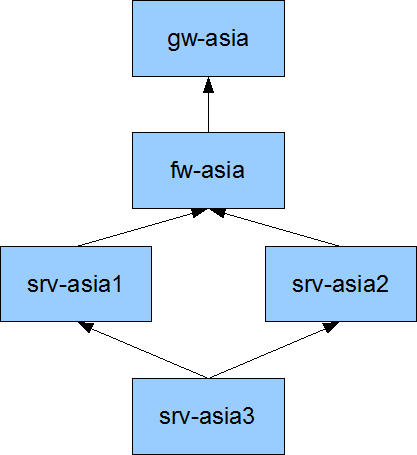 | Si gw est DOWN, tous les checks des autres éléments seront en état UNREACHABLE . Mais si fw et servers sont vérifiés 5 minutes plus tard, avant ce prochain check, la console indiquera du vert pour eux, alors qu'ils ne sont pas vraiment accessibles. Voici ce que fait la fonctionnalité de gestion des impacts : quand la passerelle est sur HARD/DOWN, il applique un état UNREACHABLE (et UNKNOWN pour les checks) pour les éléments dessous. Cela permet à l'administrateur de voir directement qu'il y a un problème et quels sont les éléments impactés. |
Il est important de savoir que cette approche ne remet pas en cause la logique de gestion HARD/SOFT : il s'agit juste d'un changement d'état pour la visualisation, mais ce n'est pas pris en compte dans la gestion des tentatives de checks .
Dans ce cas, la passerelle est déjà en DOWN/HARD. Aucun des serveurs n'a de valeur en sortie, ils ne sont pas encore vérifiés, mais sont déjà en état UNREACHABLE . Quand ils seront vérifiés, il y aura alors une valeur retour et ils prendront l'état correspondant.
Comment l'activer ?
Il suffit juste d'activer le paramètre
What is the correlation?
The main role of this feature is to allow users to have the same correlation views in the console than they got in the notifications.
From now, users won't be notified if there was a dependency problem or example (a host in DOWN make the check notifications in the state "not to be send" for example). But in the console, we still got some green and red indicators: the scheduler waited for actual checks to put the elements in a UNKNOWN or UNREACHABLE state when it already knows that there was a dependency problem.
Now it's smart enough to put such states to elements that we know the check will fail. An example?
Imagine such a parent relations between hosts:
| If gw is DOWN, all checks for others elements will put UNREACHABLE state. But if the fw and servers are checked 5 minutes later, during this period, the console will still have green indicators for them. And are they really green? No. We know that future checks will put them in errors. That why the problems/impacts feature do: when the gateway is set in HARD/DOWN, it applies an UNREACHABLE (and UNKNOWN for checks) states for others elements below. So the administrators in front of his desk sees directly that there is a problem, and what are the elements impacted. |
It's important to see that such state change do not interfere with the HARD/SOFT logic: it's just a state change for visualization interface, but it's not taken into consideration as a check attempt.
...
How to enable it?
It's quite easy, all you need is to enable the parameter:
| Code Block |
|---|
enable_problem_impacts_states_change=1 |
Dynamic priority
There is a good thing about problems and impacts when you do not identify a parent device priority: your problem will dynamically inherit the maximum priority of the failed child!
Let's take an example: you have a switch with different children, one is a development environment with a low priority (0 or 1) and one with a huge priority (4 or 5). The network administrator has set SMS notification at night but only for HUGE prioritys (Minimum Filter Priority is 4 in the contact definition for example).
It's important to say that the switch does not have its own priority defined! A switch is there just linked to the server applications, the only priority it gets is the child hosts and checks that are connected to it!
There are 2 scenario for 2 different nights:
- the first one, the switch got a problem, and only the development environment is impacted. The switch will inherit the maximum impact of its impacts (or it own value if it's higher, it's 2 by default for all elements). Here the development impact is 0, the switch one is 2, so its impact will stay at 2. It's slower than the contact value, so the notification will not be send, the admin will be able to sleep.
Priorité dynamique
L'un des bons côtés de ne pas identifier le niveau de priorité d'un parent, c'est que le problème va automatiquement hériter du niveau maximum de priorité de l'enfant qui est tombé.
Prenons un exemple: vous avez un switch avec différents enfants, l'un est un environnement de développement avec une faible priorité (0 ou 1) et un de production avec une priorité élevée (4 or 5). L'administrateur d'astreinte a paramétré un SMS de nuit mais seulement pour les priorités de niveau très élevé (Niveau 4 minimum dans la définition du contact par exemple).
Il est important de préciser que le switch en lui-même n'a pas son propre niveau de priorité défini ! Le switch est juste lié aux serveurs d'applications, la seule priorité qu'il récupère est celle des hôtes et checks qui lui sont connectés.
Il y a 2 scenario pour 2 nuits différentes :
- la première, le switch a un problème mais seul l'environnement de développement est impacté. Le switch va hériter de la valeur d'impact la plus élevée entre sa propre valeur et celle héritée (par défaut, sa propre valeur est à 2). Ici, l'impact sur le développement est à 0, le switch par défaut est à 2, donc l'impact reste à 2 (sous le seuil déclenchant une alerte) : l'administrateur peut dormir
- la deuxième nuit, le switch a un problème, mais cette fois l'impact est sur l'environnement de production! Cette fois l'impact calculé est à 5, au dessus de la valeur par défaut donc une notification sera envoyée et administrateur sera réveillé.the second night, the switch got a problem, but this time it impacts the production environment! This time, the computed impact is set at 5 (the one of the max impact, here the production application), so it's higher than the Minimum Priority Filter of the contact, so the notification is send. The admin is awaken, and can solve this problem before too many users are impacted :)