Introduction
Shinken Enterprise has the ability to distinguish between “normal" checks and "volatile" checks. The Is Volatile option in each check definition allows you to specify whether a specific check is volatile or not. The majority of all monitored checks will be mainly non-volatile (i.e. “normal"). However, volatile checks can be very useful when used properly in the right context.
How to enable this option?
| This option can be enabled on the Check configuration page | 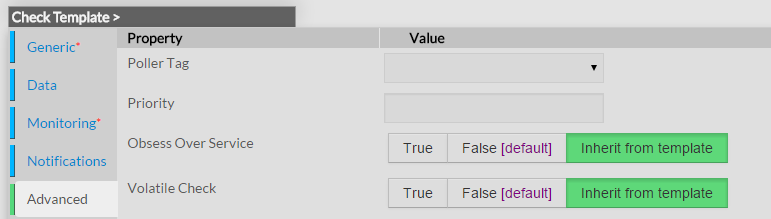 |
What Are They Useful For?
Volatile checks are useful for monitoring...
- Things that automatically reset themselves to an "OK" state each time they are checked
- Events such as security alerts which require attention every time there is a problem (and not just the first time)
What's So Special About Volatile checks?
Volatile checks differ from “normal" checks in three important ways. Each time they are checked when they are in a HARD non-OK state, and the check returns a non-OK state (i.e. no state change has occurred)...
- The non-OK check state is logged
- Contacts are notified about the problem (if that's what should be done). Notification intervals are ignored for volatile checks.
- The event handler for the check is run (if one has been defined)
These events normally only occur for checks when they are in a non-OK state and a hard state change has just occurred. In other words, they only happen the first time that a check goes into a non-OK state. If future checks of the check result in the same non-OK state, no hard state change occurs and none of the events mentioned take place again.
a la capacité de faire la distinction entre les checks dits "normaux" et les checks "volatiles".
L'option "est volatile" permet de le spécifier pour chaque définition de check. La majorité des checks seront par défaut en mode "normal". Cependant, les checks volatiles peuvent être très pratiques quand ils sont proprement utilisés, dans le bon contexte.
Comment activer cette option ?
| Cette option peut être activée dans la page de configuration du check | |
Quand sont-ils pratiques ?
Les checks volatiles peuvent permettre de superviser :
- les éléments qui se réinitialisent automatiquement en état "OK" lorsqu'ils sont vérifiés
- les événements de type alertes de sécurité qui nécessitent l'attention à chaque fois qu'un problème arrive (et pas seulement la 1ère fois)
Qu'y a-t-il de si particulier avec les checks volatiles?
Ils diffèrent des checks dits "normaux" de 3 façons importantes. A chaque vérification lorsqu'ils sont en état HARD non-OK, et que le retour est un état non-OK (i.e. aucun changement d'état)...
- l'état non-OK du check est loggué
- les contacts sont notifiés du problème (si c'est ce qui doit être fait). Les intervalles de notifications ne sont pas pris en compte pour les checks volatiles.
- le gestionnaire d'événements pour le check est lancé (Si un a été défini)
Par défaut, ces événements se lancent uniquement pour les checks qui sont dans un état non-OK et lorsqu'un changement d'état HARD vient juste arriver. En d'autres termes, ils s'appliquent uniquement la première fois qu'un check passe en état non-OK state. Si les futurs checks resultent en un état non-OK, aucun changement d'état HARD n'arrive et aucun des événements mentionnés n'arrive.