Présentation
L'utilisation des Groupes d'Hôtes est très utile à différents niveaux:
- Les Administrateurs peuvent organiser et ranger les Hôtes par
...
Overview
Host group usage is very useful in many ways :
...
- type, data centers, applications,
...
- par famille, etc.
...
You can access to the Host groups configuration by using the link in the main menu.
...
The main page of Host groups Configuration is composed of a table,
listing all existing Host groups.
This table contains the following information:
- Differences
- Name of the host group
- Members of the host group
- Status of the host group (Enabled or Disabled)
A tool bar on top of the table, gives administrators the ability to do the following :
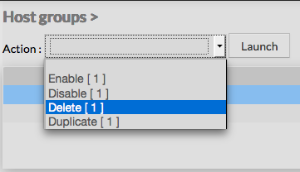
- Enable, Disable, Delete or Duplicate selected Host groups
- Filter List by Name
- Filter List by Template applied on Host groups
...
Like other configuration element pages, an action menu is displayed on the left.
This Menu provides following operations :
- Add en new Host group
- Show host group detected by automatic modules
- Accept differences on selected elements
...
Create a new hostgroup
...
To create a new Host Group, use the button "Add new [Hostgroup]" located in the Action Menu.
...
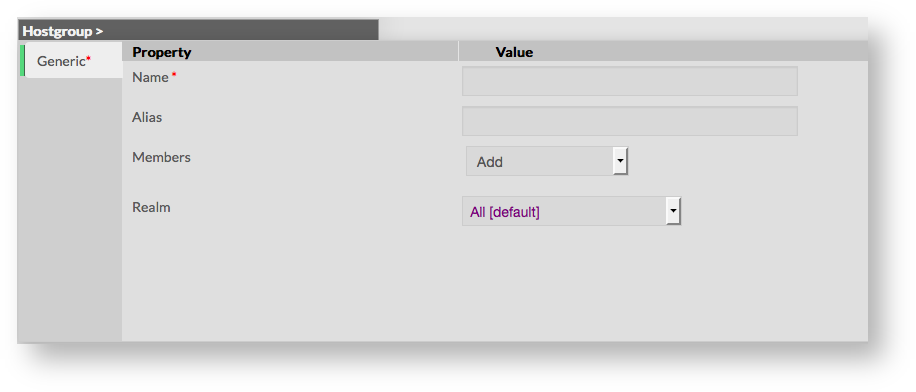
Host group creation form will be displayed.
This form is composed of one tab, containing the following properties :
- Name
- used to define the name of the host group
- this field is required
- Alias
- used to define a longer name, or a description to identify the Host group
- Members
- used to include members in the host group
- fields is a list of members that can be added using the select list of existing hosts
- Realm
- used to define the Realm in which members should be monitored
- if no realm is selected, members will be monitored on their respective realm
...
...
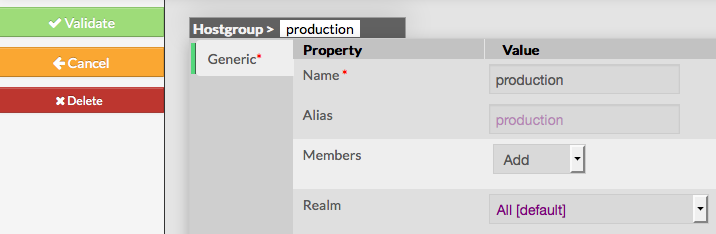
- Validate the new host group
- Cancel the action
- Delete the host group
Once validated, the new host group will appear in the table list.
...
To modify properties of a host group, first go on the Host Groups page, from the Main menu,
and then click on the Host group name you want to modify:
...
The form displayed is the same form used to create a new host group.
All fields are filled using the host group properties.
...
Add or remove Members
...
Add a member to group
To add one or more members, first edit the group of your choice.
Then in the Host group Form, select hosts you want to add by opening the selected list
...
Add a member to group
To remove a member, click on the mark displayed in the member.
...
Add a host to a host group
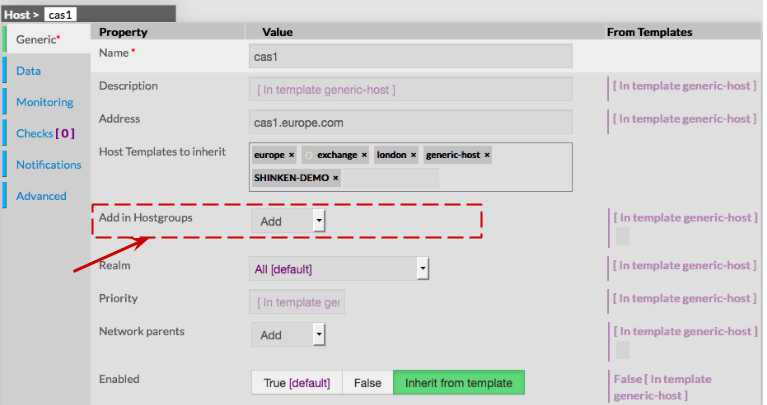
To attach a host group to a host, go first to the Hosts Page, then click on the Host of your choice.
Form of the host is displayed, giving the ability to add the Host in one or more Host groups.
...
Delete a Host group
To delete a host group, you can use the form of the host, or delete it directly from the list page.
...
From the Form page
First go to the Host groups page, from the Main menu,
then click on the host group name you want to delete.
Once in the page displaying the form, click on the Delete button available on the left menu.
A confirmation popup will be displayed.
...
From the Main page
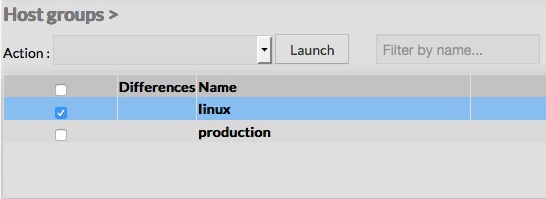
First go to the Host groups page, from the Main menu,
then click on the check box placed on the first column of the table.
...
A confirmation popup will be displayed.
...
- Les Administrateurs peuvent appliquer des propriétés communes comme les Royaumes.
Vous pouvez accéder à la configuration des Groupes d'Hôtes en utilisant le lien dans le menu principal
La page principale de la configuration des Groupes d'Hôtes se compose d'un tableau répertoriant tous les Groupes d'Hôtes existants.
Le tableau contient les informations suivantes:
- Différences
- Nom du Groupe d'Hôtes
- Membres du Groupe d'Hôtes
- Statut du Groupe d'Hôtes (activé ou désactivé)
Une barre d'outils au-dessus du tableau donne différentes possibilités à l'administrateur:
- Activer, Désactiver, Supprimer ou Dupliquer le Groupe d'Hôtes sélectionné
- Filtrer la liste par Nom
- Filtrer la liste par Template appliqué aux Groupes d'Hôtes
Comme dans d'autres pages de configuration, vous trouverez sur la gauche un menu d'actions qui vous permettra de:
- Ajouter un nouveau Groupe d'Hôtes
- Montrer les Groupes d'Hôtes détectés par les modules automatiques
- Accepter les différences sur les éléments sélectionnés
Créer un nouveau Groupe d'Hôtes
Pour créer un nouveau Groupe d'Hôte, utiliser le bouton "Ajouter un nouveau Groupe d'Hôtes" situé dans
le Menu Action sur la gauche
Apparaît alors un formulaire de création d'un Groupe d'Hôtes
Ce formulaire se compose d'un onglet contenant les champs suivants :
- Nom
- utilisé pour définir le nom du Groupe d'Hôtes
- ce champ est obligatoire
- Alias
- utilisé pour définir un nom plus long, ou une description pour identifier le Groupe d'Hôtes
- Membres
- utilisé pour inclure les membres au Groupe d'Hôtes
- le champ est une liste déroulante qui vous permet de sélectionner les membres parmi les Hôtes existants
- Royaume
- utilisé pour définir le Royaume dans lequel chaque membre doit être supervisé
- si aucun Royaume n'est sélectionné, les membres seront supervisés dans leur Royaume respectif
Comme dans d'autres formulaires, le menu de gauche donne à l'Administrateur la possibilité de:
- Valider le nouveau Groupe d'Hôtes
- Annuler l'action
- Supprimer le Groupe d'Hôtes
Une fois validé, le nouveau Groupe d'Hôtes apparaîtra dans le tableau
| Panel |
|---|
|
Ajouter ou Supprimer des membres
Des membres peuvent être ajoutés soit en éditant le Groupe, soit en éditant l'Les Hôtes ou l'Templates (à supprimer).
Ajouter un membre au Groupe
Pour ajouter un ou plusieurs membres, éditer dans un premier temps le Groupe de votre choix.
Ensuite, sur le Formulaire du Groupe d'Hôtes, sélectionnez les Hôtes que vous souhaitez ajouter dans le menu déroulant.
Ajouter un Hôte à un Groupe d'Hôtes
Pour rattacher un Hôte à un Groupe d'Hôtes, allez d'abord dans la page d'Hôte, puis cliquez sur l'Hôte de votre choix.
Le formulaire de l'Hôte apparaît, et vous offre la possibilité d'ajouter l'Hôte dans un ou plusieurs Groupe.
| Panel |
|---|
|
...
Duplicate a Host group
Duplication operation is very useful when similar Host groups must be added.
To duplicate a host group, first go on the Main page listing all host groups,
then select a host group by clicking on the check box placed on the first column.
...
Once selected, the host group can be duplicated
by selecting Duplicate in the select Action of the tool bar.
Duplication is executed by clicking the Launch button.
...
Using the Main page gives Administrators ability to Duplicate many Host groups at once.
All properties are kept when duplicating operation, as well as Members.
Duplicated Host groups are totally detached and independent of the cloned Host group. No relation is made in the configuration.
...