...
The main role of this feature is to allow users to have the same correlation views in the console than they got in the notifications.
From now, users won"'t get be notified if there was a dependency problem or example (a host in DOWN make the check notifications in the state "not to not be send" for example). But in the console, we still got some green and red indicators: the scheduler waited for actual checks to put the elements in a UNKNOWN or UNREACHABLE state when he it already know knows that there was a dependency problem.
...
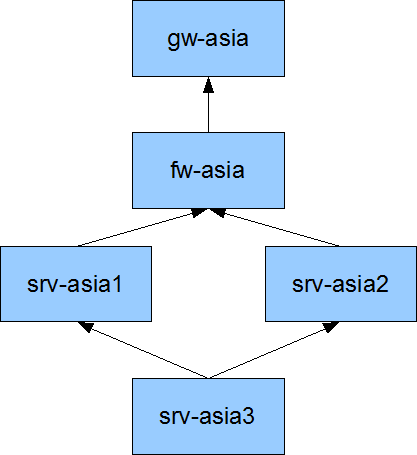 | If gw is DOWN, all checks for others elements will put UNREACHABLE state. But if the fw and servers are checks checked 5 minutes later, during this period, the console will still have green indicators for them. And are they really green? No. We know that future checks will put them in errors. That why the problems/impacts feature do: when the gateway is set in HARD/DOWN, it apply a applies an UNREACHABLE (and UNKNOWN for checks) states for others elements below. So the administrators in front of his desk saw sees directly that there is a problem, and what are the elements impacted. |
It's important to see that such state change do not interfere with the HARD/SOFT logic: it's just a state change for visualization interface, but it"'s not taken into account consideration as a checks check attempt.
Here In this case, gateway is already in DOWN/HARD. We can see that all servers do not have an output: they are not already checked, but we already set the UNREACHABLE state. When they will be checkschecked, there will be an output and they will keep this state.
...
There is a good thing about problems and impacts when you do not identify a parent devices device priority: your problem will dynamically inherit the maximum priority of the failed child!
Let's take an example: you have a switch with different children, one is a devel development environment with a low priority (0 or 1) and one with a huge priority (4 or 5). The network administrator has set SMS notification at night but only for HUGE prioritys (Minimum Filter Priority is 4 in the contact definition for example).
It's important to say that the switch does not have its own priority defined! A switch is there just linked to the server applications, the only priority it gets is the child hosts and checks that are connected to it!
There are 2 scenario for 2 different nights:
- the first one, the switch got a problem, and only the devel development environment is impacted. The switch will inherit the maximum impact of its impacts (or it own value if it's higher, it's 2 by default for all elements). Here the devel development impact is 0, the switch one is 2, so its impact will stay at 2. It's slower than the contact value, so the notification will not be send, the admin will be able to sleep.
- the second night, the switch got a problem, but this time it impacts the production environnentenvironment! This time, the computed impact is set at 5 (the one of the max impact, here the production application), so it's higher than the Minimum Priority Filter of the contact, so the notification is send. The admin is awaken, and can solve this problem before too many users are impacted :)
...