...
How are active Checks performed?
Active checks are initiated by the check logic in the Shinken Enterprise daemon. When Shinken Enterprise needs to check the status of a host or a check, it will execute a plugin and show the information about what needs to be checked. The plugin will then check the operational state of the host or check and report the results back to the Shinken Enterprise daemon. The scheduler daemon will process the results of the host or check and take the appropriate action if necessary (e.g. send notifications, ask for event handlers, etc). | 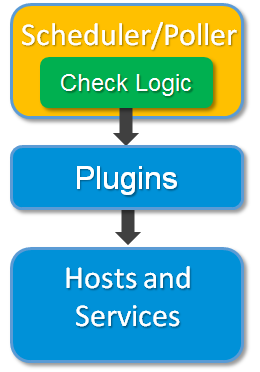 |
When Are Active Checks Executed?
...
- At regular intervals, as defined by the "check_interval" and "retry_interval" options in your host and check definitions
- On-demand as needed
...
Regularly scheduled checks occur at intervals equaling either the "check_interval" or the "retry_interval" in your host or check definitions, depending on what type of state the host or check is in. If a host or check is in a HARD state, it will be actively checked at intervals equal to the "check_interval" option. If it is in a SOFT state, it will be checked at intervals equal to the retry_interval option.
On-demand checks are performed whenever Shinken Enterprise sees a need to obtain the latest status information about a particular host or check. For example, when Shinken Enterprise is determining the reachability of a host, it will often perform on-demand checks of parent and child hosts to accurately determine the status of a particular network segment.
Passive checks
Introduction
...
- Submitting check results that happen directly within an application without using an intermediate log file(syslog, event log, etc.).
How Passive Checks Work
Here's how passive checks work in more detail.
The processing of active and passive check results is essentially the same. This allows for seamless integration of status information from external applications with Shinken Enterprise. | 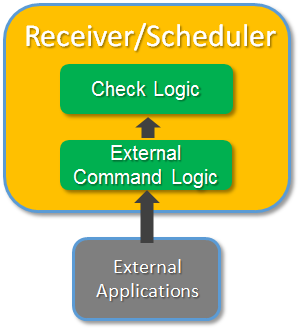 |
...
Enabling Passive Checks
In order to enable passive checks in Shinken Enterprise, you'll need to do the following:
...
Passive host checks are treated as HARD states.