How the module works
The Active Directory authentication module allows you to link a Shinken account and an Active Directory account in order to connect to the different Web interfaces of Shinken Enterprise.
| Warning |
|---|
Both accounts (Shinken and Active Directory) will be linked by a common key. For example, the authentication module looks for users with a user@domain.com email address in the Shinken database and will link this account with the one in Active Directory with the same email address.
A Shinken account and an Active Directory account must have a common data in order to be linked and authorize the connection. The steps to configure the data used to link both accounts are explained below. |
| Info | ||
|---|---|---|
| ||
To keep the Shinken and Active Directory accounts synchronized, it is far more easier to import users directly from Active Directory thanks to the Active Directory source. Please see the corresponding documentation to have more informations about this feature: Active Directory |
Configuration steps
This module allows users to authenticate by checking the account password into an Active Directory instead of the one stored in the Shinken configuration. The setup of this authentication method is done in 3 steps:
- Connection setup to the Active Directory server
- Mapping setup between Shinken and Active Directory fields
- Module activation
Active Directory connection setup
First, the authentication module must have the connection credentials in order to connect to the Active Directory server.
This is done by modifying the
Il est possible d'effectuer l'authentification des utilisateurs en allant vérifier le mot de passe du compte dans un annuaire Active Directory plutôt que celui stocké dans la configuration Shinken.La configuration de cette méthode d'authentification s'effectue en 3 étapes:
- Configuration des identifiants de connexion au serveur Active Directory
- Configuration des correspondances des champs entre Shinken et Active Directory
- Activation du module
Configuration de la connexion Active Directory
Tout d'abord, il faut spécifier au module d'authentification les identifiants de connexion au serveur Active Directory.
Cela se fait par l'intermédiaire du fichier /etc/shinken/modules/auth_active_directory.cfg file.
Uncomment if needed and fill the following linesDécommenter si besoin et renseigner les lignes suivantes:
| Code Block | ||||
|---|---|---|---|---|
| ||||
ldap_uri ldap://myserver username myuser@mydomain.com password password basedn DC=mydomain,DC=com mapping_file /etc/shinken-user/configuration/modules/auth-active-directory/mapping.json |
Le
champs présents dans la configuration ci-dessus ont le fonctionnement suivantThe fields in the configuration example above function as following:
- ldap_uri: Adresse du serveur ActiveDirectory. Le protocole utilisé peut être ldap ou ldapsActive Directory server address. The protocol used can be ldap or ldaps.
- username: Username used to connect to the Active Directory. Username has the following format: username: Nom d'utilisateur utilisé pour se connecter au serveur Active Directory. Il est de la forme "user@mydomain.com" ou or "mydomain\user".
- password: Nom d'utilisateur utilisé pour se connecter au serveur Active DirectoryPassword used to connect to the Active Directory server.
- basedn: DN utilisé comme base pour la recherche des utilisateurs. Le module cherche récursivement dans le DN fourni tous les utilisateurs présents dans ce DN pour effectuer l'authentificationused as base for user discovery. The module searchs recursively in this DN for users to perform the authentication with.
- mapping_file: Ce champ doit pointer vers le fichier de correspondances dont le fonctionnement est détaillé ci-dessousThis field must point to the mapping file used. This field usage is described in the section below.
Shinken
etand Active Directory
fields mappings setup
The Active Directory authentication module does the link between fields in the Shinken database and fields in the Active Directory base to identify the users.
By default, the module looks for contacts with the
Le module d'authentification Active Directory effectue une correspondances entres les champs dans la base Shinken et les champs dans l'annuaire Active Directory pour identifier les utilisateurs.
Par défaut, le module recherche les contacts avec le champ "contact_name" dans Shinken et recherche un contact dans Active Directory avec le champ in Shinken base and looks for a contact in Active Directory with the same value into the "samaccountname".
Il est possible de paramétrer ce comportement à l'aide d'un fichier de correspondancesIt is possible to specify this behaviour by modifying the mapping file.
Sur une nouvelle On a fresh installation, il faut copier le fichier copy "/etc/shinken-user-example/configuration/modules/auth-active-directory/mapping.json" dans into "/etc/shinken-user/configuration/modules/auth-active-directory/mapping.json" (créer l'aborescence si besoincreate file path if needed).
| Note | ||
|---|---|---|
| ||
Les fichiers présents dans The files listed in "/etc/shinken-user-example" sont en lecture seule. Il faut rajouter les droits en ecriture après la copie dans are in read-only mode. Add write rights after copying into "/etc/shinken-user". |
Dans l'exemple suivant, les contacts sont joints par le champ In the following example, contacts are joined by the "mail" sur field in Active Directory et le champ and the "email" sur field on Shinken.
| Code Block | ||||
|---|---|---|---|---|
| ||||
{
	"ldap_key": 			"mail",
	"shinken_key": 			"email",
	"login_placeholder": 	"Email du contact"
} |
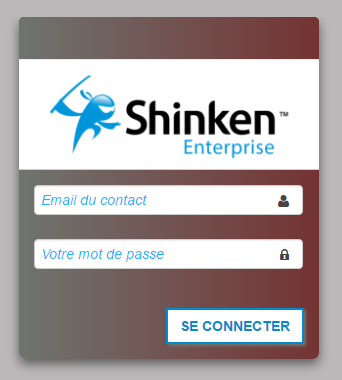
Le champ
The "login_placeholder" permet de configurer le message qui sera affiché sur l'écran de connexion afin de fournir une aide visuelle à l'utilisateur:allows you to configure the message displayed on the Login Screen in order to give a visual hint to the user.
Enabling the Active Directory module
At last, the authentication module must be activated in the corresponding configuration files.
Configuration UI
To enable the module on the Configuration UI, replace Cfg_password by
Enfin, il faut activer le module d'authentification dans les différents fichiers de configuration.
UI Configuration
Pour l'activer sur l'interface de Configuration, remplacer Cfg_password par auth-active-directory dans la configuration du Synchronizer in the Synchronizer's configuration.
| Code Block | ||||
|---|---|---|---|---|
| ||||
modules auth-active-directory |
Rémarrer ensuite le Synchronizer pour prendre en compte les modificationsRestart the Synchronizer to account for the latest changes.
| Code Block | ||||
|---|---|---|---|---|
| ||||
/etc/init.d/shinken-synchronizer restart |
Visualisation UI
VisualisationTo enable the module on the Visualisation UI, replace Pour l'activer sur l'interface de Visualisation, remplacer Cfg_password par by auth-active-directory dans la configuration du Broker in the Broker's configuration (WebUI module).
| Code Block | ||||
|---|---|---|---|---|
| ||||
modules auth-active-directory, Mongodb, webui-enterprise, sla |
Rémarrer ensuite le Broker pour prendre en compte les modificationsRestart the Broker to account for the latest changes.
| Code Block | |||
|---|---|---|---|
| |||
/etc/ | shinken/synchronizers/synchronizer-master.cfg/etc/init.d/shinken-broker restart |
| Note | |||||
|---|---|---|---|---|---|
| |||||
La présence simultanée des modules The simultaneous activation of both Cfg_password et and auth-active-directory peut provoquer un fonctionnement non anticipé. Comme le module Cfg_password vérifie les mots de passe dans la base Shinken et le module modules can provoque non-anticipated behaviours. As the Cfg_password module checks passwords in Shinken database and the auth-active-directory dans module in the Active Directory, si les 2 modules sont chargés, l'utilisateur pourra se connecter avec les 2 mots de passe (Shinken et if both modules are loaded, the user will succeed to authentify with both passwords (Shinken and Active Directory). Si ce comportement est souhaité, il est possible d'avoir les 2 modules dans la configurationIf this behaviour is wanted, both modules can be enabled in the configuration files as following:
|
Use module
avecwith OpenLDAP
The module is at first intended for Active Directory use, but functions with OpenLDAP as well.
However, a few steps in module configuration change:
- In the
Le module est initialement prévu pour Active Directory mais fonctionne également avec OpenLDAP.
Cependant, lors de la configuration, quelques étapes diffèrent:
- Dans le fichier de configuration /etc/shinken/modules/auth_active_directory.cfg, le paramètre cfg configuration file, the "mode" doit être parameter must be "openldap".
- Dans le fichier de configuration In the /etc/shinken/modules/auth_active_directory.cfg configuration file, le paramètre the "username" parameter has a un different format différent. Avec With OpenLDAP, il faut spécifier un CN à utiliser pour la connexion.
Le champ serait alors de la forme a CN must be specified to use for connection.
The field will look like "cn=user,dc=mydomain,dc=com".
Le reste de la configuration du module reste identique.
Champs à utiliser pour la correspondance des champs
The remaining configuration doesn't change.
Values to use for fields mapping
In the mapping file, multiple fields can be specified to join Shinken and Dans le fichier de correspondances, il est possible de spécifier plusieurs champs pour lier les comptes Shinken et Active Directory/LDAP .
Voici ci-dessus un tableau récapitulatif des champs les plus utilisés:
accounts.
The following table lists most used fields:
| Shinken | Active Directory | OpenLDAP |
|---|---|---|
contact_name | sAMAccountName | uid |
| display_name | displayName | displayName |
| pager | telephoneNumber | telephoneNumber |