...
Mode actif
Introduction
Shinken Enterprise is able to monitor hosts and checks in two different ways: actively and passively. Using Active checks is the most common method for monitoring hosts and checks. The main features of actives checks are the following:
- Active checks are initiated by the Shinken Enterprise poller process
- Active checks run on a regular scheduled basis
How are active Checks performed?
est capable de superviser des hôtes et les checks de 2 façons différentes: activement ou passivement. L'utilisation des checks actifs est la plus courante.
Les caractéristiques principales du mode actif sont les suivantes :
- les checks actifs sont initiés par le poller Shinken Enterprise
- ils sont lancés à intervalle régulier
Comment sont réalisés les checks actifs?
Les checks actifs sont initiés par la logique définie dans les démons dans Shinken Enterprise . Lorsque Shinken Enterprise doit vérifier les statuts d'un hôte ou d'un check, il lance un plugin et présente les informations sur ce qui doit être vérifié. Le plugin va alors vérifier l'état de l'hôte et remonter le résultat vers le démon Shinken Enterprise . Le démon scheduler va traiter le résultat et lancer les actions appropriées si nécessaire (e.g. envoi de notifications |
Active checks are initiated by the check logic in the Shinken Enterprise daemon.
When Shinken Enterprise needs to check the status of a host or a check, it will execute a plugin and show the information about what needs to be checked.
The plugin will then check the operational state of the host or check and report the results back to the Shinken Enterprise daemon.
The scheduler daemon will process the results of the host or check and take the appropriate action if necessary (e.g. send notifications, ask for event handlers, etc). | 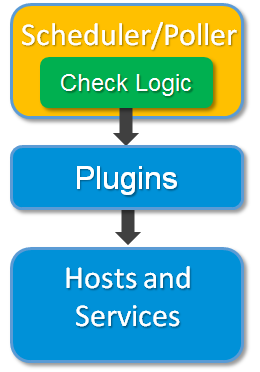 |
...
Active check are executed:
Quand sont lancés les checks actifs?
Ils sont exécutés:
- à intervalles réguliers, tel que défini dans le paramétrage du check (At regular intervals, as defined by the "check_interval" and et "retry_interval" options in your host and check definitions
- On-demand as needed
- )
- à la demande
Si un hôte est dans l'état "HARD", il sera vérifié activement selon la définition dans le Regularly scheduled checks occur at intervals equaling either the "check_interval" or the "retry_interval" in your host or check definitions, depending on what type of state the host or check is in. If a host or check is in a HARD state, it will be actively checked at intervals equal to the "check_interval" option. If it is in a SOFT state, it will be checked at intervals equal to the retry_interval option.
On-demand checks are performed whenever Shinken Enterprise sees a need to obtain the latest status information about a particular host or check. For example, when Shinken Enterprise is determining the reachability of a host, it will often perform on-demand checks of parent and child hosts to accurately determine the status of a particular network segment.
Passive checks
Introduction
In most cases you'll use Shinken Enterprise to monitor your hosts and checks using regularly scheduled active checks. Active checks can be used to "poll" a device or check for status information as often as needed. Shinken Enterprise also supports a way to monitor hosts and checks passively instead of actively. They key features of passive checks are the following:
- Passive checks are initiated and performed by external applications/processes
- Passive check results are submitted to Shinken for processing
The major difference between active and passive checks is that active checks are initiated and performed by Shinken Enterprise, while passive checks are performed by external applications.
...
Passive checks are useful for monitoring checks that are:
- Asynchronous by nature, they cannot or would not be monitored effectively by polling their status on a regularly scheduled basis, like backup or batchs
- Located behind a firewall and cannot be checked actively from the monitoring host
Examples of asynchronous checks that lend themselves to being monitored passively include:
- "SNMP" traps and security alerts. You never know how many (if any) traps or alerts you'll receive in a given time frame, so it's not possible to just monitor their status every few minutes.
- Aggregated checks from a host running an agent. Checks may be run at much lower intervals on hosts running an agent.
. S'il est dans un état "SOFT" , il sera vérifié selon la définition dans "retry_interval".
Le lancement à la demande peut s'effectuer sans aucun contrainte, lorsqu'on a besoin de connaître le tout dernier état d'un hôte.
Mode passif
Introduction
Shinken Enterprise permet également de superviser les hôtes et les checks de façon passive. Les caractéristiques principales du mode passif sont les suivantes:
- les checks passifs sont lancés par des applications ou process externes
- les résultats sont envoyés au démon Shinken Enterprise pour traitement
La principale différence avec les checks actifs réside donc dans son lancement externe.
Usages des checks passifs
les checks passifs sont utiles dans les cas :
- checks asynchrones par nature, ils ne peuvent être supervisés efficacement en vérifiant leur statut à intervalles réguliers et planifiés (comme un batch ou une sauvegarde)
- Localisation derrière un firewall ne permettant pas de lancer les checks depuis l'hôte de supervision
Exemples de checks asynchrones nécessitant d'être supervisés en mode passif :
- traps "SNMP" et alertes de sécurité. Vous ne savez jamais combien (si il y en a) de traps ou d'alertes seront remontées dans un intervalle donné. Il est donc impossible de simplement superviser leur état toutes les x minutes.
- les checks agrégés tournant avec un agent. Il peut être nécessaire de lancer ce checks à des intervalles beaucoup plus courts .
- check proposant les résultats intervenant directement dans une application sans utilisation de fichier log intermédiaires Submitting check results that happen directly within an application without using an intermediate log file (syslog, event log, etc.).
...
Comment fonctionne le mode passif
Voici le fonctionnement en détail.
|
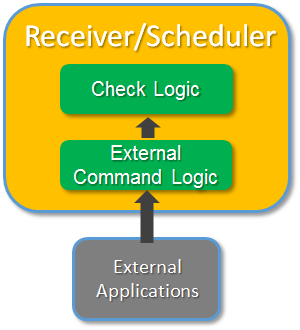
Here's how passive checks work in more detail.
- An external application checks the status of a host or check.
- The external application writes the results of the check to the webservice of the receiver. Its configuration and API is defined at Enable webservice for passive checks.
- Shinken Enterprise reads the passive checks and push them to the appropriate daemons.
|
The processing of active and passive check results is essentially the same. This allows for seamless integration of status information from external applications with Shinken Enterprise.
...
In order to enable passive checks in Shinken Enterprise, you'll need to do the following:
Le traitement du résultat d'un check actif ou passif est le même. Cela permet d'intégrer facilement les informations de statuts provenant d'applications tierces. | |
Activer le mode passif
Pour activer le mode passif dans Shinken Enterprise, vous devez réaliser les actions suivantes:
- activer le paramètre "Set accept_passive_service_checks directive is set to " à 1 (in dans shinken.cfg).Set the
- activer le paramètre "passive_checks_enable" directive in your host and check definitions is set to True.à vrai dans la définition de votre hôte et votre check.
Si vous voulez l'activer globalement, activer le paramètre "If you want to disable processing of passive checks on a global basis, set the accept_passive_check_checks directive to " à 0.If you want to disable passive checks for just a few hosts or checks, use the
Pour désactiver ce mode sur un ou plusieurs hôtes et checks, utilisez le paramètre "passive_checks_enabled " directive in the host and/or check definitions to do so.
...
You can look at the Enable webservice for passive checks about how to send external checks to the receivers.
Passive Checks and Host States
Unlike with active host checks, Shinken Enterprise does not (by default) attempt to determine whether or host is DOWN or UNREACHABLE with passive checks. Rather, Shinken Enterprise takes the passive check result to be the actual state the host is in and doesn't try to determine the hosts' actual state using the reachability logic . This can cause problems if you are submitting passive checks from a remote host.
Passive host checks are treated as HARD states.
directive" dans la définition de l'hôte et du check.
Soumettre les résultats de checks passifs
Vous pouvez vous référer à Activer les webservices pour les checks passifs pour voir comment envoyer des checks externes aux receivers.