Introduction
...
Notification escalations are explained in another page.
When Do Notifications Occur?
...
- When a hard state change occurs. More information on state types and hard state changes can be found on the sate type page.
- When a host or check remains in a hard non-OK state and the time specified by the "notification_interval" option in the host or check definition has passed since the last notification was sent out (for that specified host or check).
Who Gets Notified?
...
When Shinken Enterprise sends out a host or check notification, it will notify each contact that is a member of any contact groups specified in the "contact groups" option of the check definition. Shinken Enterprise realizes that a contact may be a member of more than one contact group, so it removes duplicate contact notifications before it does anything. Contacts specified on host or check are also notified.
What Filters Must Be Passed In Order For Notifications To Be Sent?
...
Program-Wide Filter:
The first filter that notifications must pass is a test of whether or not notifications are enabled on a program-wide basis. This is initially determined by the :ref:`"enable_notifications" <configuration/configmain-advanced#enable_notifications>` directive in the main config file, but may be changed during runtime from the web interface. If notifications are disabled on a program-wide basis, no host or check notifications can be sent out - period. If they are enabled on a program-wide basis, there are still other tests that must be passed...
check and Host Filters:
...
The second filter for host or check notification is a check to see if the host or check is flapping (if you enabled flap detection). If the check or host is currently flapping, no one gets notified. Otherwise it gets passed to the next filter.
The third host or check filter that must be passed is the host- or check-specific notification options. Each check definition contains options that determine whether or not notifications can be sent out for warning states, critical states, and recoveries. Similarly, each host definition contains options that determine whether or not notifications can be sent out when the host goes down, becomes unreachable, or recovers. If the host or check notification does not pass these options, no one gets notified. If it does pass these options, the notification gets passed to the next filter...
Notifications about host or check recoveries are only sent out if a notification was sent out for the original problem. It doesn't make sense to get a recovery notification for something you never knew as a problem.
The fourth host or check filter that must be passed is the time period test. Each host and check definition has a "notification_period" option that specifies which time period contains valid notification times for the host or check. If the time that the notification is being made does not fall within a valid time range in the specified time period, no one gets contacted. If it falls within a valid time range, the notification gets passed to the next filter...
If the time period filter is not passed, Shinken Enterprise will reschedule the next notification for the host or check (if its in a non-OK state) for the next valid time present in the time period. This helps ensure that contacts are notified of problems as soon as possible when the next valid time in time period arrives.
The last set of host or check filters is conditional upon two things: (1) a notification was already sent out about a problem with the host or check at some point in the past and (2) the host or check has remained in the same non-OK state that it was when the last notification went out. If these two criteria are met, then Shinken Enterprise will check and make sure the time that has passed since the last notification went out either meets or exceeds the value specified by the "notification_interval" option in the host or check definition. If not enough time has passed since the last notification, no one gets contacted. If either enough time has passed since the last notification or the two criteria for this filter were not met, the notification will be sent out! Whether or not it actually is sent to individual contacts is up to another set of filters...
...
At this point the notification has passed the program mode filter and all host or check filters and Shinken Enterprise starts to notify all the people it should. Does this mean that each contact is going to receive the notification? No! Each contact has their own set of filters that the notification must pass before they receive it.
Contact filters are specific to each contact and do not affect whether or not other contacts receive notifications.
The first filter that must be passed for each contact are the notification options. Each contact definition contains options that determine whether or not check notifications can be sent out for warning states, critical states, and recoveries. Each contact definition also contains options that determine whether or not host notifications can be sent out when the host goes down, becomes unreachable, or recovers. If the host or check notification does not pass these options, the contact will not be notified. If it does pass these options, the notification gets passed to the next filter...
Notifications about host or check recoveries are only sent out if a notification was sent out for the original problem. It doesn't make sense to get a recovery notification for something you never knew was a problem.
The last filter that must be passed for each contact is the time period test. Each contact definition has a "notification_period" option that specifies which time period contains valid notification times for the contact. If the time that the notification is being made does not fall within a valid time range in the specified time period, the contact will not be notified. If it falls within a valid time range, the contact gets notified!
Notification Methods
...
Ce chapitre explique en détail quand et comment sont envoyées les notifications, ainsi que les contacts concernés.
Quand s'opèrent les notifications ?
La décision d’envoyer une notification est définie dans la politique de vérification. Elles sont lancées dans les cas suivants :
- Quand un état "hard" change. Plus d'informations sur le statut "hard" sont disponibles dans la page Etat "Hard" et "Soft"
- Quand un hôte ou un check rentre d'un contexte particulier (DOWNTIME, ACKNOWLEDGE, ou FLAPPING), ou qu'il en sors (sauf ACKNOWLEDGE, qui n'est notifié qu'une fois).
Les notifications sont désactivées pendant la durée du contexte. Cela permet d'éviter de noyer l'information principale par celle des changements de status intermédiaires lors d'une maintenance ou d'un FLAPPING. - Si l'élément possède une Escalade des notifications, elle peut être activée si l'élément est toujours non-OK pendant un temps donné.
- Après un temps précisé dans l'intervalle de notification, une notification se répète si l'état de l'élément est toujours non-OK (par défaut, une journée).
Notez que seuls les changements sont notifiés. Il est donc possible de ne pas recevoir de notification lorsqu'on les active sur un hôte ou un check qui est déjà en état "hard" non-OK, puisque cet état n'a pas encore changé.
Par ailleurs, les notifications de reprise ne sont envoyées que si la notification de problème d'origine (warning ou critique) a été notifiée.
Qui est notifié ?
Dans chaque définition d'hôte et de check, les paramètres Contact et Contact groups précisent quels contacts doivent recevoir les notifications pour cet élément en particulier (voir l'onglet de notification dans la page Créer un Hôte et Créer un check)
Si un contact est présent soit dans le paramètre contacts, ou appartient à un des groupes, il fera parti des contacts à notifier.
Après application des filtres, pour chaque contact à notifier, le Reactionner lancera la commande de notification appropriée. Cette commande est définie dans la Méthodes de notification.
La méthode de notification permet de choisir la commande envoyée et de configurer les filtres par type de notification et par période.
Les filtres
Plusieurs mécanismes permettent de filtrer les notifications. Ces filtres sont cumulatifs, et une notification doit donc respecter tous les critères de configuration avant d'être envoyée.
Filtre global
Il est possible de désactiver de manière globale les notifications envoyées, en utilisant le paramètre Notification Enabled dans la configuration de l'hôte ou du check.
Mettre cette option à 0 désactivera toute notification sur l'élément concerné.
Filtres sur le type de notification
La configuration spécifique des éléments sur un check ou un hôte permet de déterminer si un type de notification donné est envoyé.
Il est possible de déterminer, par exemple, que seuls les notifications de type état critique seront envoyé, et de désactiver donc les warning (dans le cas des checks), le unknown, le flapping, les maintenances et les reprises.
Ce filtre est également présent sur la méthode de notification. Le type de notification doit être autorisé à la fois par l'élément à l'origine de la notification et la méthode de notification.
Filtre par période
Chaque définition d'hôte et de check contient un paramètre Notification Period qui précise la période de validité pendant laquelle les notifications sont autorisées (par ex, 8h-18h). Si le temps ne correspond pas à la période valide, personne n'est contacté.
Si le passage du filtre de période n'est pas réussi, le Shinken Enterprise va replanifier la prochaine notification pour l'hôte ou le check (si il est dans un état non-OK ) dans la période temps valide. Cela permet de garantir que les contacts seront notifiés des problèmes dès que possible lorsque la prochaine période temps valide arrivera.
Ce filtre est également présent sur la méthode de notification et la période doit donc également correspondre.
Récapitulatif en visualisation
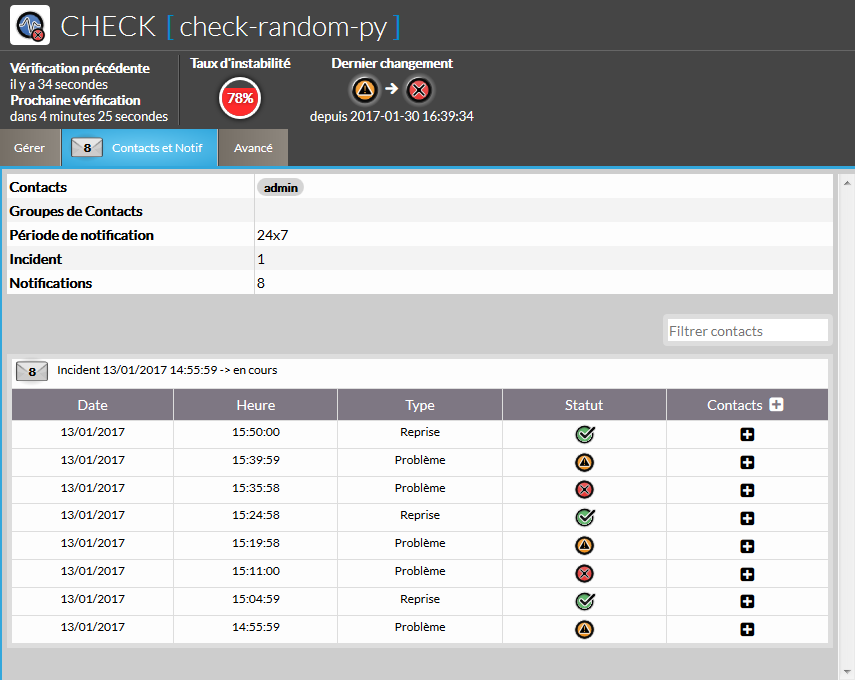
Les dernières notifications envoyées sont récapitulées sur l'élément en question, dans l'UI de visualisation. Dans le cas des checks, les notifications récentes sont disponibles dans un onglet du volet de détail du check.
Il est également possible de rechercher un contact particulier dans le but de connaître les notifications qu'il a effectivement reçues, après application des filtres.
| Panel |
|---|
|
There are a thousand different ways to do notifications and there are already a lot of packages out there that handle the dirty work, so why re-invent the wheel and limit yourself to a bike tire? Its much easier to let an external entity (i.e. a simple script or a full-blown messaging system) do the messy stuff. Some messaging packages that can handle notifications for pagers and cellphones are listed below in the resource section.
Notification Type Macro
...
| Value | Decription |
|---|---|
| PROBLEM | A check or host has just entered (or is still in) a problem state. If this is a check notification, it means the check is either in a WARNING, UNKNOWN or CRITICAL state. If this is a host notification, it means the host is in a DOWN or UNREACHABLE state. |
| RECOVERY | A check or host recovery has occurred. If this is a check notification, it means the check has just returned to an OK state. If it is a host notification, it means the host has just returned to an UP state. |
| ACKNOWLEDGEMENT | This notification is an acknowledgement notification for a host or check problem. Acknowledgement notifications are initiated via the web interface by contacts for the particular host or check. |
| FLAPPINGSTART | The host or check has just started flapping. |
| FLAPPINGSTOP | The host or check has just stopped flapping. |
| FLAPPINGDISABLED | The host or check has just stopped flapping because flap detection was disabled |
| DOWNTIMESTART | The host or check has just entered a period of scheduled downtime. Future notifications will be suppressed. |
| DOWNTIMESTOP | The host or check has just exited from a period of scheduled downtime. Notifications about problems can now resume. |
| DOWNTIMECANCELLED | The period of scheduled downtime for the host or check was just cancelled. Notifications about problems can now resume. |
...