| Scroll Ignore | ||||||||||||||||
|---|---|---|---|---|---|---|---|---|---|---|---|---|---|---|---|---|
| ||||||||||||||||
|
Contexte
Shinken permet dans certains cas de modifier dans les interfaces ( "Configuration" et "Visualisation" ):
- le nom d'affichage d'une propriété.
- les valeurs
Ces modifications sont configurables grâce au
Il peut être nécessaire de changer le nom des propriétés affichées dans l'UI de Configuration et de Visualisation.
Ce renommage va pouvoir être défini dans lefichier /etc/shinken-user/configuration/monitoring_policy/elements/elements_default_properties/default_properties_configuration.cfg.
- (
un - Un fichier d'exemple est disponible : /etc/shinken-user-example/configuration/monitoring_policy/elements/elements_default_properties/default_properties_configuration.cfg. )
Comme il s- S'
agit - agissant d'un texte,
il - celui-ci doit être traduit
dans - dans les langues couvertes par Shinken.
- Le mot
clef - -clé pour définir
les noms - le nom de propriété est [DISPLAY_TEXT: LANG]
ou lang peut valeur- , où "LANG" peut valoir :
- fr
⇒ - , où "LANG" peut valoir :
- ⇒ pour le français
- en ⇒ pour l'anglais
| Note |
|---|
Remarque : Les propriétés modifiables sont :
|
Pour Redémarrer l'Arbiter et le Synchronizer pour que les changements soient pris en compte, il faut redémarrer L'arbiter et le Synchronizer.
| Excerpt Include | ||||||
|---|---|---|---|---|---|---|
|
| Excerpt Include | ||||||
|---|---|---|---|---|---|---|
|
Propriété URL externe ( notes_url )
Il est possible de changer le nom d'affichage de la propriété "notes_url" ( visible par défaut avec sous le nom "Url externe" ). En effet, car suivant selon l'utilisation, il y a possiblement besoin d' un texte plus explicite que le nom par défaut peut s'avérer nécessaire.
Exemple de modification
Au Afficher " Documentation " au lieu de "Url externe", il est possible d'afficher "Documentation".
Affichage dans l'interface de configuration
| Panel |
|---|
|


| Panel |
|---|
|

Affichage dans l'interface de visualisation
| Panel |
|---|
|

| Panel |
|---|
|

Format d'écriture
Pour modifier les valeurs d'affichage de la propriété impact métier"URL externe", décommenter et modifier les lignes DISPLAY_TEXT TEXT.
Exemple :
| Code Block | ||||
|---|---|---|---|---|
| ||||
    # ┌───────────────────────────────────────────────────────────┐ #
    # │ ─────────     NOTES_URL DISPLAY LABELTEXT CONFIGURATION    ───────────── │ #
    # └───────────────────────────────────────────────────────────┘ #

    # ───  /!\ Only alphanumeric characters, allowed /!\           spaces, hyphens, apostrophes and underscores are allowed /!\ ───
    # ───  /!\      Only 80 characters allowed      /!\           ───
      #[DISPLAY_TEXT:fr] notes_url=Url externe
#[DISPLAY_TEXT:en] notes_url=External URL |
| Code Block | ||||
|---|---|---|---|---|
| ||||
    # ┌───────────────────────────────────────────────────────────┐ #
    # │ ─────────     NOTES_URL LABEL CONFIGURATION    ────────── │ #
    # └───────────────────────────────────────────────────────────┘ #

    # ───  /!\ Only alphanumeric characters allowed /!\           ───
    # ───  /!\      Only 80 characters allowed      /!\           ───
    [DISPLAY_TEXT:fr] notes_url=Documentation
[DISPLAY_TEXT:en] notes_url=Documentation |
Propriété business_impact
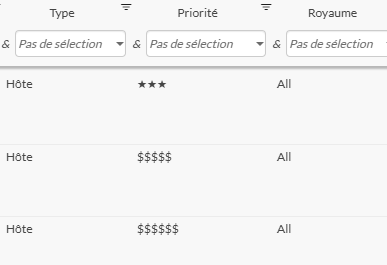
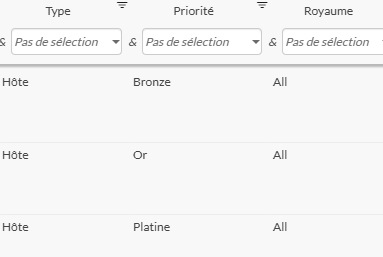
Il est possible de changer l'affichage des valeurs de la propriété "business_impact" ( Impact Métier dans l'interface ).
Exemple de modification
Au lieu d'avoir "*, **, ***, $$$$, $$$$$, $$$$$$", il est possible d'afficher "Plomb, Fer, Bronze, Argent, Or, Platine"
Affichage l'interface de configuration
| Panel |
|---|
|

| Panel |
|---|
|

Affichage dans l'interface de visualisation
| Panel |
|---|
|
| Panel |
|---|
|
Format d'écriture
Pour modifier les valeurs d'affichage de la propriété impact métier, décommenter et modifier les lignes PROPERTY_VALUE__DISPLAY_TEXT.
Exemple :
| Code Block | ||||
|---|---|---|---|---|
| ||||
# ┌───────────────────────────────────────────────────────────┐ # # │ ── BUSINESS IMPACT LABEL CONFIGURATION PER VALUE ─── ── │ # # └───────────────────────────────────────────────────────────┘ # # ─── /!\ Only alphanumeric characters, allowed /!\ ─── # ─── /!\ Only 80 characters allowed /!\ ─── # ───────────────────────── fr ────────────────────────────── # #[PROPERTY_VALUE__DISPLAY_TEXT:fr] business_impact_0=* #[PROPERTY_VALUE__DISPLAY_TEXT:fr] business_impact_1=** #[PROPERTY_VALUE__DISPLAY_TEXT:fr] business_impact_2=*** #[PROPERTY_VALUE__DISPLAY_TEXT:fr] business_impact_3=$$$$ #[PROPERTY_VALUE__DISPLAY_TEXT:fr] business_impact_4=$$$$$ #[PROPERTY_VALUE__DISPLAY_TEXT:fr] business_impact_5=$$$$$$ # ───────────────────────── en ────────────────────────────── # #[PROPERTY_VALUE__DISPLAY_TEXT:en] business_impact_0=* #[PROPERTY_VALUE__DISPLAY_TEXT:en] business_impact_1=** #[PROPERTY_VALUE__DISPLAY_TEXT:en] business_impact_2=*** #[PROPERTY_VALUE__DISPLAY_TEXT:en] business_impact_3=$$$$ #[PROPERTY_VALUE__DISPLAY_TEXT:en] business_impact_4=$$$$$ #[PROPERTY_VALUE__DISPLAY_TEXT:en] business_impact_5=$$$$$$ | ||||
| Code Block | ||||
| ||||
# ┌───────────────────────────────────────────────────────────┐ # # │ ── BUSINESS IMPACT LABEL CONFIGURATION PER VALUE ── │ # # └───────────────────────────────────────────────────────────┘ # # ─── /!\ Only alphanumeric characters allowed /!\ spaces, hyphens, apostrophes and underscores are allowed /!\ ─── # ─── /!\ Only 80 characters allowed /!\ ─── # ───────────────────────── fr ────────────────────────────── # [PROPERTY_VALUE__ [DISPLAY_TEXT:fr] businessnotes_impact_0url=PlombDocumentation [PROPERTY_VALUE__DISPLAY_TEXT:fr] business_impact_1=Fer [PROPERTY_VALUE__DISPLAY_TEXT:fr] business_impact_2=Bronze [PROPERTY_VALUE__DISPLAY_TEXT:fr] business_impact_3=Argent [PROPERTY_VALUE__DISPLAY_TEXT:fr] business_impact_4=Or [PROPERTY_VALUE__DISPLAY_TEXT:fr] business_impact_5=Platine # ───────────────────────── en ────────────────────────────── # [PROPERTY_VALUE__DISPLAY_TEXT:en] business_impact_0=Plumb [PROPERTY_VALUE__DISPLAY_TEXT:en] business_impact_1=Iron [PROPERTY_VALUE__DISPLAY_TEXT:en] business_impact_2=Bronze [PROPERTY_VALUE__DISPLAY_TEXT:en] business_impact_3=Silver [PROPERTY_VALUE__DISPLAY_TEXT:en] business_impact_4=Gold [PROPERTY_VALUE__DISPLAY_TEXT:en] business_impact_5=Platinium en] notes_url=Documentation |