/var /log /shinken
You will find in this directory, a log file for each Shinken Enterprise daemon Vous trouverez dans ce répertoire un fichier log pour chaque démon Shinken Enterprise :
- /var/log/shinken/arbiterd.log
- /var/log/shinken/brokerd.log
- /var/log/shinken/pollerd.log
- /var/log/shinken/reactionnerd.log
- /var/log/shinken/receiverd.log
- /var/log/shinken/schedulerd.log
- /var/log/shinken/synchronizerd.log
and an
aggregated oneet un fichier aggrégé:
- /var/log/shinken/shinken.log
Note : there is a daily rotation of log files).il y a une mise à jour quotidienne des fichiers logs .
Ces fichiers sont également dans le répertoire, sous une syntaxe avec date du type Those files are also in this directory and they are suffixed with a date like this : arbiterd.log.2015-09-02
Four levels of debugging are available :
4 niveaux de debugging disponibles :
Vous pouvez définir le niveau dans le fichier de configuration Fichier de configuration You can setup the level inside your configuration file (shinken.cfg)
- DEBUG ( ? )
- INFO
- WARNING ( = Info + Warning events événements Warning)
- CRITICAL ( = Info + Warning + Critical events événements Critiques )
To launch Pour lancer Shinken Enterprise in en mode debug mode :
| Code Block | ||||
|---|---|---|---|---|
| ||||
service shinken -d [debug level] restart |
or (only one deamonou (un seul démon)
| Code Block | ||||
|---|---|---|---|---|
| ||||
service shinken-[daemon name] -d [debug level] restart |
arbiterd.log
In this one, you will find all events about your Shinken Enterprise Architecture, because the arbiter daemon is used to check and dispatch configuration to the others daemons ( but not the Dans ce fichier, vous trouverez tous les événements liés à l'architecture de Shinken Enterprise, car l'arbiter est utilisé pour vérifier et distribuer la configuration aux autres démons (sauf le Synchronizer ).
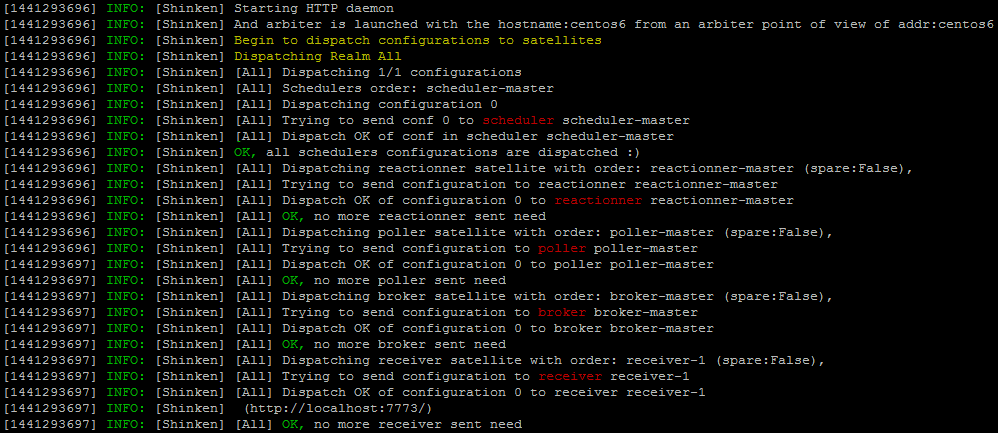
In error case En cas d'erreur :

Very useful in complex architecture with spare daemons where you will see here high availability events.
Très utile dans une configuration complexe avec des démons en spare , avec visualisation des des événements en haute disponibilité
brokerd.log
In this one, you will find all events about data management, because the broker daemon is used to export and manage data ( from schedulers ), for example, making those logs files ( and rotation ).
In this log you will find log output abou connection errors with the others daemons when occurs:
Dans ce fichier, vous trouverez tous les éléments liés à la gestion des données (Broker utilisé pour exporter et gérer les données du scheduler) .
Dans les logs, vous trouverez les informations générés quand une erreur intervient dans la connexion entre démons.
- schedulers
- pollers
- reactionners
- receivers
pollerd.log
In this one, you will find all events about checks plugins, because the poller daemon is used to launch checks and return results to the schedulers.
You will mainly find issues with the scheduler communication if occurs.
reactionnerd.log
In this one, you will find all events about Dans ce fichier, vous trouverez tous les événements liés à la communication ( mail, RSS, ... ) , because the reactionner daemon is used to issue notifications and launch event_handlers.
You will mainly find issues with the scheduler communication if occurs.
receiverd.log
In this one, you will find all events about passive checks, because the receiver daemon is used to receives passive check data and serves as a distributed passive command buffer that will be read by the arbiter daemon.
You will mainly find issues with the scheduler communication if occurs and if the receiver is in direct routing modeDans ce fichier, vous trouverez tous les événements liés aux checks passifs .
schedulerd.log
In this one, you will find all events about checks (dispatch, returnsDans ce fichier, vous trouverez tous les événements relatifs aux checks (distribution, retours, ...), because the scheduler daemon is used to manage the dispatching of checks and actions to the poller and reactionner daemons respectively..
Vous visualiserez tous les retours de checks You will see all checks returns :

synchronizerd.log
In this one, you will find all events about configuration, because the synchronizer daemon is used to manage the whole configuration. It uses modules to detect new hosts and host modifications.
Dans ce fichier, vous trouverez tous les éléments liés à la configuration.
Le poller windows: c:\shinken\var\pollerd.log.DATE
Le poller windows a ses fichiers de log dans le répertoire c:\shinken\var.
Il y a un fichier de log pour le processus principal (qui récupère les checks) en pollerd.log.DATE et chaque sous processus worker (qui exécute les sondes) a son fichier propre également en pollerd.log.worderID.DATE. Note: les fichier pollerd.log.DATE ont un jour de retention de moins que les fichier workerID.
Les ID vont de 1 à nombres de CPUs sur la machine.