Description
A check is based on a specific command available in your Shinken Enterprise environment.
Some of the available commands will provide more details than just the status. These information are called metrics.
The metric values are stored after every check run.
The Graphs widget will display all metrics of a check from a chosen host,
...
for the last 24 hours (like CPU, RAM, response time, …)
...
Configuration:
...
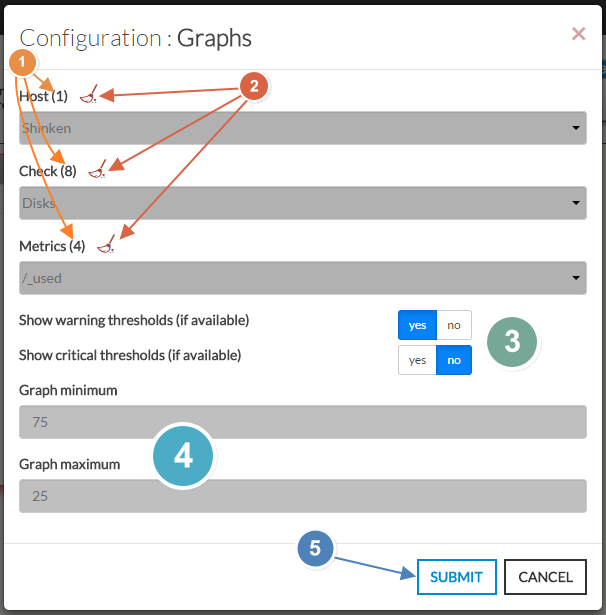
Open the configuration box:
...
Select the host.
It will fill the check area with all available checks with metrics.
...
Select the checks.
It will fill the metrics area with all available metrics.
...
Then select the metrics.
...
You can also
.
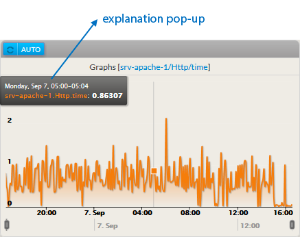
Moving the mouse on the graph will display an explanation pop-up (in a black box):
- This pop-up displays the date + time and the corresponding metric value.
- The mouse position correspond to the time line at the bottom of the graph
| Panel |
|---|
|
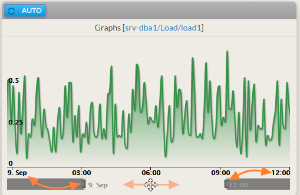
- The graph can display up to 1 day values (24 hours):
- You can reduce the period displayed by moving the 2 sliders
- You can move this reduced range along the 24 hours scale.
| Panel |
|---|
|
Configuration
...
...
...
...
...
...
Move the mouse on the graph to display the value of each checks on the services.
Up to 1 day values will be displayed in the graph.
...
Example: Graphs for the check [srv-mysql-1/Mysql-connection/connection_time]:
4. When configured, press the SUBMIT button (5). |
| Panel |
|---|
|
...