Overview
This document describes how you can import hosts and users from OpenLDAP.
There are some steps you’ll need to follow in order to be able to import users :
- Enable the OpenLDAP source,
- Configure the OpenLDAP module,
- Configure the connection to OpenLDAP,
- Configure the mapping import rules,.
- Configure the import rules.mapping rules (optional),
What is already available in the Shinken Installation
To make your life a bit easier, a few configuration tasks have already been done for you:
- Installation of the OpenLDAP import module,
- Availability of an example of pre-configured OpenLDAP source ready to be customized for your first try.
| Panel | ||
|---|---|---|
| ||
|
Setup the pre-installed source
Installation and update script of Shinken will set up a default OpenLDAP source already configured:
- You can see it in the source table of the UI Configuration home page.
- This source uses 2 kinds of configuration files
- Source definition files
- Configuration files to customize the data mining.
- the example is available in folder ( /etc/shinken-user/source-data/source-data-openldap-sample/_configuration ).
- the example is available in folder ( /etc/shinken-user/source-data/source-data-openldap-sample/_configuration ).
Tip title Advice The first time, we advise you to only update Configuration files.
Then, you will have to decide if you want to have 1 or more OpenLDAP sources ( if you have a big directory, it might be interesting to have many sources pointing of specific entries for performance gain).
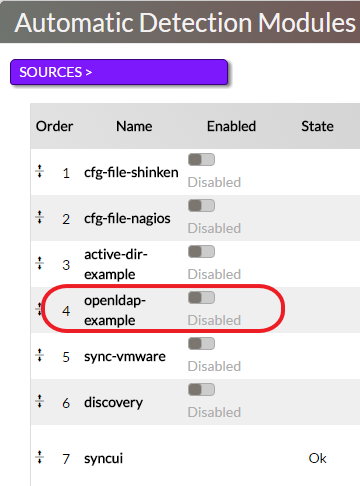
Source definitions:
Enable the openldap-import Source
In the Automatic Detection Modules panel, click on the button to enable the module. | 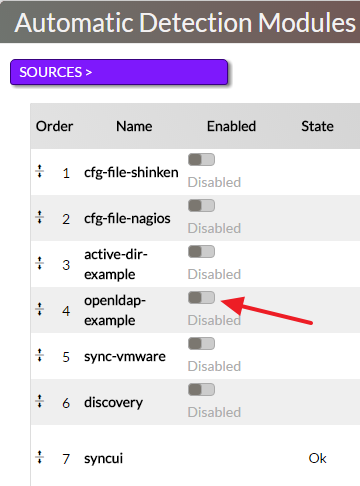 |
You can find the following parameters in the source file /etc/shinken/sources/openldap.cfg :
| Property | Example | Description | |||||
|---|---|---|---|---|---|---|---|
| source_name | openldap-example | Name of the source displayed in the UI configuration home page. Must be unique. | |||||
| order | 2 | Order in the merge algorithm of this source data. Look in the Synchronizer page for more information about merging order. | |||||
| import_interval | 5 | The source will be run automatically every import_inverval minutes.
| |||||
| modules | openldap-example | Module definition used by Shinken to parse OpenLDAP data. | |||||
| enabled | 0 | Activate or Disable the source. This property is also edited automaticaly when you use the Enabled button. | |||||
| description | This source is about loading hosts and contacts from OpenLDAP |
Configure the OpenLDAP Module
Modify if necessary, the file /etc/shinken/modules/openldap-import.cfg
| Property | Value | Description |
|---|---|---|
| module_name | openldap-example | Module's name. Must be unique. |
| module_type | ldap-import | Type of module. Don't change it as it refers to the shinken component. |
| connection_configuration_file | /etc/shinken-user/source-data/source-data-openldap-sample/_configuration/openldap-connection.json | Connection information. |
| mapping_configuration_file | /etc/shinken-user/source-data/source-data-openldap-sample/_configuration/openldap-mapping.json | Mapping rules Mapping of attributes can be different between 2 Openlapd installation. You can specify in this file for example what will be the attribute's name of the user phone number. |
| rules_configuration_file | /etc/shinken-user/source-data/source-data-openldap-sample/_configuration/openldap-rules.json | Rules configuration You can choose what kind of elements (host and contact) will be retrieved and define criteria to set automatically template attachment on them. |
Connection configuration
This file is used to make the connection to your OpenLDAP server.
 | Edit the file /etc/shinken-user/source-data/source-data-openldap-sample/_configuration/openldap-connection.json |
| Property | Default | Description |
|---|---|---|
| url | ldap://YOUR-DC-FQDN/ | URL of your OpenLDAP server. |
| ldap_protocol | 3 | Version of LDAP protocol (by default set to 3 if not set) |
| base | dc=YOUR,dc=DOMAIN,dc=com | Base OU for your objects discovery. |
| hosts_base | OU=DataCenter Servers,dc=YOUR,dc=DOMAIN,dc=com | Base OU for the hosts discovery. |
| hostgroups_base | OU=computers,dc=shinkendom,dc=local | Base OU for host groups discovery |
| contacts_base | dc=YOUR,dc=DOMAIN,dc=com | Base OU for the contacts discovery. |
| username | uid=user1,ou=peoples,dc=YOUR,dc=DOMAIN,dc=com | Username used to connect to the server. |
| password | PASSWORD | Password used to connect to the server. |
Example
| Code Block | ||||
|---|---|---|---|---|
| ||||
{
  "url": "ldap://vm-w2k8r2.shinkendom.local/",
  "ldap_protocol":3,
  "base": "dc=shinkendom,dc=local",
  "hosts_base": "OU=serveurs,dc=shinkendom,dc=local",
  "hostgroups_base": "OU=serveurs,dc=shinkendom,dc=local",
  "contacts_base": " OU=utilisateurs,DC=shinkendom,DC=local",
  "username": "uid=user1,ou=peoples,dc=shinkendom,dc=local",
  "password": "P@ssword1"
}
|
| Tip | ||
|---|---|---|
| ||
The account used to request LDAP only need read-only access. You should create a user account with read-only access dedicated to the OpenLDAP import module. |
Mapping rules configuration
This file allows you to do the mapping between OpenLDAP attributes and Shinken properties.
| Warning |
|---|
Unless you know what you're doing here, you should keep this file unmodified. |
You can find some customization in the HOW TO section.
File /etc/shinken-user/source-data/source-data-openldap-sample/_configuration/openldap-mapping.json
| Code Block | ||||
|---|---|---|---|---|
| ||||
# IMPORTANT: Do not edit this file.
# To have your own mapping, copy it under the /etc/shinken-users/source-data/YOU_SOURCE_FOLDER/_configuration/ directory and edit your copy instead.
# Note: comments should be with a # starting the line, NOT after a value
{
# first hosts propertyes (computer cat 	object in openldap)
   "host.name": "name",
   "host.dNSHostName": "dNSHostName",
   "host.operatingSystem": "operatingSystem",
   "host.operatingSystemServicePack":"operatingSystemServicePack",
   "host.distinguishedName": "distinguishedName",
   "host.filter": "(objectClass=computer)",

# Now contact properties
    "contact.ClassFilter":"inetOrgPerson",
    "contact.categoryFilter": "",
    "contact.mail": "mail",
    "contact.name": "uid",
    "contact.member":"uniqueMember",
    "contact.telephoneNumber":"telephoneNumber",
    "contact.mobile":"mobile",
# Co: for country
    "contact.co":"co",
# l: for city
    "contact.l":"l",
    "contact;company":"company",
    "contact.filter":"(objectClass=inetOrgPerson)",
# By default hostgroup are not requested. Setup a filter to enabled it
    "hostgroup.filter":""
}
|
Import rules configuration
This file is used to apply host template, contact template and tags to the hosts and contacts while the import.
| Edit the file /etc/shinken-user/source-data/source-data-openldap-sample/_configuration/openldap-rules.json |
| Tip | ||
|---|---|---|
| ||
A host template called windows is already available in Shinken that checks : Cpu, Disks, EventLogApplication, EventLogSystem, Memory, Network Interface, Reboot, Services, Swap. As a good start, you can configure the property hosts_tag in this way :
|
The mandatory properties to modify are in green.
The mandatory properties to modify are in green.
| Property | Default | Description | ||
|---|---|---|---|---|
| hosts_tag | your-host-template | The host template "your-host-template" will be applied to any host discovered in LDAP during the import. | ||
| contacts_tag | generic-contact | The contact template "generic-contact" | ||
| Property | Default | Description | ||
| hosts_tag | your-host-template | The host template "your-host-template" will be applied to any host discovered in LDAP during the import. | ||
| contacts_tag | generic-contact | The contact template "generic-contact" will be applied to any contact discovered in LDAP during the import. | ||
| contacts_group_filter | CN=Domain Admins,CN=Users,DC=YOUR,dc=DOMAIN,dc=com | CN=OTHERGROUPS,OU=Groups,OU=Users Groups,DC=YOUR,dc=DOMAIN,dc=com | Organizational Unit or User group to import You can define many group by separing filter by | | ||
| hosts_tag_citrix | OU=Terminal Servers,OU=DataCenter Servers,DC=YOUR,dc=DOMAIN,dc=com | host template citrix applied | ||
| hosts_tag_database | OU=Database Servers,OU=DataCenter Servers,DC=YOUR,dc=DOMAIN,dc=com | host template database applied | ||
| hosts_tag_exchange | OU=Email Collaboration Servers,OU=DataCenter Servers,DC=YOUR,dc=DOMAIN,dc=com | host template exchange applied | ||
| hosts_tag_fileprint | OU=Files Print Servers,OU=DataCenter Servers,DC=YOUR,dc=DOMAIN,dc=com | Host template fileprint applied | ||
| hosts_match_operatingSystem_windows | windows | Host template windows will be applied for hosts matching "windows" in the property operatingSystem (Ldap data). | ||
| hosts_match_operatingSystem_windows2008 | windows*.*2008(?!.*.(?:r2)) | Host template windows2008 applied for hosts matching "windows*.*2008(?!.*.(?:r2))" in the property operatingSystem (Ldap data). | ||
| hosts_match_operatingSystem_windows2008r2 | windows*.*2008*.*r2 | Host template windows 2008r2 | ||
| hosts_match_operatingSystem_windows2003 | windows*.*2003 | Host template windows2003 | ||
| hosts_match_operatingSystem_windows2012 | windows*.*2012(?!.*.(?:r2)) | Host template windows2012 | ||
| hosts_match_operatingSystem_windows2012r2 | windows*.*2012*.*r2 | Host template windows2012r2 | ||
| hosts_match_operatingSystem_windows2000 | windows*.*2000 | Host template windows 2000 | ||
| hosts_match_operatingSystem_windowsxp | windows*.*xp | Host template windows xp | ||
| hosts_match_operatingSystem_enterprise | Enterprise | Host template Enterprise | ||
| hosts_match_operatingSystemServicePack_sp1 | Service Pack 1 | Host template Service Pack 1 | ||
| hosts_match_operatingSystemServicePack_sp2 | Service Pack 2 | Host template Service Pack 2 | ||
| hosts_match_operatingSystemServicePack_sp3 | Service Pack 3 | Host template Service Pack 3 | ||
| Service Pack 2 | Host template Service Pack 2 | |||
| hosts_match_operatingSystemServicePack_sp3 | Service Pack 3 | Host template Service Pack 3 | ||
| AddFirst_template_(domain-admins)_to_contact_matching_[memberOf] | CN=Domain Admins,CN=Users,DC=YOUR,dc=DOMAIN,dc=com | Add the "domain-admins" contact template to every contacts matching the value "CN=Domain Admins,CN=Users,DC=YOUR,dc=DOMAIN,dc=com" in its attribute "memberOf" first in list (before the contacts_tag template). | ||
| AddLast_template_(users)_to_contact_matching_[memberOf] | CN=Users,DC=YOUR,dc=DOMAIN,dc=com | Add the "users" contact template to every contacts matching the value "CN=Users,DC=YOUR,dc=DOMAIN,dc=com" in its attribute "memberOf" last in list (after the contacts_tag template). | ||
| Force_template_(specific)_to_contact_matching_[memberOf] | CN=SpecificUsers,DC=YOUR,dc=DOMAIN,dc=com | Add the "specific" contact template to every contacts matching the value "CN=SpecificUsers | contacts_match_memberOf_domain-admins | CN=Domain Admins,CN=Users,DC=YOUR,dc=DOMAIN,dc=comContact tag domains-admins" in its atribute "memberOf" all alone (the contacts_tag template will not be applied). |
| Tip | ||
|---|---|---|
| ||
See below about the tag functionality. |
Example :
| Code Block | ||||
|---|---|---|---|---|
| ||||
{{ "hosts_tag": "windows", "hosts_tag_citrix": "OU=citrix,OU=serveurs,dc=shinken,dc=local", "hosts_tag_database": "OU=database,OU=serveurs,dc=shinken,dc=localyou-host-template", "hostscontacts_tag_exchange": "OU=exchange,OU=serveurs,dc=shinken,dc=localgeneric-contact", "hostscontacts_taggroup_fileprintfilter": "OU=fileprintCN=paris_shinken_users,OU=serveursutilisateurs,dcDC=shinkenshinkendom,dcDC=local", | "hosts_tag_windows": "OU=infraCN=bordeaux_shinken_users,OU=serveursutilisateurs,dcDC=shinkenshinkendom,dcDC=local", "hosts_match_operatingSystem_windows": "windows", "hosts_match_operatingSystem_windows2008": "windows*.*2008(?!.*.(?:r2))", "hosts_match_operatingSystem_windows2008r2": "windows*.*2008*.*r2", "hosts_match_operatingSystem_windows2003": "windows*.*2003", "hosts_match_operatingSystem_windows2012": "windows*.*2012(?!.*.(?:r2))", "hosts_match_operatingSystem_windows2012r2": "windows*.*2012*.*r2", "hosts_match_operatingSystem_windows2000": "windows*.*2000", "hosts_match_operatingSystem_windowsxp": "windows*.*xp", "hosts_match_operatingSystem_enterprise": "Enterprise", "hosts_match_operatingSystemServicePack_sp1": "Service Pack 1", "hosts_match_operatingSystemServicePack_sp2": "Service Pack 2", "hosts_match_operatingSystemServicePack_sp3": "Service Pack 3", "contacts_tag": "generic-contact", "contacts_group_filterAddFirst_template_(domain-admins)_to_contact_matching_[memberOf]": "CN=paris_shinken_users,OU=utilisateursDomain Admins,CN=Users,DC=shinkendom,DC=local | CN=bordeaux_shinken_users,OU=utilisateurs,DC=shinkendom,DC=localYOUR,dc=DOMAIN,dc=com", "AddLast_template_(users)_to_contact_matching_[memberOf]": "CN=Users,DC=YOUR,dc=DOMAIN,dc=com", "contacts_match_memberOf_domain-adminsForce_template_(specific)_to_contact_matching_[memberOf]": "OUCN=shinken_adminsSpecificUsers,OUDC=utilisateursYOUR,DCdc=shinkendomDOMAIN,DCdc=localcom" } |
| Tip |
|---|
If you want to import all objects of an OU instead of groups, set no contactcontacts_group_filter. All objects inside contacts_base (file openldap-connection.json) filtered via contact.filter (file openldap-mapping.json) will be imported. |
Import the objects
After each source modification, you have to restart the Synchronizer Daemon.
Import the objects
Go to the UI Configuration home page, if your configuration is ok you should have an ouput "OK: Import clean."
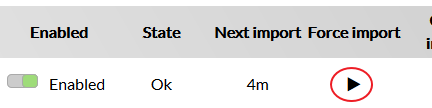
Now do a "Force import" in clicking on 
In the "Elements >" panel you will see new elements appearing.

The next step will be to import those new objects.
HOW TO
Import users of multiple groups
With the OpenLDAP source, it's possible to import users that are in different groups.
| Edit the file /etc/shinken-user/source-data/source-data-openldap-sample/_configuration/openldap-rules.json |
In contactcontacts_group_filtersfilter, add the Distinguished Name (DN) to the different user contact groups separated by a pipe.
| Code Block | ||
|---|---|---|
| ||
"contacts_group_filter": "CN=shinken_admins,OU=utilisateurs,DC=shinkendom,DC=local | CN=shinken_users,OU=utilisateurs,DC=shinkendom,DC=local", |
Restart the Synchronizer Daemon to apply your modification.
/etc/init.d/shinken-synchronizer restart
Creation of your own sources
Having multiple sources can help you if you have a huge directory and want to have the control on what to import at any time. As an example, you have an OU containing Paris users and another OU containing Bordeaux users. At a given time, you want to import only Bordeaux users. If you create two sources, you can activate just the Bordeaux source and import its objects.
| Tip |
|---|
Every time you have to customize Shinken Sources, you have to do it in the /etc/shinken-user folder. |
You will have to do the following to create your own source :
- Create a module
- Create a source
- Configure the source-data
- Configure the Synchronizer daemon to take the new module in consideration
Create a module
| Code Block | ||
|---|---|---|
| ||
cd /etc/shinken/modules/ cp openldap-import.cfg openldap-import-Bordeaux.cfg |
| Edit the file openldap-import-Bordeaux.cfg Delete the 4 lines beginning from # Shinken Enterprise to # End of Shinken Enterprise part
|
Modify
| Code Block |
|---|
module_name openldap-example |
With
| Code Block |
|---|
module_name openldap-Bordeaux |
Modify the following lines to point to the new source data (see below for the source data configuration)
| Code Block |
|---|
connection_configuration_file rules_configuration_file mapping_configuration_file |
Example :
| Code Block |
|---|
    # Configuration file for your OpenLDAP connection (server, user, password, ...)
    connection_configuration_file   /etc/shinken-user/source-data/source-data-openldap-Bordeaux/_configuration/openldap-connection.json

    # Configuration file for your import rules (like OU=>template rules)
    rules_configuration_file       /etc/shinken-user/source-data/source-data-openldap-Bordeaux/_configuration/openldap-rules.json

	# Configuration file for your ldap fields mapping (like for openldap users)
    mapping_configuration_file     /etc/shinken-user/source-data/source-data-openldap-Bordeaux/_configuration/openldap-mapping.json
|
Create a source
| Code Block | ||
|---|---|---|
| ||
cd /etc/shinken/sources/ cp openldap.cfg openldap-Bordeaux.cfg |
| Edit the file openldap-Bordeaux.cfg Delete the 4 lines beginning from # Shinken Enterprise to # End of Shinken Enterprise part |
Modify
| Code Block |
|---|
source_name openldap-example modules openldap-example |
With
| Code Block |
|---|
    source_name			  openldap-Bordeaux
modules openldap-Bordeaux |
Configure the source data
To create your own import source, do the following :
| Code Block | ||
|---|---|---|
| ||
cd /etc/shinken-user/source-data cp -r source-data-openldap-sample source-data-openldap-Bordeaux |
In our example :
| Code Block |
|---|
cp -r source-data-openldap-sample source-data-openldap-Bordeaux |
| Tip | ||
|---|---|---|
| ||
Let's consider that the folder in which you will have your new OpenLDAP source is : /etc/shinken-user/source-data/source-data-openldap-Bordeaux/ |
See above on how to configure the source data
Configure the Synchronizer Daemon
| Edit the file /etc/shinken/synchronizers/synchronizer-master.cfg At the end of the "sources" line, add you new source. |
Example :
| Code Block |
|---|
sources syncui,cfg-file-shinken,active-dir-example,sync-vmware,cfg-file-nagios,discovery,openldap-example,openldap-Bordeaux |
Restart the Synchronizer Daemon to apply your modification.
/etc/init.d/shinken-synchronizer restart
you can see your new source :

Apply contact templates to specific contact groups
During the import process a contact template is applied on every contacts thanks to the "contacts_tag" property found in the openldap-rules.json.
However, you have the possibility to apply contact templates to specific contact groups with the following properties (file openldap-rules.json):
| Property | Value | Description |
|---|---|---|
| AddFirst_template_(domain-admins)_to_contact_matching_[memberOf] | CN=Domain Admins,CN=Users,DC=YOUR,dc=DOMAIN,dc=com | Add the "domain-admins" contact template to every contacts matching the value "CN=Domain Admins,CN=Users,DC=YOUR,dc=DOMAIN,dc=com" in its attribute "memberOf" first in list (before the contacts_tag template). |
| AddLast_template_(users)_to_contact_matching_[memberOf] | CN=Users,DC=YOUR,dc=DOMAIN,dc=com | Add the "users" contact template to every contacts matching the value "CN=Users,DC=YOUR,dc=DOMAIN,dc=com" in its attribute "memberOf" last in list (after the contacts_tag template). |
| Force_template_(specific)_to_contact_matching_[memberOf] | CN=SpecificUsers,DC=YOUR,dc=DOMAIN,dc=com | Add the "specific" contact template to every contacts matching the value "CN=SpecificUsers,DC=YOUR,dc=DOMAIN,dc=com" in its atribute "memberOf" all alone (the contacts_tag template will not be applied). |
If you want to customize your OpenLDAP directory by adding a new property, for example called countryCode and to apply a template to it, you can do it like :
| Code Block |
|---|
"AddFirst_template_(domain-admins)_to_contact_matching_[countryCode]" : "33" |
By default, there is no "memberOf" attribute in OpenLDAP and therefor it's a virtual attribute.
| Tip | ||
|---|---|---|
| ||
Keep in mind that the group in which you want to apply specific contact templates must be part of the "contacts_group_filter" filter. For example, let's consider you want to apply the contact templates to the groups listed in the table above. You have to set "contacts_group_filter" like this : "contacts_tag" : "CN=Domain Admins,CN=Users,DC=YOUR,dc=DOMAIN,dc=com|CN=User,DC=YOUR,dc=DOMAIN,dc=com|CN=SpecificUsers,DC=YOUR,dc=DOMAIN,dc=com" |