| Scroll Ignore | ||||||||||||||
|---|---|---|---|---|---|---|---|---|---|---|---|---|---|---|
| ||||||||||||||
|
Contexte
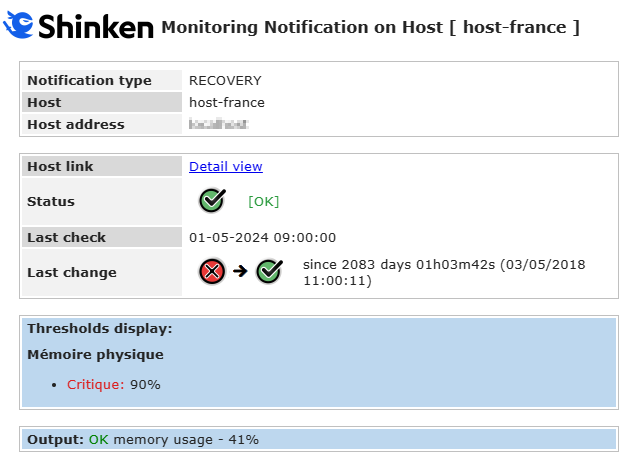
La commande de notification SHINKEN EXAMPLE [ notify-host-by-email-with-thresholds ] - Clone before use permet d'envoyer un mail de notification .sous le format suivant :
| Panel |
|---|
|
Paramétrage
La commande utilise la définition suivante :
| Code Block | ||||
|---|---|---|---|---|
| ||||
$NOTIFPLUGINDIR$/notify_by_email.py --title-tpl $NOTIFPLUGINDIR$/host_alert_title_template.tpl --content-tpl $NOTIFPLUGINDIR$/host_alert_content_template.tpl -F "$SENDER$" -r "$CONTACTEMAIL$" -n $NOTIFICATIONTYPE$ -H "$HOSTNAME$" --address "$HOSTADDRESS$" --url $MAILURL$ --huuid $HOSTUUID$ --state $HOSTSTATE$ --last-state $LASTHOSTSTATEID$ --last-change $LASTHOSTSTATECHANGE$ --last-check "$DATE$ $TIME$" --output "$HOSTOUTPUT$" --long-output "$LONGHOSTOUTPUT$" --ack-author "$ACKAUTHOR$" --ack-data "$ACKDATA$" --downtime-comment "$HOSTDOWNTIMECOMMENT$" --downtime-author "$HOSTDOWNTIMEAUTHOR$" --first-notification-delay "$HOSTFIRSTNOTIFICATIONDELAY$" --notification-number "$HOSTNOTIFICATIONNUMBER$" --realm "$HOSTREALM$" --with-images --thresholds-display "$HOSTTHRESHOLDSDISPLAY$""$HOSTTHRESHOLDSDISPLAY$" |
Les commandes utilisent le mécanisme des Variables pour recevoir les informations spécifiques à l'élément de la notification ( voir la page Les Variables ( Remplacement dynamique de contenu - Anciennement les Macros ) )
L'option "--thresholds-display" permet d'ajouter au mail le contenu de la propriété "l'affichage des seuils".
| Info | ||
|---|---|---|
| ||
A noter que l'option -S, permettant d'envoyer le mail vers un serveur mail différent de "localhost", n'est pas présente dans la commande.
|
Données de configuration du script d'envoi de mail
| Excerpt Include | ||||||
|---|---|---|---|---|---|---|
|
Données de fonctionnement indispensable pour une notification minimal
| Excerpt Include | ||||||
|---|---|---|---|---|---|---|
|
Données pour compléter l'affichage du contenu du mail
| Excerpt Include | ||||||
|---|---|---|---|---|---|---|
|
Données pour l'affichage des seuils
| Nom | Modifiable sur | Description | ||
|---|---|---|---|---|
| L'hôte ( Onglet Supervision ) | Rendu de l'affichage des seuils |
Exemples
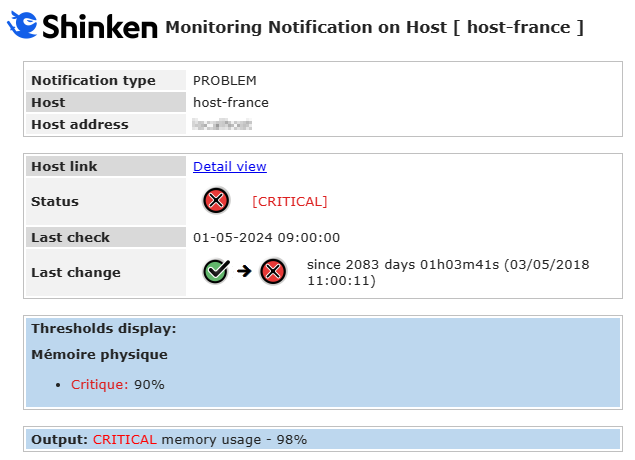
Notification type - PROBLEM
| Panel |
|---|
|
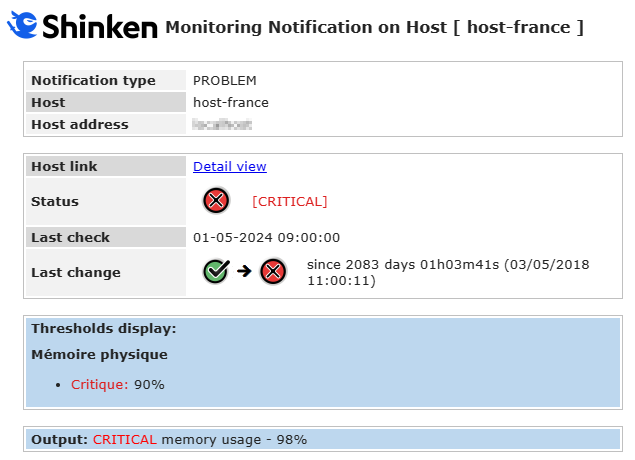
Notification type - RECOVERY
| Panel |
|---|
|