...
Comment plusieurs pollers se connectent à un scheduler commun
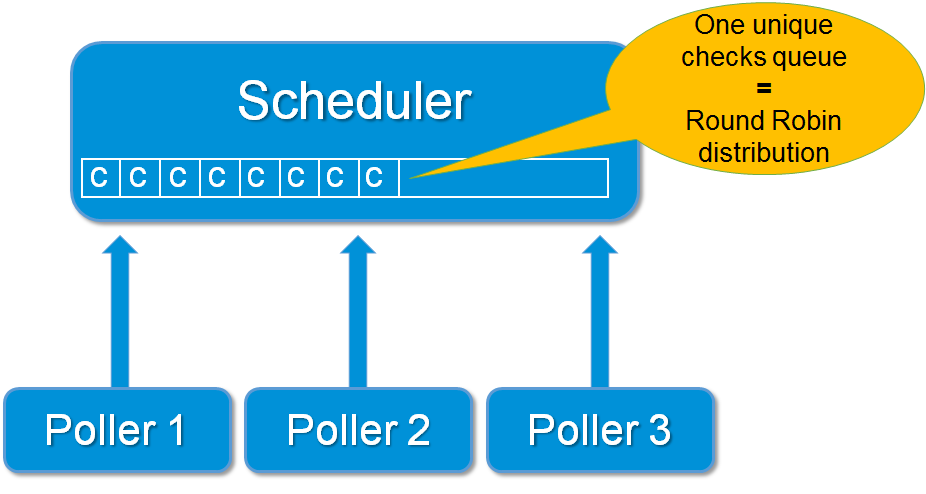
Mise en oeuvre d'une
...
architecture en load balancing avec plusieurs pollers
Commencez par installer le package Shinken Enterprise comme d'ordinaire, mais juste en mode pollernode :
...
Éditez le fichier /etc/shinken/pollers/poller-master.cfg file et définissez votre nouveau poller sous la définition du poller-1 existant (sur le server1):
| Code Block | ||||
|---|---|---|---|---|
| ||||
# Pollers launch checks
define poller{
  poller_name poller-2
  address server2
  port 7771
} |
...
Vérifiez que vous avez bien ces lignes:
| Code Block | ||||
|---|---|---|---|---|
| ||||
define scheduler{
  scheduler_name scheduler-1 ; just the name
  address 192.168.0.1 ; ip or dns address of the daemon
  port 7768 ; tcp port of the daemon
} |
...
Vous pouvez regarder dans le fichier global shinken.log file que le nouveau poller est démarré et qu'il peut joindre le scheduler-1.
Recherchez les lignes :
| Code Block | ||||
|---|---|---|---|---|
| ||||
[All] poller satellite order: poller-2 (spare:False), poller-1 (spare:False), |
...
[All] Trying to send configuration to poller poller-2 |
...
[All] Dispatch OK of for configuration 0 to poller poller-2 |
Vous pouvez également regarder les logs du poller sur le server2.
Vous aurez alors les lignes : Waiting for initial configuration
| Code Block | ||||
|---|---|---|---|---|
| ||||
Waiting for initial configuration [poller-2] Init de connection with scheduler-1 at HTTP://192.168.0.1:7768 |
...
[poller-2] Connexion OK with scheduler scheduler-1 |
...
I correctly loaded the modules: [] |
...
[poller-2] Allocating new fork Worker: 0 |