| Scroll Ignore | ||||||||||||||||
|---|---|---|---|---|---|---|---|---|---|---|---|---|---|---|---|---|
| ||||||||||||||||
|
Contexte
Il peut être nécessaire de changer le nom des propriétés affichées dans l'UI de Configuration et de Visualisation.
- Ce renommage va pouvoir être défini dans le fichier /etc/shinken-user/configuration/monitoring_policy/elements/elements_default_properties/default_properties_configuration.cfg
- ( un fichier d'exemple est disponible : /etc/shinken-user-example/configuration/monitoring_policy/elements/elements_default_properties/default_properties_configuration.cfg )
- Comme il s'agit d'un texte, il doit être traduit dans les langues couvertes par Shinken.
- Le mot clef pour définir les noms de propriété est [DISPLAY_TEXT:LANG] ou lang peut valeur
- fr ⇒ pour le français
- en ⇒ pour l'anglais
| Note |
|---|
Remarque : : Les propriétés modifiable sont :
|
Propriété notes_url
Nous permettons Il est possible de changer le nom d'affichage de la propriété "notes_url" ( visible par défaut avec le nom "Url externe" ), car suivant votre l'utilisation, vous aurez peut-être besoin il y a possiblement besoin d'un texte plus explicite que le nom par défaut.
Exemple de modification
Au
: aulieu de "Url externe",
vous voudrez peut-êtreil est possible d'afficher "
Les documentations"Décommentez les 2 lignes contenant DISPLAY_TEXT et saisissez le texte voulu après notes_url=Documentation".
Affichage l'interface de configuration
| Panel |
|---|
|

| Panel |
|---|
|
Affichage dans l'interface de visualisation
| Panel |
|---|
|

| Panel |
|---|
|

Format d'écriture
Pour modifier les valeurs d'affichage de la propriété impact métier, décommenter et modifier les lignes DISPLAY_TEXT
Exemple :
| Code Block | ||||
|---|---|---|---|---|
| ||||
    # ┌───────────────────────────────────────────────────────────┐ #
    # │ ─────────     NOTES_URL LABEL CONFIGURATION    ────────── │ #
    # └───────────────────────────────────────────────────────────┘ #

    # ───  /!\ Only alphanumeric characters allowed /!\           ───
    # ───  /!\      Only 80 characters allowed      /!\           ───
    #[DISPLAY_TEXT:fr] notes_url=Url externe
#[DISPLAY_TEXT:en] notes_url=External URL |
| Code Block | ||||
|---|---|---|---|---|
|
    # ┌───────────────────────────────────────────────────────────┐ #
    # │ ─────────     NOTES_URL LABEL CONFIGURATION    ────────── │ #
    # └───────────────────────────────────────────────────────────┘ #

    # ───  /!\ Only alphanumeric characters allowed /!\           ───
    # ───  /!\      Only 80 characters allowed      /!\           ───
    [DISPLAY_TEXT:fr] notes_url=Documentation
[DISPLAY_TEXT:en] notes_url=Documentation |
Propriété business_impact
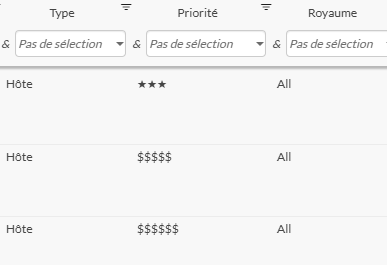
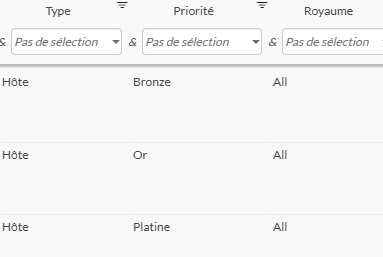
Il est possible de changer l'affichage des valeurs de la propriété "business_impact" ( Impact Métier dans l'interface ).
Exemple de modification
Au lieu d'avoir "*, **, ***, $$$$, $$$$$, $$$$$$", il est possible d'afficher "Plomb, Fer, Bronze, Argent, Or, Platine"
Affichage l'interface de configuration
| Panel |
|---|
|

| Panel |
|---|
|

Affichage dans l'interface de visualisation
| Panel |
|---|
|
| Panel |
|---|
|
Format d'écriture
Pour modifier les valeurs d'affichage de la propriété impact métier, décommenter et modifier les lignes PROPERTY_VALUE__DISPLAY_TEXT.
Exemple :
| Code Block | ||||
|---|---|---|---|---|
| ||||
    # ┌───────────────────────────────────────────────────────────┐ #
    # │ ──    BUSINESS IMPACT LABEL CONFIGURATION PER VALUE    ── │ #
    # └───────────────────────────────────────────────────────────┘ #

    # ───  /!\ Only alphanumeric characters allowed /!\           ───
    # ───  /!\      Only 80 characters allowed      /!\           ───

    # ─────────────────────────  fr  ────────────────────────────── #

    #[PROPERTY_VALUE__DISPLAY_TEXT:fr] business_impact_0=*
    #[PROPERTY_VALUE__DISPLAY_TEXT:fr] business_impact_1=**
    #[PROPERTY_VALUE__DISPLAY_TEXT:fr] business_impact_2=***
    #[PROPERTY_VALUE__DISPLAY_TEXT:fr] business_impact_3=$$$$
    #[PROPERTY_VALUE__DISPLAY_TEXT:fr] business_impact_4=$$$$$
    #[PROPERTY_VALUE__DISPLAY_TEXT:fr] business_impact_5=$$$$$$

    # ─────────────────────────  en  ────────────────────────────── #

    #[PROPERTY_VALUE__DISPLAY_TEXT:en] business_impact_0=*
    #[PROPERTY_VALUE__DISPLAY_TEXT:en] business_impact_1=**
    #[PROPERTY_VALUE__DISPLAY_TEXT:en] business_impact_2=***
    #[PROPERTY_VALUE__DISPLAY_TEXT:en] business_impact_3=$$$$
    #[PROPERTY_VALUE__DISPLAY_TEXT:en] business_impact_4=$$$$$
#[PROPERTY_VALUE__DISPLAY_TEXT:en] business_impact_5=$$$$$$ |
| Code Block | ||||
|---|---|---|---|---|
| ||||
# ┌───────────────────────────────────────────────────────────┐ # # │ ── BUSINESS IMPACT LABEL CONFIGURATION PER VALUE ── │ # # └───────────────────────────────────────────────────────────┘ # # ─── /!\ Only alphanumeric characters allowed /!\ |
─── # ─── /!\ Only 80 characters allowed /!\ ─── # ───────────────────────── fr ────────────────────────────── # [PROPERTY_VALUE__DISPLAY_TEXT:fr] business_impact_0=Plomb [PROPERTY_VALUE__DISPLAY_TEXT:fr] business_impact_1=Fer [PROPERTY_VALUE__DISPLAY_TEXT:fr] business_impact_2=Bronze [PROPERTY_VALUE__DISPLAY_TEXT:fr] business_impact_3= |
Argent [PROPERTY_VALUE__DISPLAY_TEXT:fr] business_impact_4=Or [PROPERTY_VALUE__DISPLAY_TEXT:fr] |
business_impact_ |
5=Platine # ───────────────────────── en ────────────────────────────── # [PROPERTY_VALUE__DISPLAY_TEXT:en] |
business_impact_ |
0=Plumb
    [PROPERTY_VALUE__DISPLAY_TEXT:en] business_impact_1=Iron
    [PROPERTY_VALUE__DISPLAY_TEXT:en] business_impact_2=Bronze
    [PROPERTY_VALUE__DISPLAY_TEXT:en] business_impact_3=Silver
    [PROPERTY_VALUE__DISPLAY_TEXT:en] business_impact_4=Gold
[PROPERTY_VALUE__DISPLAY_TEXT:en] business_impact_5=Platinium |