Versions Compared
compared with
Key
- This line was added.
- This line was removed.
- Formatting was changed.
Overview
The checks tab displays all the checks attached to
...
a host or a cluster.
...
On the top, the header displays :
(1)
...
Total Count of checks
(2)
...
Count of checks after filtering (6)
(3)
...
Count of selected check rows in the list. On the selection you can perform 3 group
...
actions (4) :
- Submit a check result (fully described in Manage Tab, Action Buttons)
- Acknowledge the current status of the check (fully described for Host status in Hud, State Summary : 4 )
- Launch an instant check
The grid :
(5)
...
can be sorted (possible multiple sorts)
(6)
...
can be filtered (possible multiple filters)
(7)
...
In "Actions" column, 4 buttons are available for each check row.
...
There are the same 3 actions already available in the header plus a fourth action :
...
 Image Addedwhich opens the Graphs Tab
...
with the check already developed.
...
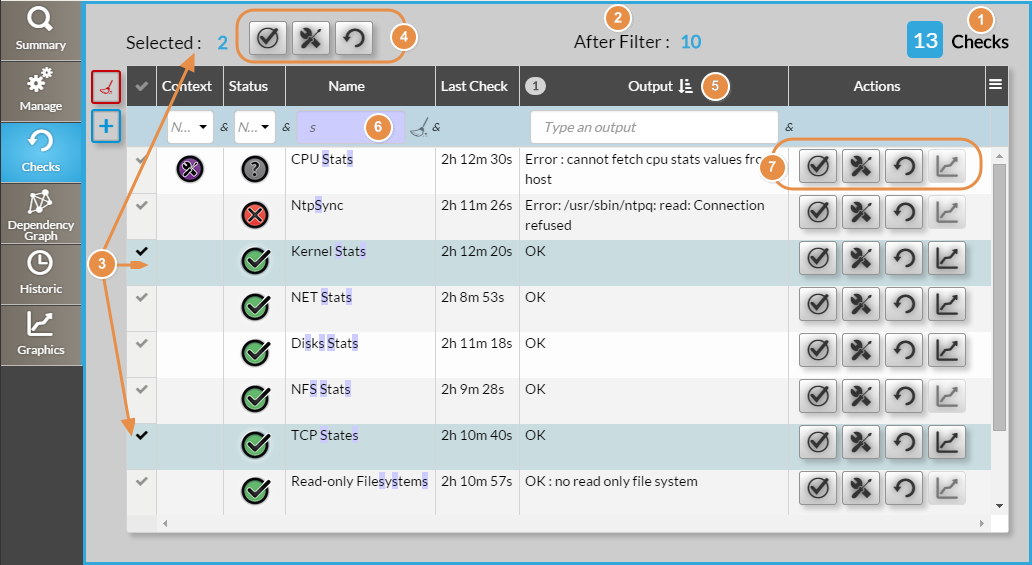 Image Added