Versions Compared

Key

  • This line was added.
  • This line was removed.
  • Formatting was changed.

Host Concepts

Hosts configuration is related to Host elements, Host Templates and Host Groups.

Hosts

  • They are elements that will be checked, in a scheduled way, using Checks.
  • It can be a server, a switch, a firewall, but also like a fridge, a satelite, an handset...
    • in fact any hardware operating system that can run a run a Check and have an IP address.

Host Templates

Host Templates represent models of

...

behaviour:

  • Shinken Enterprise contains predifined Host Templates like windows, exchange, apache, linux, but Adminstators can extend existing one, create new one...
  • The concept of templates, is to provide a way for setting common options and properties, list of checks, that will apply to

...

  • any hosts

...

  • using the template.

We use the following vocabulary for template usage (both sentences mean the same):

  • Hosts inherit from templates
  • Template are attached to hosts

Hosts can inherit from more than one

...

template, giving the ability to

...

keep an homogenous configuration, and spend less time when deploying Hosts.

Hostgroups

They are used to organize the display of Hosts by groups

...

.

  • It makes ordering easier. you can for example create a group called "web servers" in which you can regroup hosts inheriting of apache,
  • nginx and IIS templates, or any template you have defined.
  • Checks can be attached to a Hostgroup, that will be executed on each

...

  • host of concerned groups.

...


Access the Hosts Configuration


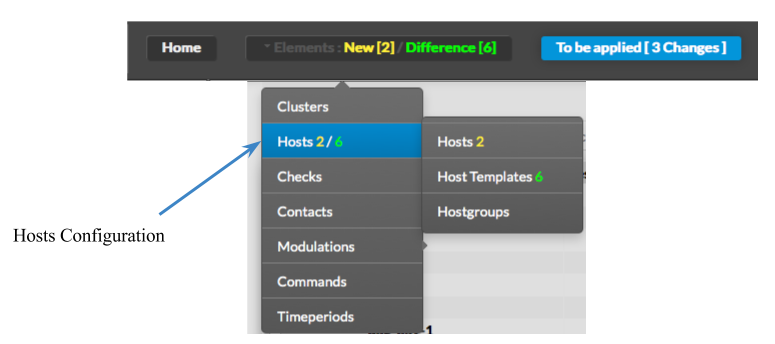
Hosts Configuration can be accessed by the Main Menu "Elements".

When pointing cursor over Hosts in the Main Menu, a sub menu appears,
showing 3 categories :

  • Hosts
  • Host Template
  • Hostgroups

Select one of the sub categories to get into Configuration.


Note: Selecting Hosts in the Main Menu, is the same as selecting Hosts
in the Sub Menu.

Image Modified


...