Concept
Ce module permet aux utilisateurs de se connecter à l'interface de Visualisation à l'aide d'un code généré par le module et qui est envoyé par e-mail à l'utilisateur.
Si ce module n'est pas présent, il ne sera pas possible de se connecter avec l'email défini dans l'interface de Configuration.
Ce module peut être utilisé :
comme méthode d'authentification unique
dans le cadre d'une authentification multifacteur
Les modules webui--module-authentication--by-mail sont de type BY_USER_CODE.
Le type du module a une importance dans la définition de la séquence d'authentification ( voir la page === Module d'authentification de la WebUI === )
Pour pouvoir s'authentifier à l'aide du module d'authentification par mail, le module demande la saisie de l'identifiant d'un utilisateur, puis utilise le contenu de la propriété Email de cet utilisateur pour lui faire parvenir le code à saisir dans l'interface d'authentification.
Dans le cas d'une authentification multi-facteur ( enchainement de plusieurs modules d'authentification ) :
- Ce module utilisera automatiquement le nom d'utilisateur qui aura été saisi dans les modules précédents.
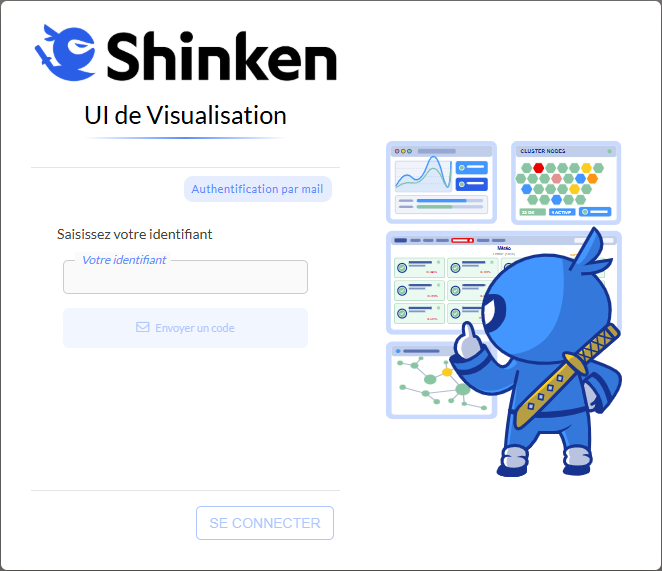
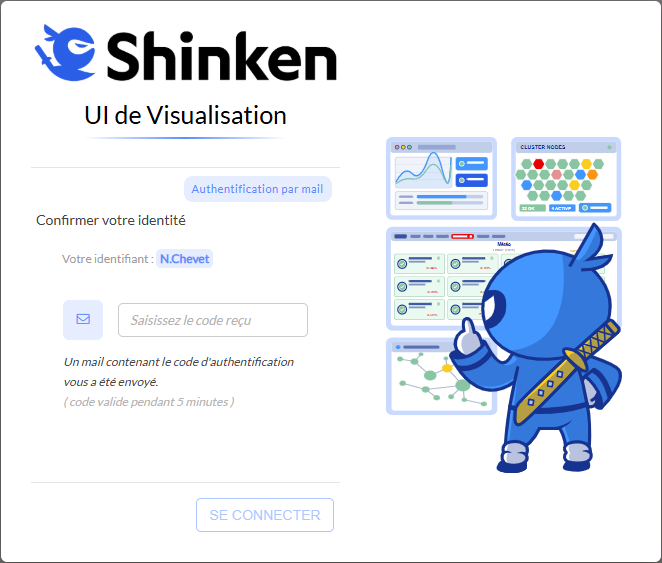
Rendu dans l'interface
En fonction de la place du module dans la séquence d'authentification ( voir la page : Configuration du module WebUI ), le rendu de l'interface change afin de ne pas demander les informations déjà connues ( identifiant ).
Rendu avec le module en première position
Rendu avec le module à une autre position
|
|
Activation du module
Les modules de type "webui__module_authentication__by_mail" sont des modules qui peuvent être activés sur le module de type "webui", il existe également leur équivalent pour un démon de type "synchronizer" ( voir la page : Module synchronizer--module-authentication--by-mail pour le Synchronizer ).
- L'activation du module s'effectue en ajoutant le nom du module dans la configuration du module parent.
- Pour cela, il faut ouvrir le fichier de configuration du module parent ( de type "
webui" ), et ajouter dans le paramètre modules, le nom du module de type"webui__module_authentication__by_mail".
- Pour cela, il faut ouvrir le fichier de configuration du module parent ( de type "
- S'il y a plusieurs modules de type
"webui"présents dans l'architecture, il ne faut pas oublier d'activer le module de type"webui__module_authentication__by_mail"dans la configuration de chacun d'eux. - Contraintes :
- Activable uniquement sur un module de type
"webui"( voir la page : Configuration du module WebUI ) et démon de type "synchronizer" ( voir la page : Paramètres globaux ( synchronizer.cfg ) ).
- Activable uniquement sur un module de type
Pour prendre en compte le changement de configuration, il faut redémarrer l'Arbiter :
Exemple d'activation du module nommé "webui--module-authentication--by-mail" sur le module nommé "WebUI" ( configuration livrée par défaut par Shinken )
L'exemple suivant active le module "sur le module webui--module-authentication--by-mail" "WebUI",dont la configuration est dans le fichier /etc/shinken/modules/webui.cfg
Modification dans le fichier du module /etc/shinken/modules/webui.cfg :
define module {
    [...]
    modules                                       Module 1, Module 2, Module 3, webui--module-authentication--by-mail
    broker__module_webui__authentication_modules_order     webui--module-authentication--by-mail
    [...]
} |
Pour prendre en compte le changement de configuration, redémarrer l'Arbiter :
Créer un nouveau module de type webui__module_authentication__by_mail
Pour pouvoir configurer un module de type "webui__module_authentication__by_mail", il faut faire un nouveau fichier de configuration grâce au fichier d'exemple fourni par défaut.
- Pour commencer, il faut choisir le nom du nouveau module.
- Pour l'exemple, on l'appelle "
Mon-Module-authentication-by-mail". - Remplacer dans l'exemple le mot "
Mon-Module-authentication-by-mail" par le nom qui a été choisi.
- Pour l'exemple, on l'appelle "
- Puis il faut créer le fichier de configuration :
Copier le fichier de définition du module d'exemple /etc/shinken-user-example/configuration/daemons/brokers/modules/webui/authentication_modules/webui--module-authentication--by-mail/webui--module-authentication--by-mail.cfg dans le répertoire de définition des modules /etc/shinken/modules.
( Exemple : /etc/shinken/modules/Auth__Mon-Module-authentication-by-mail.cfg )
cp /etc/shinken-user-example/configuration/daemons/brokers/modules/webui/authentication_modules/webui--module-authentication--by-mail/webui--module-authentication--by-mail.cfg /etc/shinken/modules/Auth__Mon-Module-authentication-by-mail.cfg
- Ensuite, il faut modifier le fichier nouvellement créé pour configurer le nouveau module.
Il faut vérifier que le fichier appartienne à l'utilisateur shinken et qu'il possède le droit d'édition. Si ce n'est pas le cas, il faut effectuer les commandes suivantes :
chown -R shinken:shinken /etc/shinken/modules/Auth__Mon-Module-authentication-by-mail.cfg
chmod u+w /etc/shinken/modules/Auth__Mon-Module-authentication-by-mail.cfg
On change le nom du module en "Mon-Module-authentication-by-mail" dans le fichier /etc/shinken/modules/Auth__Mon-Module-authentication-by-mail.cfg
...
    # ─── Module name [ Must be unique ]                                                      [ MANDATORY ] ───
    # ───                                                                                                   ───
    module_name                                         Mon-Module-authentication-by-mail

...
- Ensuite, il faut ajouter le nouveau module dans le module de type
"WebUI"correspondant.Dans notre exemple, on ajoute le module
"Mon-Module-authentication-by-mail"au module"WebUI"défini dans le fichier /etc/shinken/modules/webui.cfgdefine module { [...] modules Module 1, Module 2, Module 3, Mon-Module-authentication-by-mail broker__module_webui__authentication_modules_order Mon-Module-authentication-by-mail [...] }
Pour finir, il faut redémarrer l'Arbiter pour que le Broker puisse prendre en compte ce nouveau module.
Configuration
La configuration du module se trouve par défaut dans le fichier /etc/shinken/modules/webui--module-authentication--by-mail.cfg.
- Un exemple est disponible dans le dossier suivant : /etc/shinken-user-example/configuration/daemons/brokers/modules/webui/authentication_modules/webui--module-authentication--by-mail/webui--module-authentication--by-mail.cfg
Exemple de fichier de configuration
# CFG_FORMAT_VERSION 1 ( SHINKEN : DON'T TOUCH THIS LINE )
#================================================================================
# Module Authentication by Mail
#================================================================================
# Modules that can load this module:
# - WebUI
# This module enables authentication to the visualisation interface using a code sent by email.
# The code must be entered in the interface to authenticate the user.
#================================================================================
define module {
# ┌─────────────────────────────────────────────────────────────────────────────────────────────────────┐ #
# │ ────────────────────────────────────── MODULE IDENTITY ────────────────────────────────────── │ #
# └─────────────────────────────────────────────────────────────────────────────────────────────────────┘ #
# ─── Module name [ Must be unique ] [ MANDATORY ] ───
# ─── ───
module_name webui--module-authentication--by-mail
# ─── Module type [ Do not edit ] [ MANDATORY ] ───
# ─── ───
module_type webui__module_authentication__by_mail
# ┌─────────────────────────────────────────────────────────────────────────────────────────────────────┐ #
# │ ───────────────────────────────────── LOGIN UI SETTINGS ───────────────────────────────────── │ #
# └─────────────────────────────────────────────────────────────────────────────────────────────────────┘ #
# ─── Module name displayed in the UI ───
# ─── ───
# webui__module_authentication__by_mail__module_display_name
# ┌─────────────────────────────────────────────────────────────────────────────────────────────────────┐ #
# │ ──────────────────────────────── EMAIL SENDING CONFIGURATION ──────────────────────────────── │ #
# └─────────────────────────────────────────────────────────────────────────────────────────────────────┘ #
# ─── Email sender address ───
# ───
# Default : do_not_reply@shinken_mail_authentication ───
# ─── ───
# webui__module_authentication__by_mail__email_sender_address do_not_reply@shinken_mail_authentication
# ─── SMTP server host ───
# ───
# Default : localhost ───
# ─── ───
# webui__module_authentication__by_mail__smtp_server__host localhost
# ─── SMTP server port ───
# ───
# Default : 25 ───
# ─── ───
# webui__module_authentication__by_mail__smtp_server__port 25
# ─── SMTP server login ───
# ─── If this setting or the "password" setting is empty, ───
# ─── no login and password will be used to connect to the SMTP server. ───
# ───
# Default : (empty) ( No login and password will be used ) ───
# ─── ───
# webui__module_authentication__by_mail__smtp_server__login
# ─── SMTP server password ───
# ─── If this setting or the "login" setting is empty, ───
# ─── no login and password will be used to connect to the SMTP server. ───
# ───
# Default : (empty) ( No login and password will be used ) ───
# ─── ───
# webui__module_authentication__by_mail__smtp_server__password
# ── SSL SMTP server connection authentication parameters ────────────────────────────────────────────── #
# ─── SMTP server SSL usage ───
# ───
# ... : Enable => 1 ───
# Default : Disable => 0 ───
# ─── ───
# webui__module_authentication__by_mail__smtp_server__use_ssl 0
# ─── SMTP server connection SSL key to use. ───
# ───
# Default : (empty) ───
# ─── ───
# webui__module_authentication__by_mail__smtp_server__ssl_private_key
# ─── SMTP server connection SSL certificate file ───
# ───
# Default : (empty) ───
# ─── ───
# webui__module_authentication__by_mail__smtp_server__ssl_certificate
# ─── SMTP server connection to SSL certificate authorities file. ───
# ───
# Default : (empty) ( Use system CA file ) ───
# ─── ───
# webui__module_authentication__by_mail__smtp_server__ssl_certificate_authorities
# ┌─────────────────────────────────────────────────────────────────────────────────────────────────────┐ #
# │ ───────────────────────────────── CODE VALIDATION SETTINGS ────────────────────────────────── │ #
# └─────────────────────────────────────────────────────────────────────────────────────────────────────┘ #
# ─── To authenticate a user, this module sends an email containing a code. ───
# ─── The user must enter this code in the interface. ───
# ─── These settings determine how codes remain valid. ───
# ─── A user can be authenticated using this code as long as it is valid. ───
# ─── The first of the following events invalidates the code : ───
# ─── -> The code's validity period has expired. ───
# ─── -> A new email containing a new code for this user has been sent. ───
# ─── -> The user has exceeded the maximum number of attempts to enter the code. ───
# ─── Validity period of the code sent by email. ───
# ─── When this period is expired, the code becomes invalid, and ───
# ─── the user will need to request a new one to authenticate. ───
# ───
# Default : 300 ( seconds ) ( 5 minutes ) ───
# ─── ───
# webui__module_authentication__by_mail__code_expiration_delay 300
# ─── The time interval after which a user can request that an email be resent. ───
# ─── Between these intervals, the send mail button will be unavailable. ───
# ───
# Default : 10 ( seconds ) ───
# ─── ───
# webui__module_authentication__by_mail__mail_resend_delay 10
# ─── Maximum number of attempts to enter a code. ───
# ─── When the number of attempts for a code is exceeded, it becomes invalid, and ───
# ─── the user will need to request a new one to authenticate. ───
# ───
# ... : Minimum value : 2 ( Users can have at least two attempts to enter their code. ) ───
# ... : Maximum value : 10 ───
# Default : 5 ( attempts ) ───
# ─── ───
# webui__module_authentication__by_mail__code_max_attempts 5
# ┌─────────────────────────────────────────────────────────────────────────────────────────────────────┐ #
# │ ─────────────────────────────────── MONITORING PARAMETERS ─────────────────────────────────── │ #
# └─────────────────────────────────────────────────────────────────────────────────────────────────────┘ #
# ─── How many minutes the module will save connection errors to the SMTP server that occurred. ───
# ─── The errors will be deleted if the module is restarted. ───
# ─── This parameter is only useful for the sup of sup checks. ───
# ───
# ... : Minimum value : 1 ───
# ... : Maximum value : 60 ( 1 hour ) ───
# Default : 5 ( minutes ) ───
# ─── ───
# webui__module_authentication__by_mail__nb_minutes_before_errors_expires 5
} |
Détails des sections composant le fichier de configuration
Identification du module
    # ┌─────────────────────────────────────────────────────────────────────────────────────────────────────┐ #
    # │ ──────────────────────────────────────    MODULE IDENTITY    ────────────────────────────────────── │ #
    # └─────────────────────────────────────────────────────────────────────────────────────────────────────┘ #

    # ─── Module name [ Must be unique ]                                                      [ MANDATORY ] ───
    # ───                                                                                                   ───
    module_name                                         webui--module-authentication--by-mail

    # ─── Module type [ Do not edit ]                                                         [ MANDATORY ] ───
    # ───                                                                                                   ───
module_type webui__module_authentication__by_mail |
Il est possible de définir plusieurs instances de module de type "webui__module_authentication__by_mail" dans une architecture Shinken.
- Chaque instance devra avoir un nom unique.
|
Paramètres d'affichage sur les pages d'authentification
    # ┌─────────────────────────────────────────────────────────────────────────────────────────────────────┐ #
    # │ ─────────────────────────────────────    LOGIN UI SETTINGS    ───────────────────────────────────── │ #
    # └─────────────────────────────────────────────────────────────────────────────────────────────────────┘ #

    # ─── Module name displayed in the UI                                                                   ───
    # ───                                                                                                   ───
# webui__module_authentication__by_mail__module_display_name |
Ces paramètres permettent de configurer l'affichage du module sur les pages d'authentification.
|
Configuration de l'envoi de mail
    # ┌─────────────────────────────────────────────────────────────────────────────────────────────────────┐ #
    # │ ────────────────────────────────    EMAIL SENDING CONFIGURATION    ──────────────────────────────── │ #
    # └─────────────────────────────────────────────────────────────────────────────────────────────────────┘ #

    # ─── Email sender address                                                                              ───
    #                                                                                                       ───
    #           Default : do_not_reply@shinken_mail_authentication                                          ───
    # ───                                                                                                   ───
    # webui__module_authentication__by_mail__email_sender_address do_not_reply@shinken_mail_authentication

    # ─── SMTP server host                                                                                  ───
    #                                                                                                       ───
    #           Default : localhost                                                                         ───
    # ───                                                                                                   ───
    # webui__module_authentication__by_mail__smtp_server__host localhost

    # ─── SMTP server port                                                                                  ───
    #                                                                                                       ───
    #           Default : 25                                                                                ───
    # ───                                                                                                   ───
    # webui__module_authentication__by_mail__smtp_server__port 25

    # ─── SMTP server login                                                                                 ───
    # ─── If this setting or the "password" setting is empty,                                               ───
    # ─── no login and password will be used to connect to the SMTP server.                                 ───
    #                                                                                                       ───
    #           Default : (empty) ( No login and password will be used )                                    ───
    # ───                                                                                                   ───
    # webui__module_authentication__by_mail__smtp_server__login

    # ─── SMTP server password                                                                              ───
    # ─── If this setting or the "login" setting is empty,                                                  ───
    # ─── no login and password will be used to connect to the SMTP server.                                 ───
    #                                                                                                       ───
    #           Default : (empty) ( No login and password will be used )                                    ───
    # ───                                                                                                   ───
# webui__module_authentication__by_mail__smtp_server__password |
|
Paramètres d'authentification pour la connexion au serveur SMTP en SSL
    # ──  SSL SMTP server connection authentication parameters  ────────────────────────────────────────────── #

    # ─── SMTP server SSL usage                                                                             ───
    #                                                                                                       ───
    #           ...     : Enable  => 1                                                                      ───
    #           Default : Disable => 0                                                                      ───
    # ───                                                                                                   ───
    # webui__module_authentication__by_mail__smtp_server__use_ssl 0

    # ─── SMTP server connection SSL key to use.                                                             ───
    #                                                                                                       ───
    #           Default : (empty)                                                                           ───
    # ───                                                                                                   ───
    # webui__module_authentication__by_mail__smtp_server__ssl_private_key

    # ─── SMTP server connection SSL certificate file                                                        ───
    #                                                                                                       ───
    #           Default : (empty)                                                                           ───
    # ───                                                                                                   ───
    # webui__module_authentication__by_mail__smtp_server__ssl_certificate

    # ─── SMTP server connection SSL certificate authorities file.                                           ───
    #                                                                                                       ───
    #           Default : (empty) ( Use system CA file )                                                    ───
    # ───                                                                                                   ───
# webui__module_authentication__by_mail__smtp_server__ssl_certificate_authorities |
|
Paramètres de validation du code
    # ┌─────────────────────────────────────────────────────────────────────────────────────────────────────┐ #
    # │ ─────────────────────────────────    CODE VALIDATION SETTINGS    ────────────────────────────────── │ #
    # └─────────────────────────────────────────────────────────────────────────────────────────────────────┘ #

    # ─── To authenticate a user, this module sends an email containing a code.                             ───
    # ─── The user must enter this code in the interface.                                                   ───

    # ─── These settings determine how codes remain valid.                                                  ───
    # ─── A user can be authenticated using this code as long as it is valid.                                ───
    # ─── The first of the following events invalidates the code :                                          ───
    # ───       -> The code's validity period has expired.                                                  ───
    # ───       -> A new email containing a new code for this user has been sent.                           ───
    # ───       -> The user has exceeded the maximum number of attempts to enter the code.                  ───

    # ─── Validity period of the code sent by email.                                                        ───
    # ─── When this period is expired, the code becomes invalid, and                                        ───
    # ─── the user will need to request a new one to authenticate.                                          ───
    #                                                                                                       ───
    #           Default : 300 ( seconds ) ( 5 minutes )                                                     ───
    # ───                                                                                                   ───
    # webui__module_authentication__by_mail__code_expiration_delay 300

    # ─── The time interval after which a user can request that an email be resent.                         ───
    # ─── Between these intervals, the send mail button will be unavailable.                                ───
    #                                                                                                       ───
    #           Default : 10 ( seconds )                                                                    ───
    # ───                                                                                                   ───
    # webui__module_authentication__by_mail__mail_resend_delay 10

    # ─── Maximum number of attempts to enter a code.                                                       ───
    # ─── When the number of attempts for a code is exceeded, it becomes invalid, and                       ───
    # ─── the user will need to request a new one to authenticate.                                          ───
    #                                                                                                       ───
    #           ...     : Minimum value : 2 ( Users can have at least two attempts to enter their code. )   ───
    #           ...     : Maximum value : 10                                                                ───
    #           Default : 5 ( attempts )                                                                    ───
    # ───                                                                                                   ───
# webui__module_authentication__by_mail__code_max_attempts 5 |
|
Paramètres pour la supervision du module
    # ┌─────────────────────────────────────────────────────────────────────────────────────────────────────┐ #
    # │ ───────────────────────────────────    MONITORING PARAMETERS    ─────────────────────────────────── │ #
    # └─────────────────────────────────────────────────────────────────────────────────────────────────────┘ #

    # ─── How many minutes the module will save connection errors to the SMTP server that occurred.         ───
    # ─── The errors will be deleted if the module is restarted.                                            ───
    # ─── This parameter is only useful for the sup of sup checks.                                          ───
    #                                                                                                       ───
    #           ...     : Minimum value : 1                                                                 ───
    #           ...     : Maximum value : 60 ( 1 hour )                                                     ───
    #           Default : 5 ( minutes )                                                                     ───
    # ───                                                                                                   ───
# webui__module_authentication__by_mail__nb_minutes_before_errors_expires 5 |
|