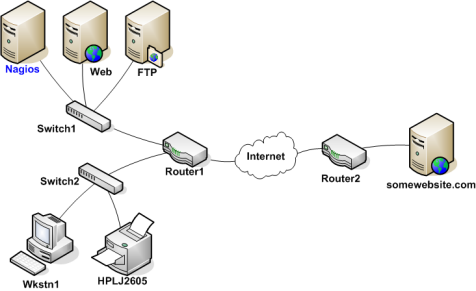
Network dependencies are a way to manage large outage resolution. Assuming its a technical problem, you begin to search for the root problem. Perhaps the user's computer is turned off, maybe their network cable is unplugged, or perhaps your organization's core router just took a dive. Whatever the problem might be, one thing is most certain - the Internet isn't down. It just happens to be unreachable for that user.
Shinken Enterprise is able to determine whether the hosts you're monitoring are in a DOWN or UNREACHABLE state. These are very different (although related) states and can help you quickly determine the root cause of network problems. Such dependencies are also possible for applications problems, like your web app is not available because your database is down. Theses cases are managed by cluster definitions.
Take a look at the simple network diagram below. For this example, lets assume you're monitoring all the hosts (server, routers, switches, etc) that are pictured by defining a check_command for each host.
The network dependencies will be named "parent/child" relationship. The parent is the switch for example, and the child will be the server.
In order for Shinken Enterprise to be able to distinguish between DOWN and UNREACHABLE states for the hosts that are being monitored, you'll first need to tell Shinken how those hosts are connected to each other - from the standpoint of the Shinken daemon. To do this, trace the path that a data packet would take from the Shinken daemon to each individual host. Each switch, router, and server the packet encounters or passes through is considered a "hop" and will require that you define a parent/child host relationship in Shinken. Here's what the host parent/child relationships looks like from the viewpoint of Shinken:
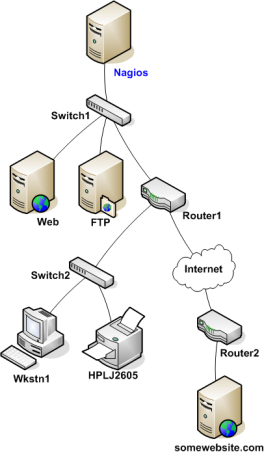
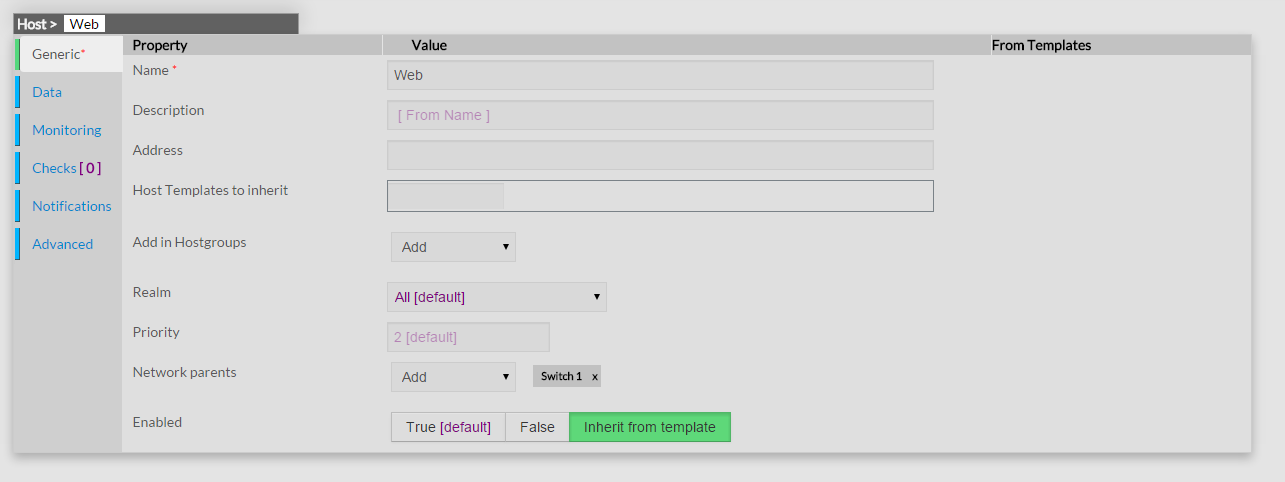
Now that you know what the parent/child relationships look like for hosts that are being monitored, how do you configure Shinken to reflect them? The parents directive in your :ref:`host definitions <configobjects/host>` allows you to do this. Here's what the (abbreviated) host definitions with parent/child relationships would look like for this example:
For the Web host:
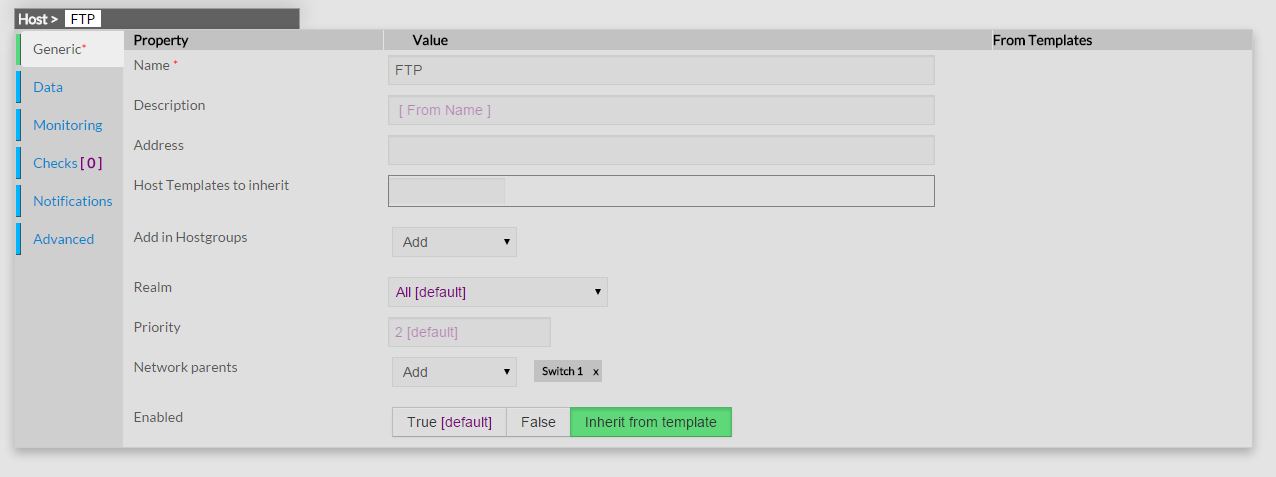
For the FTP host:
For the Router 1 host:
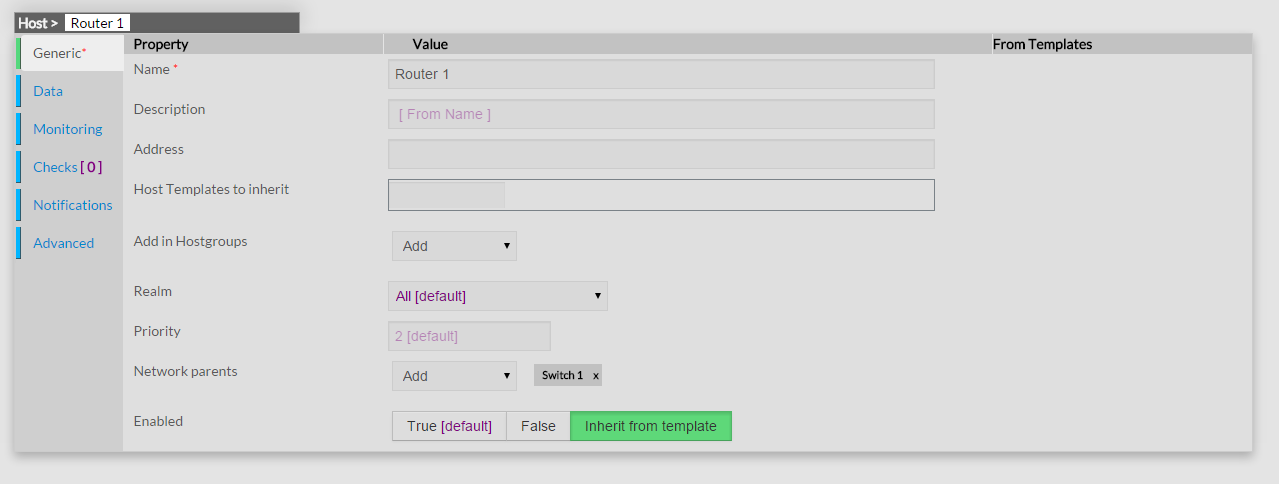
And for the Switch 2 host:
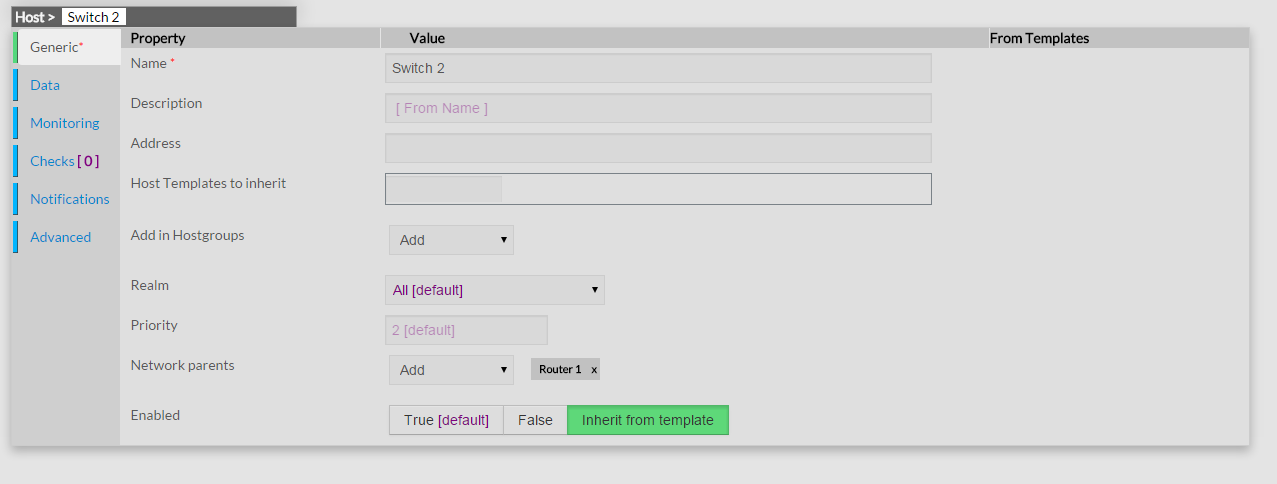
In summary: the network declaration is done on the child, that call for his parent(s).
Now that you're configured Shinken with the proper parent/child relationships for your hosts, let's see what happen when problems arise. Assume that two hosts - Web and Router1 - go offline...
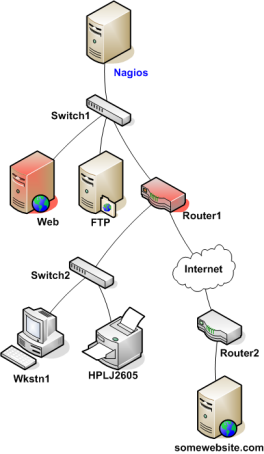
When hosts change state (i.e. from UP to DOWN), the host reachability logic in Shinken kicks in. The reachability logic will initiate parallel checks of the parents and children of whatever hosts change state. This allows Shinken to quickly determine the current status of your network infrastructure when changes occur. During this additional check time, the notification for the web and router1 hosts are blocked because we don't know yet **WHO** is the root problem.
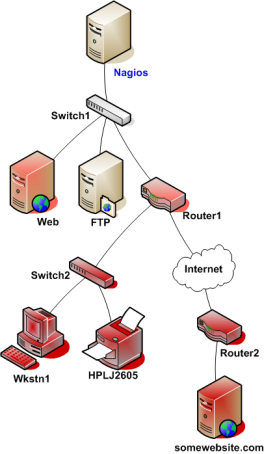
In this example, Shinken will determine that Web and Router1 are both in DOWN states because the "path" to those hosts is not being blocked (switch1 is still alive), and so **it will allow web and router1 notifications to be sent**.
Shinken will determine that all the hosts "beneath" Router1 are all in an UNREACHABLE state because Shinken can't reach them. Router1 is DOWN and is blocking the path to those other hosts. Those hosts might be running fine, or they might be offline - Shinken doesn't know because it can't reach them. Hence Shinken considers them to be UNREACHABLE instead of DOWN, and won't send notifications about them. Such hosts and services beneath router1 are the **impacts** of the **root problem** "router1"
You see that there is a 's' in parents. Because you can define as many parent as you want for a host (like if you got an active/passive switch setup). **The host will be UNREACHABLE only, and only if all it's parents are down or unreachable**. If one is still alive, it will be down. See this as a big *OR* rule.
UNREACHABLE States and Notifications
-------------------------------------
One important point to remember is **Shinken only notifies about root problems**. If we allow it to notify for root problems AND impacts you will receive too many notifications to quickly find and solve the root problems. That's why Shinken will notify contacts about DOWN hosts, but not for UNREACHABLE ones.
What about notification about services of a down or unreachable hosts?
-----------------------------------------------------------------------
You will not be notified about all critical or warning errors on a down or unreachable host, because such service states are the impacts of the host root problem. You don't have to configure anything, Shinken will suppress these useless notifications automatically. The official documentation provides more information on :ref:`how notifications work <thebasics/notifications>`.
Network is not the only element that can have problems. Applications can too.
Service and host dependencies are an advanced feature of Shinken that allows you to control the behavior of hosts and services based on the status of one or more other hosts or services. This section explains how dependencies work, along with the differences between host and service dependencies.
Let's starts with service dependencies. We can take the sample of a Web application service that will depend upon a database service. If the database is failed, it's useless to notify about the web application one, because you already know it's failed. **So Shinken will notify you about your root problem, the database failed, and not about all its impacts, here your web application**.
With only useful notifications, you will be able to find and fix them quickly and not take one hour to find the root problem in your mails.
Service Dependencies Overview
------------------------------
There are a few things you should know about service dependencies:
* A service can be dependent on one or more other services
* A service can be dependent on services which are not associated with the same host
* Advanced service dependencies can be used to cause service check execution and service notifications to be suppressed under different circumstances (OK, WARNING, UNKNOWN, and/or CRITICAL states)
* Advanced service dependencies might only be valid during specific :ref:`timeperiods <thebasics/timeperiods>`
Defining simple advanced dependencies
--------------------------------------
Define a service dependency is quite easy in fact. All you need is to define in your Web application service that it is dependent upon the database service.
::
define service{
host_name srv-web
service_description Http
service_dependencies srv-db,mysql
}
So here the web service Http on the host srv-web will depend upon the database service mysql on the host srv-db. If the mysql service has failed, there will be no notifications for service srv-web. If Shinken gets an error state check on the Http service, it will raised a mysql check and suppress the http notification until it knows if the Http service is a root problem or an impact.
Dependencies inheritance
-------------------------
By default, service dependencies are inherited. Let take an example where the mysql service depend upon a nfs service.
::
define service{
host_name srv-db
service_description mysql
service_dependencies srv-file,nfs,srv-dns,dns
}
If Shinken find a problem on Http, it will raise a check on mysql. If this one got a problem too, it will raise a check on the nfs service and srv-dns dns service. If one of these has got a problem too, it will be tagged as the root problem, and will raise a notification for the nfs administrator or dns administrator. If these are ok (dns and nfs), the notification will be sentfor the mysql admin.
And with the host down/unreachable logic?
------------------------------------------
The dependency logic is done in parallel to the network one. If one logic say it's an impact, then it will tag the problem state as an impact. For example, if the srv-db is down a warning/critical alert on the Http service will be set as an **impact**, like the mysql one, and the root problem will be the srv-db host that will raise only one notification, a host problem.
Advanced dependencies
----------------------
For timeperiod limited dependencies or for specific states activation (like for critical states but not warning), please consult the :ref:`advanced dependencies <advanced/advanced-dependencies>` documentation.
Notification Dependencies
==========================
If all of the notification dependency tests for the service *passed*, Shinken will send notifications out for the service as it normally would. If even just one of the notification dependencies for a service fails, Shinken will temporarily repress notifications for that (dependent) service. At some point in the future the notification dependency tests for the service may all pass. If this happens, Shinken will start sending out notifications again as it normally would for the service. More information on the notification logic can be found :ref:`here <thebasics/notifications>`.
In the example above, **Service F** would have failed notification dependencies if **Service C** is in a CRITICAL state, //and/or* **Service D** is in a WARNING or UNKNOWN state, *and/or// if **Service E** is in a WARNING, UNKNOWN, or CRITICAL state. If this were the case, notifications for the service would not be sent out.
Dependency Inheritance
=======================
As mentioned before, service dependencies are not inherited by default. In the example above you can see that Service F is dependent on Service E. However, it does not automatically inherit Service E's dependencies on Service B and Service C. In order to make Service F dependent on Service C we had to add another service dependency definition. There is no dependency definition for Service B, so Service F is not dependent on Service B.
If you do wish to make service dependencies inheritable, you must use the inherits_parent directive in the :ref:`service dependency <configobjects/servicedependency>` definition. When this directive is enabled, it indicates that the dependency inherits dependencies of the service that is being depended upon (also referred to as the master service). In other words, if the master service is dependent upon other services and any one of those dependencies fail, this dependency will also fail.
In the example above, imagine that you want to add a new dependency for service F to make it dependent on service A. You could create a new dependency definition that specified service F as the dependent service and service A as being the master service (i.e. the service that is being dependend on). You could alternatively modify the dependency definition for services D and F to look like this:
::
define servicedependency{
host_name Host B
service_description Service D
dependent_host_name Host C
dependent_service_description Service F
execution_failure_criteria o
notification_failure_criteria n
inherits_parent 1
}
Since the inherits_parent directive is enabled, the dependency between services A and D will be tested when the dependency between services F and D are being tested.
Dependencies can have multiple levels of inheritance. If the dependency definition between A and D had its inherits_parent directive enable and service A was dependent on some other service (let's call it service G), the service F would be dependent on services D, A, and G (each with potentially different criteria).
Host Dependencies
==================
As you'd probably expect, host dependencies work in a similar fashion to service dependencies. The difference is that they're for hosts, not services.
Do not confuse host dependencies with parent/child host relationships. You should be using parent/child host relationships (defined with the parents directive in :ref:`host <configobjects/host>` definitions) for most cases, rather than host dependencies. A description of how parent/child host relationships work can be found in the documentation on :ref:`network reachability <thebasics/networkreachability>`.
Here are the basics about host dependencies:
- A host can be dependent on one or more other host
- Host dependencies are not inherited (unless specifically configured to)
- Host dependencies can be used to cause host check execution and host notifications to be suppressed under different circumstances (UP, DOWN, and/or UNREACHABLE states)
- Host dependencies might only be valid during specific :ref:`timeperiods <thebasics/timeperiods>`
Example Host Dependencies
==========================
The image below shows an example of the logical layout of host notification dependencies. Different hosts are dependent on other hosts for notifications.
In the example above, the dependency definitions for Host C would be defined as follows:
::
define hostdependency{
host_name Host A
dependent_host_name Host C
notification_failure_criteria d
}
define hostdependency{
host_name Host B
dependent_host_name Host C
notification_failure_criteria d,u
}
As with service dependencies, host dependencies are not inherited. In the example image you can see that Host C does not inherit the host dependencies of Host B. In order for Host C to be dependent on Host A, a new host dependency definition must be defined.
Host notification dependencies work in a similar manner to service notification dependencies. If *all* of the notification dependency tests for the host *pass*, Shinken will send notifications out for the host as it normally would. If even just one of the notification dependencies for a host fails, Shinken will temporarily repress notifications for that (dependent) host. At some point in the future the notification dependency tests for the host may all pass. If this happens, Shinken will start sending out notifications again as it normally would for the host. More information on the notification logic can be found :ref:`here <thebasics/notifications>`.