Description
The aim of the widget status is to provide an overview of a host, a cluster or a check. Il will contain:
- The name of the element
- The status and its context (see Monitoring logic for more details)
- Notifications sent:
- Notifications can be configured in Shinken administration UI in case an element becomes WARNING or CRITICAL.
- So if notification has been sent for this element, an envelope will be displayed with the number of notification on the right.
- For host, it displays also the number of check, sorted per status.
- Here are the possible states:
| | Ok => no problem. |
| | Warning => the element is running but in a degraded mode. |
| | Critical => not running. |
| | Unknown => no information is available. |
- Here are the possible contexts:
| | FLAPPING => its state changed often (by default, checks are made every five minutes, so its means that the X last checks results were different) |
| | DOWNTIME => the element has been flagged by a Shinken user as “under maintenance” |
| | ACKNOWLEDGED => the problem has been taken into consideration by a Shinken user |
| | PARTIAL ACKNOWLEDGED => the problem has been taken into consideration by a Shinken user |
- If you you select a host (not a cluster or a check), number of checks in each status will be displayed
- If the status refer to an element, a click in the widget will open the “Detailed view” of the element.
Configuration
- Open the configuration box.
- Type the element in the edit field under Host.
- The total number of host and cluster will be displayed near host (119 in our exemple).
- It will automatically show the list of available hosts.
- If you type characters, the list will be automatically filtered.
Once your element is selected, if you want to monitor a specific check, you just have to type check name inside this second box.
As soon as you have typed 1 letter, a matching list of checks will be displayed below | 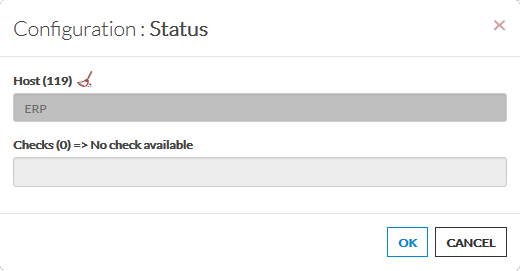 |
| | |
· The total number of host will be displayed near host (119 in our exemple).
· It will automatically show the list of available hosts.
· If you type characters, the list will be automatically filtered.
Once your element is selected, if you want to monitor a specific check, you just have to type check name inside this second box. As soon as you have typed 1 letter, a matching list of checks will be displayed below.