Visualization UI
General
Translated in French
The Visualization User Interface is now available in french.
Responsive design
The UI is now adapting itself to any navigator size.
Table of content |
DASHBOARD
[Improvement]
Screen d'un status de Dashboard à 6 widgets.
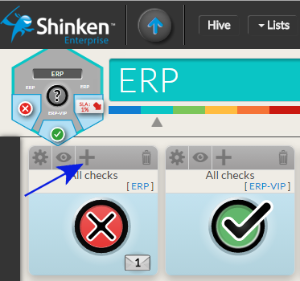
Computing the dashboard Status is no more limited to 3 widgets STATUS
The STATUS of any widget in the dashboard can be added to the computation of the Dashboard status.
- Select any STATUS widget in the Dashboard.
- Click on the PLUS icon located on the widget title bar.
- A summary bar of this widget will be displayed near the status icon.
- The PLUS icon will become a MINUS icon.
- Click on the PLUS icon located on the widget title bar.
- Select any STATUS widget in the Dashboard.
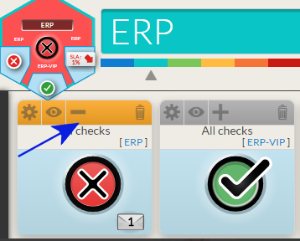
- You can remove this STATUS by clicking on the MINUS icon.
- The MINUS icon will be replaced by PLUS icon.
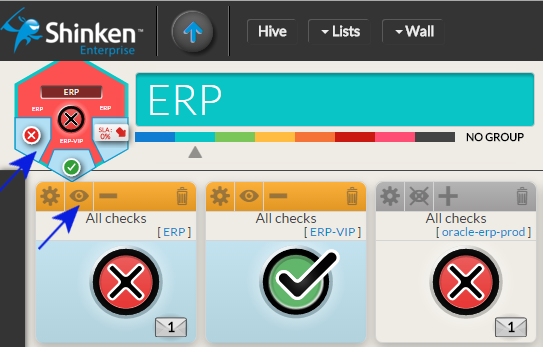
Summaries displayed in tiles are no more linked to the status of the tile
- You can display a summary (on a Widget SLA or a Status) without taking it into account for the status evaluation.
- Adding a summary is now only to provide additional information on the tile.
- Adding a summary is now only to provide additional information on the tile.
- To add a summary, click on the EYE icon.
- The EYE icon will be replaced by a crossed EYE icon.
- The EYE icon will be replaced by a crossed EYE icon.
- To remove it, click on the crossed EYE icon.
- The crossed EYE icon will be replaced by the EYE icon.
- You can display a summary (on a Widget SLA or a Status) without taking it into account for the status evaluation.
The tile can be seen directly on the dashboard
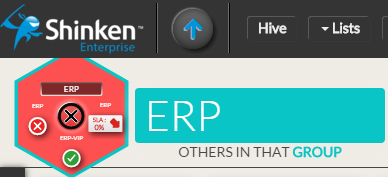
The tile is located on the top left corner of the dashboard:
- It is exactly the same tile displayed in the hive. It will prevent you to go back and forth between the hive and the dashboard in order to see the status and summary displayed.
- Any change (Dashboard status or adding/removing a summary) will be seen immediately in the tile.
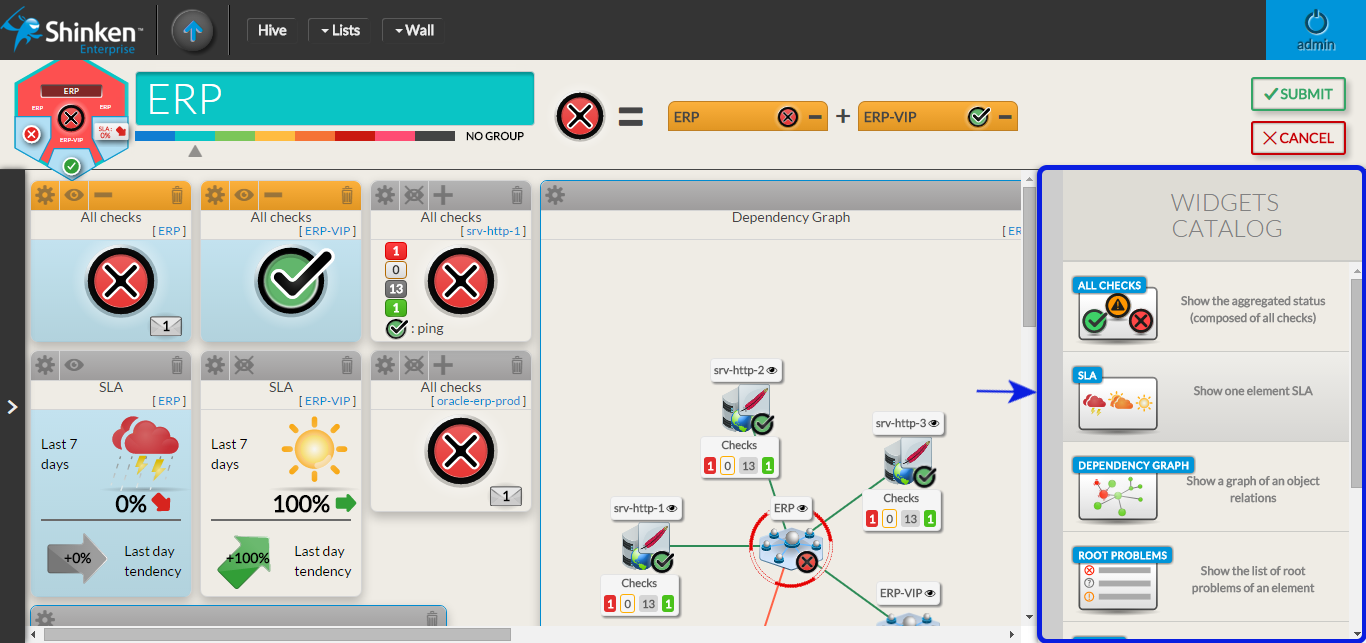
In edit mode, Widgets catalog is now in a panel on the right
The widget catalog is in vertical, the user can see more widget without scrolling.
Click on the widget in the status bar of the Dashboard to focus your screen on it
It is useful in 2 cases:
- Click on the widget in the status bar of the Dashboard will help you to locate it, if for example the dashboard is too big to be totally displayed on your screen (
 )
) - If the Widget is not totally viewable, it is quicker to click on the title than moving the mouse on slide bar.
- Click on the widget in the status bar of the Dashboard will help you to locate it, if for example the dashboard is too big to be totally displayed on your screen (
The dashboard automatically move to location of the new created widget
In case the widget is added on a hidden part of the dashboard, the User doesn't have to search the added widget by himself.
The widget layout has been improved
- Limits of the dashboard is now displayed (a grey background, surrounded by a black Area).
- The size of the dashboard can be increased by dragging a widget on the left or bottom edge.
- Dragging a widget don't immediately change the layout of widget:
- Moving a widget outside the visible part will now generate an automatic scroll of the dashboard. The widget will always be visible.
- A shadow will be displayed, showing the future position
- When you release the dragged widget on the spot of another one, the latter shifts to the bottom.
DETAIL PANEL
[Improvement]
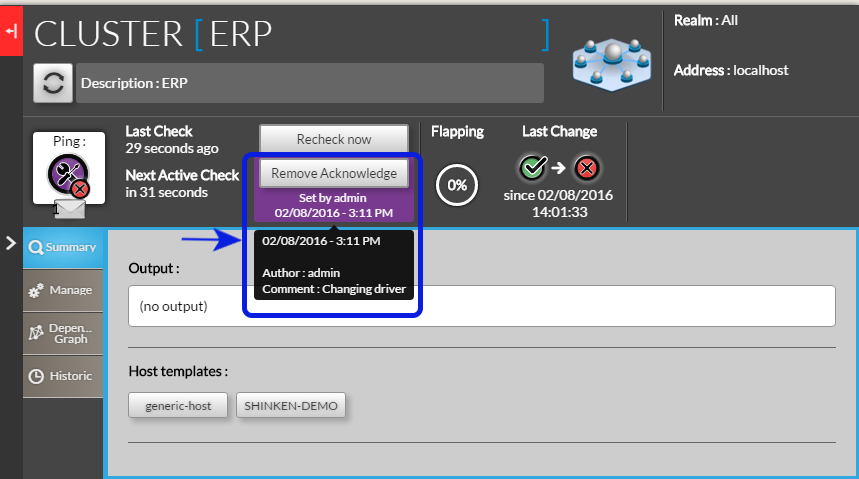 The user that have set the acknowledge is displayed
- Once the acknowledge is set
- A purple area surround the Submit/Remove acknowledge button
- Inside this area is displayed:
- The user name that set the acknowledge,
- The time with it has been set at.
- A hover show the comment that the user has written.
- Once the acknowledge is set
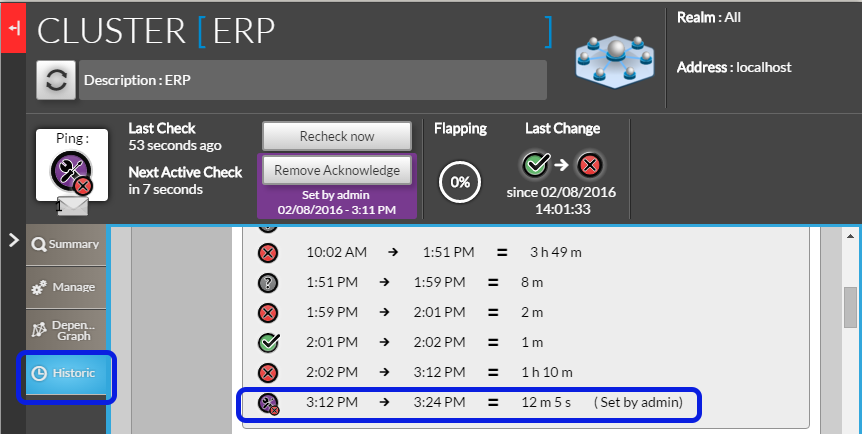
Tab Historic is updated in real time
- The historic of a host is now updated on every refresh of the detail panel.
- The name of the user that set the acknowledge is displayed on the historic
A padlock and forbidden message is displayed for unauthorized host
- if a user try to open a host he doesn't have access to
The detail panel will be empty
The text " " will be displayed with a padlock.
Showing this screen will allow users to discuss with Shinken Administrators of the reason of this unauthorized access.
Je n'ai pas le cas sur ma démo pour te faire une capture d'écran
[Bugs]
Tab Summary: Host template name too long
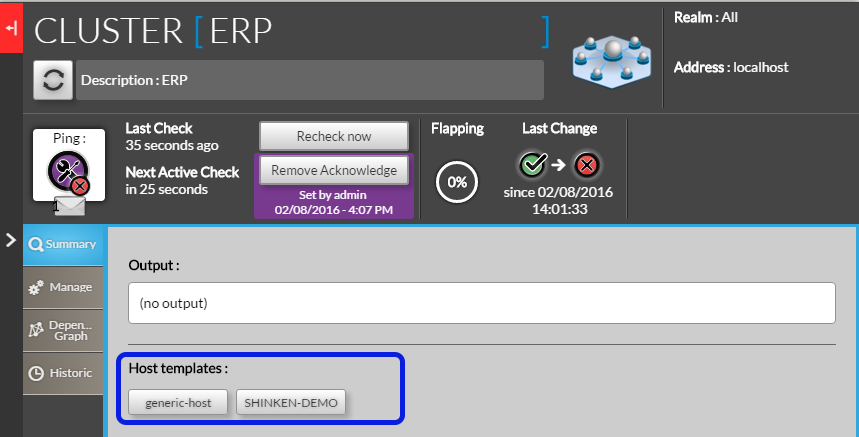 In the host template area, if the host template name is longer than the outline of the box, this latter is now automatically re-sized.
Checks Tab: Setting or removing an acknowledge on a host refresh the checks tab
- When an acknowledge is set on a host, all checks will automatically have the acknowledge context.
- If the tab checks is opened, it be automatically refresh to show the acknowledge context on all checks.
- When an acknowledge is set on a host, all checks will automatically have the acknowledge context.
WIDGETS
[Improvement]
ALL WIDGETS: Instead of hiding non-authorized host, Widgets will show the name of the host adding a padlock
We changed this behavior to provide more information to Shinken user
- If a user has been able to configure a host but has no more right to see it, it will be easier to discuss with supervision administrator to check if it is not an error.
- A user may need to see a cluster but doesn't have access to host composing. This feature will let him understand why the cluster is down and discuss with the right person.
Je ne peux pas créer le screenshot à partir de ma démo
[Bugs]
Widget Graph
- A check with a name containing a space wasn't displayed.
- If there is no value for a metric during a period, the graphic was not showing this period. Activity period were directly concatenated.
- (For example, if the check has run up to 10:00, then stop 1 hour then restart, it was displaying a continue graphic)
- It will now show a period with metric set to 0
Widget Root Problem
- When we keep mouse over an element in the list of root problems widget and the detail panel is opened, the tooltip describing the host was displayed over detail panel, hiding it.
Il manque le screenshot du bugg d'avant
LISTS
[Improvement]
Overview: new design and behavior
The behavior of list has been improved to get a better user experience.
- On the previous list:
- By default, filtering fields on column were basic selector or string filter.
- Advance filtering was possible, but wasn't user friendly:
- it was visually difficult to make the link between the complex filter defined and the result in the list.
- it was visually difficult to make the link between the complex filter defined and the result in the list.
- So the new list has been design with the following objectives:
- integrating the advanced filtering directly in the list
- more flexibility on the layout of the list
- all modifications done on the list will be saved. User will have the list the same layout and filter on the next load of the list.
- On the previous list:
Hiding/Showing column
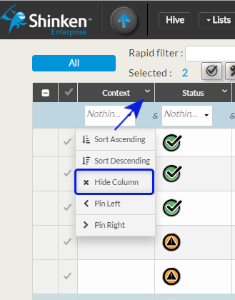
We kept this feature from the previous list:
- Each column can be removed or added depending of the user need
- You can do it in to way:
- In a column, open the column menu and click on the entry hide the column.
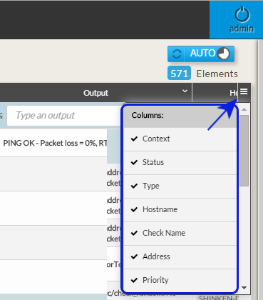
- In the right side of the list, open the column selector menu and choose which column has to be displayed or hidden.
Moving column
The user can choose the display order of column:
- Click on the header of the column and maintain pressed.
- A copy of the header will appear.
- Drag it to the location you expect.
- Release the mouse.
Docking column on the left side
A column can be always be seen:
- If the number of column is to big to be displayed in the navigator width. It can be useful to always see the host name for example.
- Adding a column;
- open the column menu
- click on the entry "pin on the left".
- The column will be transferred to the left and always be visible.
- Removing the column:
- open the column menu
click on the entry "Détacher".
- The column will be removed from the left container and will come back to it previous location in the list.
Sorting column
Multi filter
Quick filter
Opening the detail panel
Configuration UI
Menu
- The menu is updated dynamically:
- In the home page, the menu element is updated every 2 seconds.
- On other pages, it is updated every 30 seconds.
- It is now responsive, adapting itself to any navigator size.
Home page
[Improvement]
We change the look and feel of the page and improved SOURCES behavior.
- The home page is now responsive.
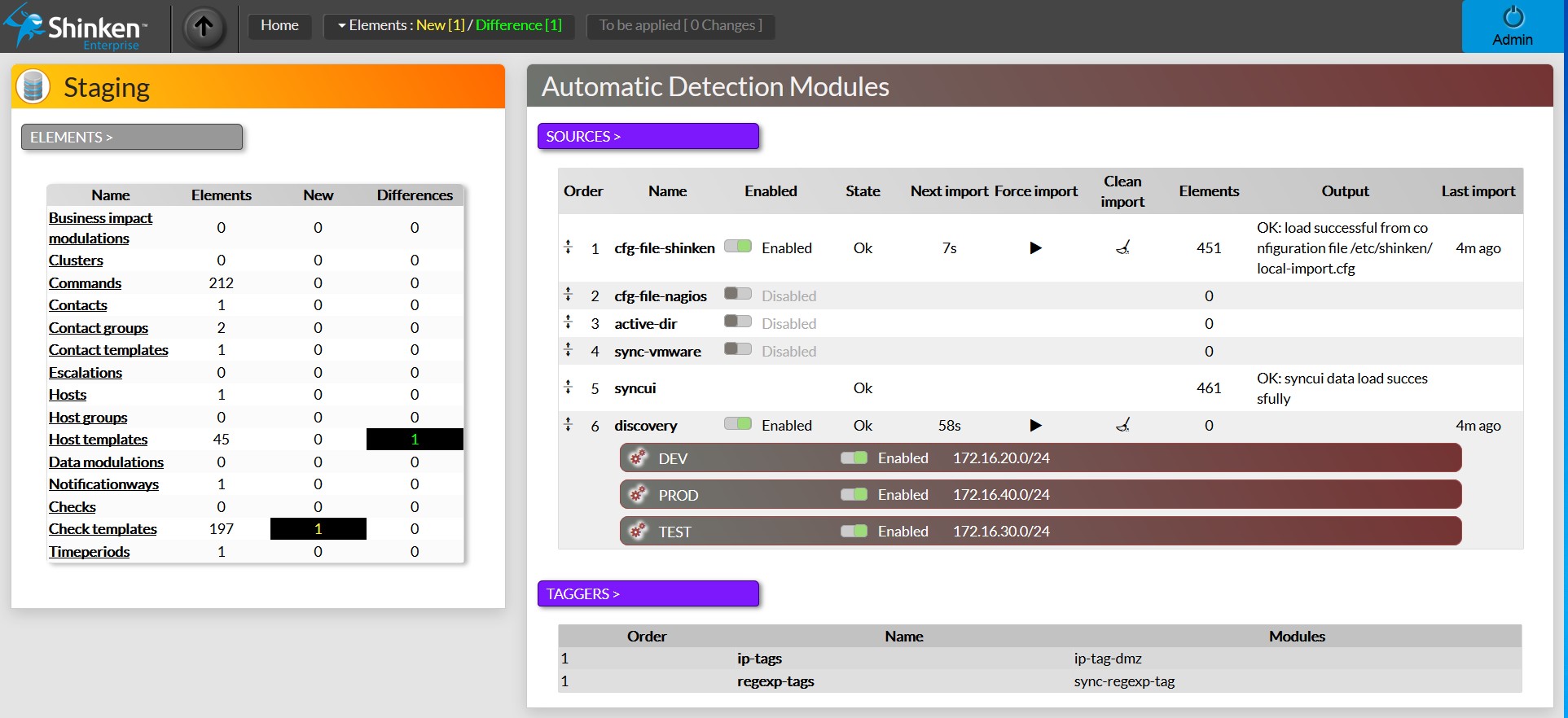
SOURCES BEHAVIOR
It can be directly modified in the home page (in the previous version, a restart of the Synchronizer was necessary).
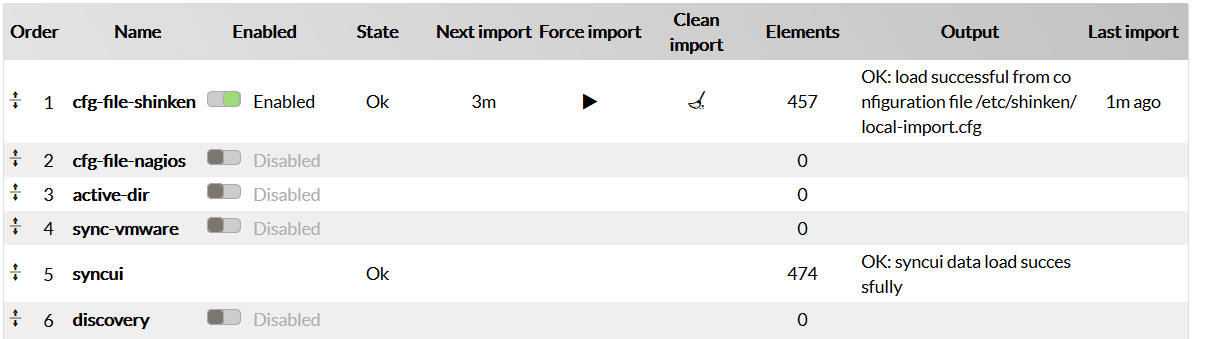
The user can:
- ENABLE / DISABLE a source:
- Enabling the source will run the source and show if any, all differences and new elements.
- Disabling the source will clean the display to remove all differences and new elements of this source in the menu and the staging table.
- FORCE the import:
- The user can manually run the source to detect differences and new elements (no more being obliged to restart the Synchronizer or wait for the next automatic import).
- Press the play icon (
 ) :
) :- "Import in progress" will be first displayed in the column state.
- Then "Computing difference" will indicated than the import is finished and that the merge with all other source is on going.
- When finish, the "OK" will be displayed.
- CLEAN the last import result:
- cleaning the result can be interesting to remove the import result without disabling the source.
- Press the broom icon (
 ):
):- The element column will be set to 0.
- The element column will be set to 0.
- CHANGING PRIORITY ORDER
- Each active source will import data and then all data discovered will be merged together.
- If 2 SOURCES need to update the same information, the one whose priority is the smallest will win.
- In the screen example, if for a host the description is set in the "cfg-file-shinken" source and the "cfg-file-nagios" source , then it will always be the "cfg-file-shinken" that will win (order 1).
- The column Order has been added to show this merging priority of each source
- If 2 SOURCES need to update the same information, the one whose priority is the smallest will win.
- Changing the priority Order is easy:
- Move the mouse over one of Source.
- The mouse cursor will change to the shifting icon (
 ).
). - Drag the table line containing this source to the order you want.
- All sources order below the new position will change of order (increased by one).
- Each active source will import data and then all data discovered will be merged together.
- ENABLE / DISABLE a source:
SOURCES DISCOVERY ENHANCEMENT
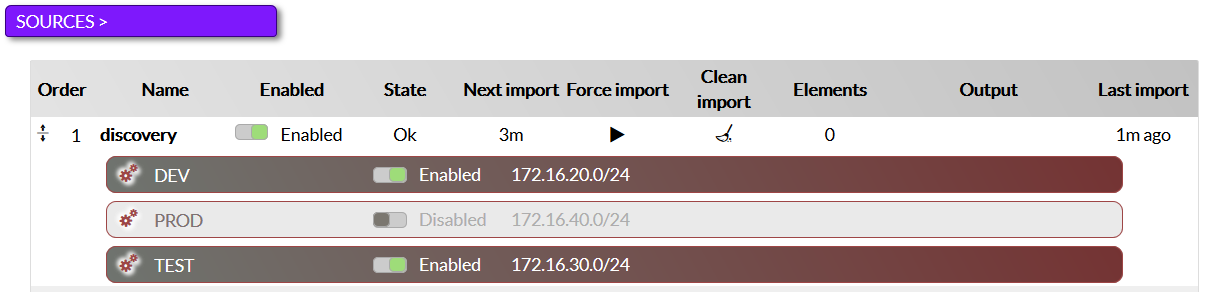
The discovery line displays range defined for the source.
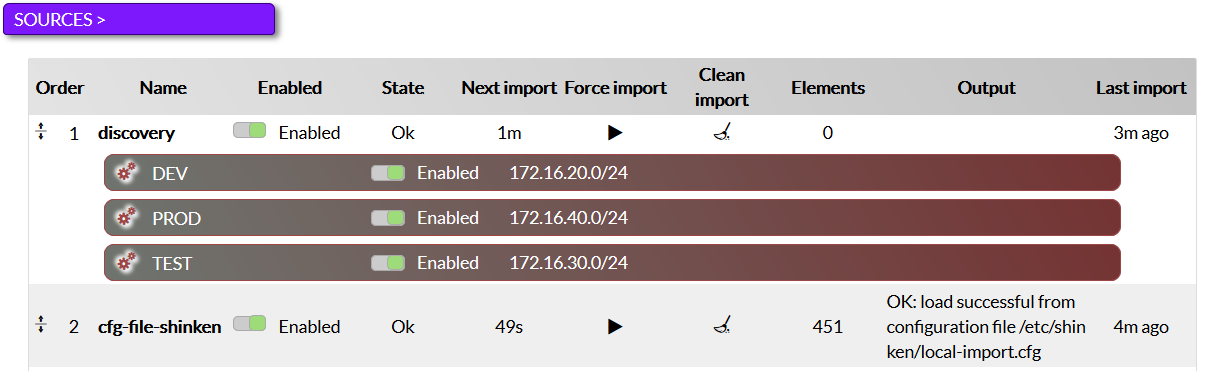
- Each range can be enable or disable in the range line:
- Enable: the line is brown and the button is green
- Disable: the line and but are light gray.
- Each range can be enable or disable in the range line:
[Bugs]
SOURCES DISCOVERY
- Range name can now contain any character ( like /, :, -, ... )
Elements List
[Improvement]
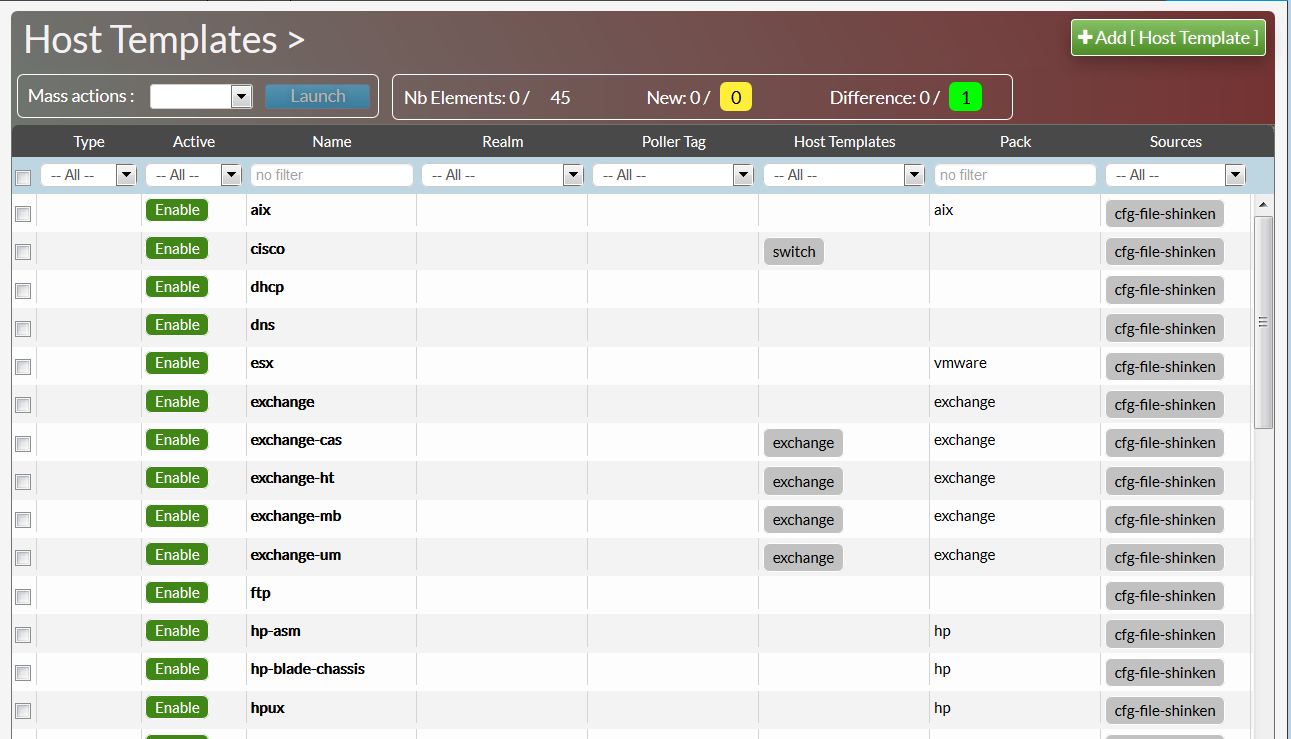
- The look and feel of the page has been completely changed.
- The count of element is displayed (selected/max number).
- mass action include now importing new elements and differences.
- Each column can filtered.
Filtering the list
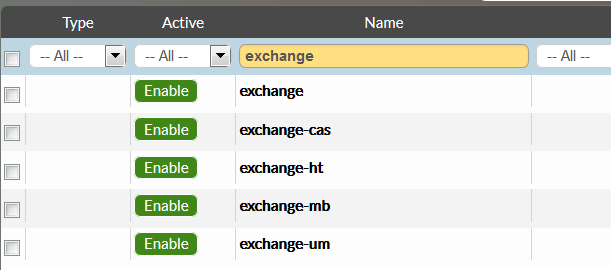
- There is 2 types of filters (depending of the column type):
- Typing a text and press enter
- the corresponding result will contain typed text, wherever the typed text is located (beginning, middle or end).
- Typing a text and press enter
- Selecting a value in the proposed list
- Selecting a value in the proposed list
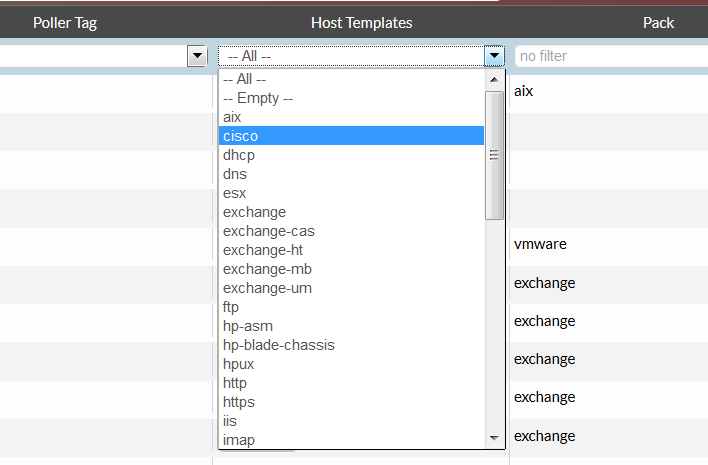
- Setting a filter in many column will display lines that are matching all filters
- Removing a filter:
- for a typed text, delete it, and press enter.
- for a selected element of a filtering list, set the filter to "-- All -- ".
- Removing a filter:
Mass Actions
- 2 mass actions has be added:
- Enable ( enable an element)
- Disable (disable an element)
- Delete
- Duplicate
- Import
- Difference
- 2 mass actions has be added:

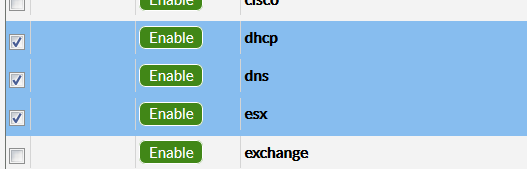
- To run a mass mass action, lines must be selected:
- Click on an un-select line to select it
- the line will be highlighted in blue
- Click on a select line to un-select it
- The blue will disappear.
- The blue will disappear.
- Click on an un-select line to select it
- if no lines are selected, the launch button will be deactivated.
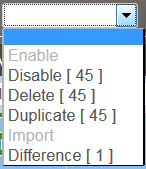
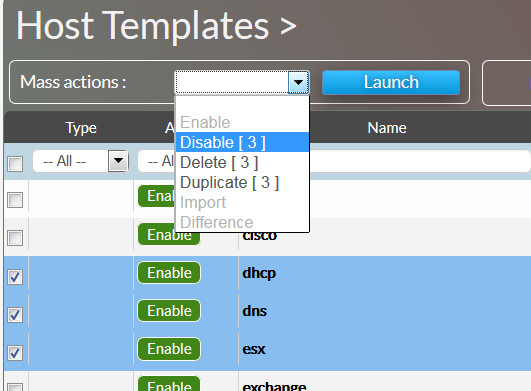
- Only mass actions possible for selected elements will be available.
- If among selected elements, some actions can't be applied to the whole list, the exact number of affected elements by action will be displayed displayed inside brackets.
- in the example below, 45 lines are selected but only one contain a difference.
- Only mass actions possible for selected elements will be available.
Elements Count

- 3 type of elements are counted:
- elements displayed in the page (all elements, including new and difference),
- elements that are news (in yellow)
- elements that have differences (in green)
- for each type, it will be displayed:
- the total amount of element.
- the number of selected element for this type ( in blue).
- 3 type of elements are counted:
Elements Page
[Improvement]
Template Colored
Template type are now highlighted with color :
- Normal template in Green
- Unactive template in Grey
- Unactive templates are templates already included in other template (MyLinux include the linux tempate, so linux in in grey and MyLinux in green).
- Checks in double are removed of the unactive template.
- Not existing template in Orange
- New Template (detected via sources, but not already accepted) are in Yellow.

Editing Local Data
- Local data can now be renamed after the creation.
- Click in the column name
- Type the new name
- The change will be taken into account only when the validate button will be clicked.
- Local data can now be renamed after the creation.
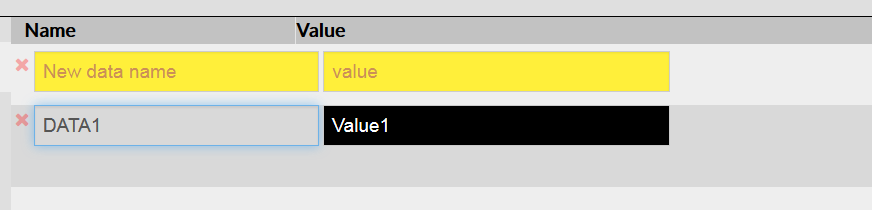
- New local data are displayed in Yellow ( the new color)
- While editing, it helps the user to see which data haven't been saved.
- While editing, it helps the user to see which data haven't been saved.
- New local data are displayed in Yellow ( the new color)
Try this check Improved

- The "Evaluate check" has been added:
- Instead of running the check, the user can click on the gear icon (
 )to evaluate the check.
- It will display each evaluation step without running the check.
- It is very useful when the command behind the check take some time to be perform.
- Instead of running the check, the user can click on the gear icon (
- Any error encountered by the command itself will now be displayed as a result to help the user to understand errors.
- previously, the check running was endlessly running.
- previously, the check running was endlessly running.
- The "Evaluate check" has been added:
- If a check is not linked to a command, the "(no command)" text will be displayed in red.
- The evaluate and play icon are removed
- If a check is not linked to a command, the "(no command)" text will be displayed in red.

Errors Displayed
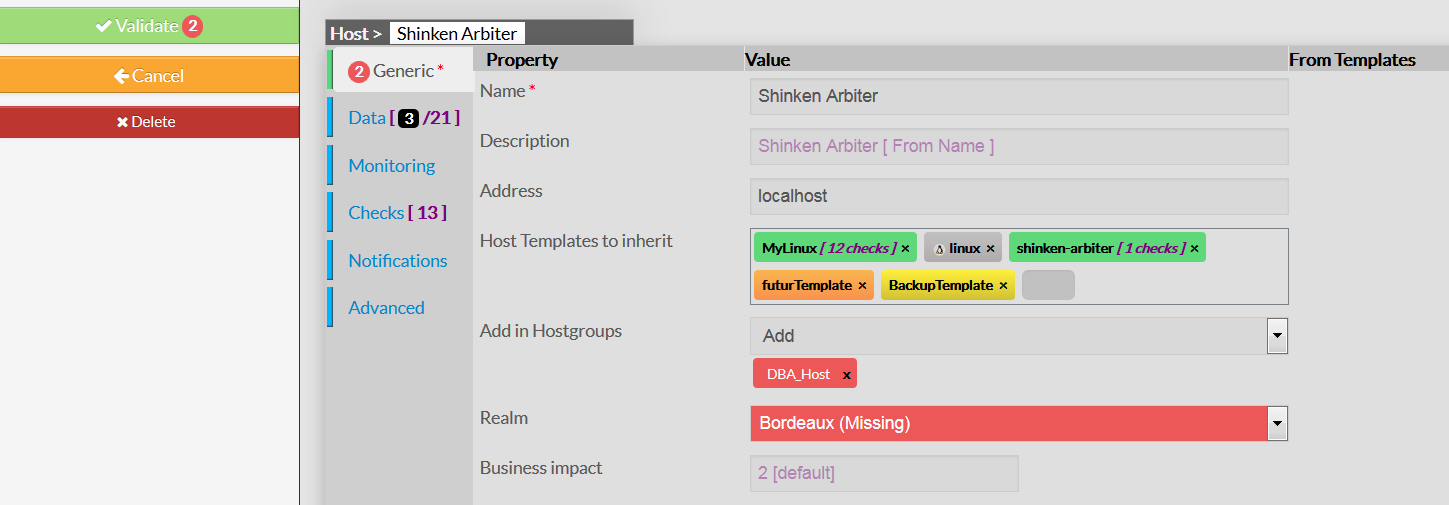
- Error mainly occurs when a host is imported via a source module:
- If the element refers to an undefined value, element or property, the missing or corrupted information is highlighted in red.
- A tab containing errors will have the errors counts on the left of the tab
- the total number of errors in the page will be displayed on the validate button.
- Solving errors presents during an import may take some time to the user. So the page is not blocking the save of any object even if there is errors inside.
- But the Apply page will not accept to publish elements with errors.
- Error mainly occurs when a host is imported via a source module:
[Bugs]
Host and Host group not displayed
- A host added in a group via the host page was not displayed in the host group page
- it was the same if a host was added in the host group page (The group was not displayed in the host page).
Data including other data wasn't resolved
- For example, the data $_HOSTDOMAIN$ containing $_HOSTDOMAINUSERS\$_HOSTDOMAINUSERSHORT$ was not evaluated.
- For example, the data $_HOSTDOMAIN$ containing $_HOSTDOMAINUSERS\$_HOSTDOMAINUSERSHORT$ was not evaluated.
A template containing a space was not displaying its checks
- The space was blocking the checks list retrieval.
All level of inheritance will be present in elements page
- Only 2 levels of inheritance was previously displayed.
- there is no more limits in page that need to handle inheritance (hosts, checks, contacts).
Backend
Clusters
[Bugs]
Cluster with an regular expression
A cluster calling itself was unable to be evaluated and its status was staying in 'UNKNOWN'.
- Now the backend automatically remove the reference to itself and the status can be evaluated.
SLA
[Bugs]
Fix an error on the SLA (%) computation
- the error was present when the day was incomplete (by special check_period or by a poller setup without spares)
UIs Active Directory Authentication
[Improvement]
Active directory autentication also checks the email address
- If the login set by the user cannot match the user name, try to lookup at the contact by the email address.
- Allow the users to login with their emails if the contact name if not the same as the Active directory principal name.
Installation
Mixed installation (US/FR)
[Bugs]
- Allow an update to replace the previous installation whatever the language was installed, even if versions are the same.
SSL/HTTPS daemons
[Improvement]
- The pyopenssl package needed by daemons and UIs to open in HTTPS is now installed by default.
Plugin NRPE available
[Bugs]
- The nrpe client plugin (check_nrpe) is now installed by default.
- But no checks or host template are linked to it.
- Using nrpe plugins require a specific configuration per monitored equipments. It is not possible to provide easy to use check using nrpe plugin.
Maintenance Tools
Enabling/Disabling daemon commands
[Bugs]
- When disabling, is the daemon was running, stop it in the same time.
- Daemons in DISABLE state are not displayed in the init.d script start/stop/ commands.
- There was a "Central" daemon type on the previous version of the commands shinken-daemons-[list, enable, disable]. Now this daemon type is removed.
Additional parameters for Backup/Restore commands
[Enhancements]
- There are now parameters to select which part of the data application to backup and/or restore:
- --sla: backup/restore all SLA and history data for your elements
- --user: backup/restore the visualization UI data for your users (hive, list parameters, ...)
- --configuration: backup/restore the whole configuration of your installation (daemons and ui configuration databases)
- --metrology: backup/restore all your metrology data (all metrics)
- --log: backup/restore all your logs
Health check commands
[Enhancements]
- If launched from the central server (arbiter/synchronizer), the shinken-healthcheck executes a "global" check and also looks at distant daemons states.
- if launched from a distant server (not arbiter/synchronizer) then the shinken-healthcheck only look at the local daemons states.
Monitoring Pack
Linux Pack
[Bugs]
Ntp check
The distant ntpq command called was with an absolute path
- Was working on Redhat/Centos but did fail to check a distant debian8 host . Now the distant command is search on the PATH.
Nfs check
On the first run, the check did return a CRITICAL state
- Now the first run returns an UNKNOWN state.
Windows Pack
[Improvements]
Check_wmi_plus upgraded to 1.60
The check_wmi_plus.pl version is upgraded from 1.49 to 1.60 version in order to fix a problems:
- with the checknetworks command that did not detect all interfaces by default.
- with accents in output (accents were preventing any metrics display).