Overview
In this view, you can easily see the list of all hosts and services.
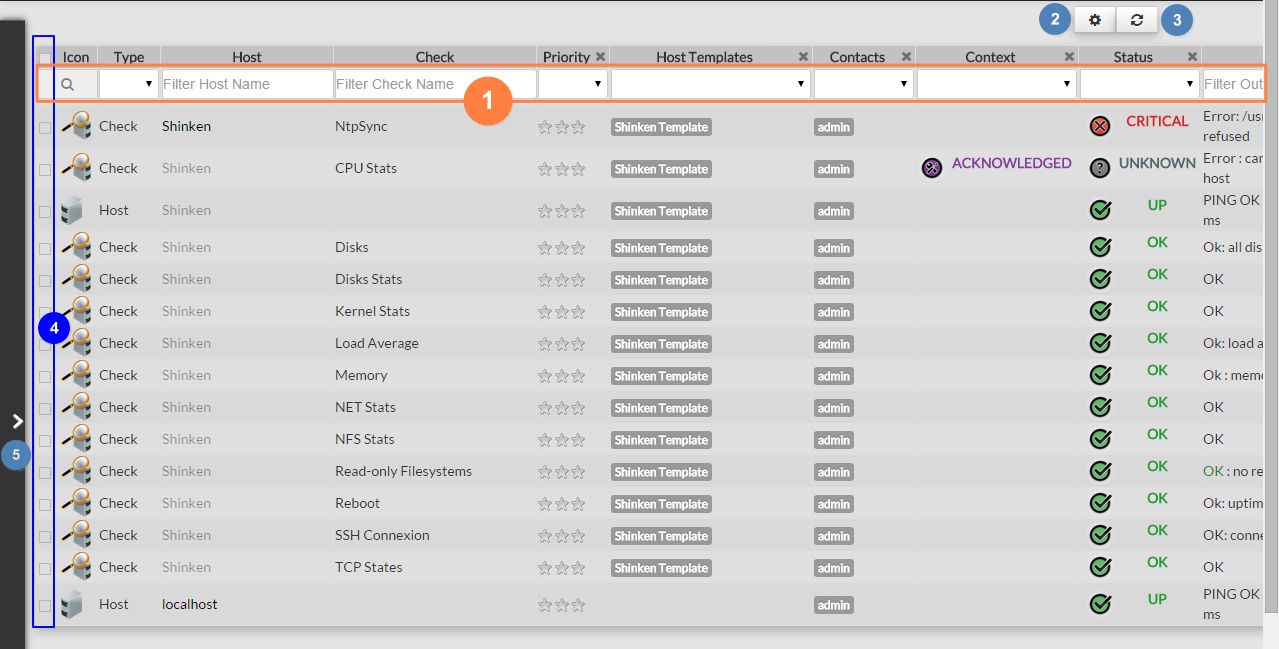
- Quickly filter the list with typed values
- Choose column data displayed or the number of lines displayed per page.
- Make a refresh of the whole list.
- Select elements.
- Make a complex filter
Quickly filter elements
On the top of the list, field will allow to filter the list:
There is 2 kinds of filters:
Text: like on host and check. - Type some letters (from 1 to as many you want)
- Press enter
- The list will be filtered, displaying only line containing letters you typed
- To removed the filter, select the the typed text, delete it and press enter
| 
|
|---|
List of values: like on Priority and Status - Click in the field
- The list with possible values will be displayed
- Select one of then
| 
|
|---|
Only line matching this selected value will be displayed.